00196428-0102_AI_Reconfig_Kit_X-Serie_CPP_DE EN - 第83页
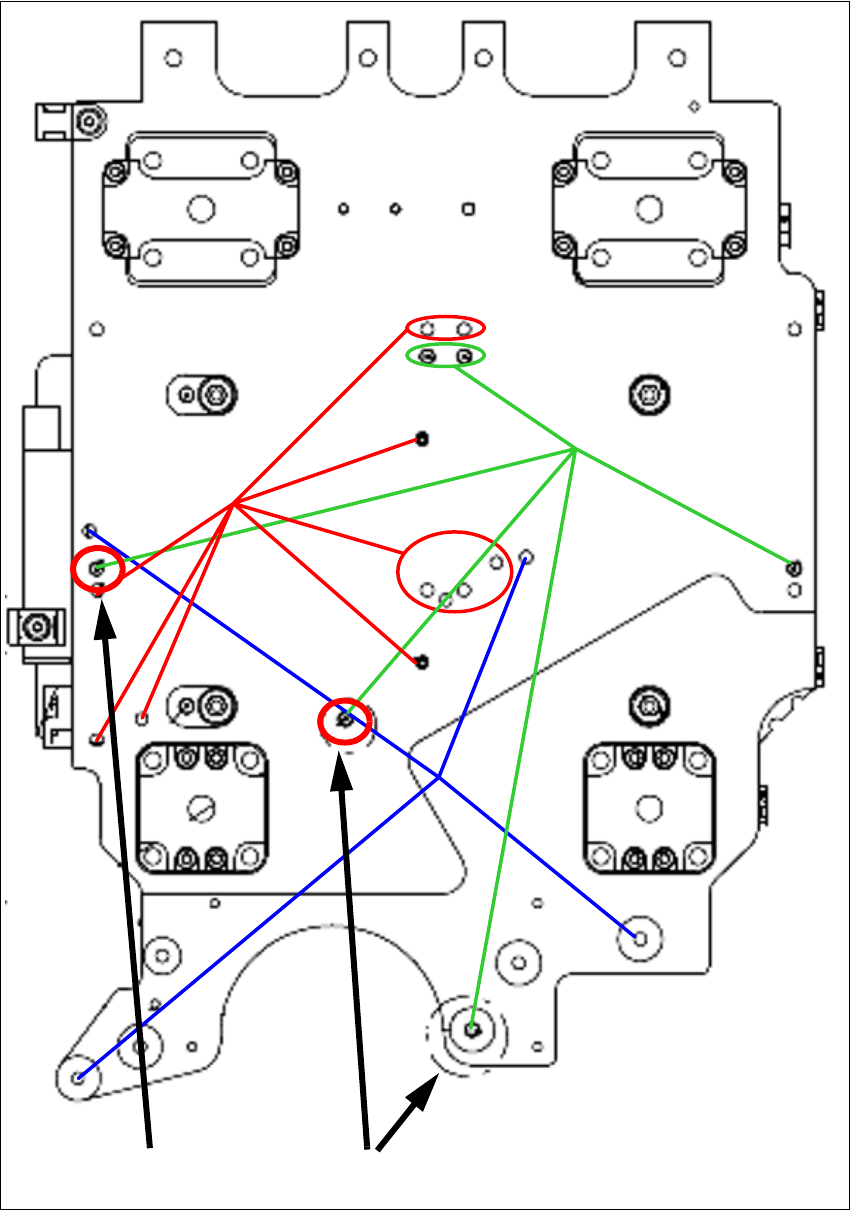
Head Reconfiguration Kit 2 Assembly Instructions Head Reconfiguration Kit CPP fo r the SIPLACE X Ser ies Issue 03/2010 2.7 Installing the CPP Placement H ead 83 fig. 2.7.1 Scheme of the CFK06 head plate 4 screws to fix t…
2 Assembly Instructions Head Reconfiguration Kit CPP for the SIPLACE X Series Head Reconfiguration Kit
2.7 Installing the CPP Placement Head Issue 03/2010
82
2.7.2 Preparing the Head Plate
2.7.2.1 Checking the Pins on the Head and the Cooling Air Sealing
X Place the CPP template on the head fixture plate.
Remove excess screws and add the necessary ones:
Fixing screws: 4x DIN912 M4x18 - 8.8 [00095023-xx]]
Sealing screws: 9x DIN913 4x6 - ST [00309422-xx], secure with locking varnish, gray
[00318199-xx]!
If the head is not fixed correctly the cooling air flux might be disturbed.
X The other pins may protrude by max. 4.5 - 0.5 mm Please check these as well.
CAUTION:
Use standard tools only!
Make sure to use the correct screw lengths! The lengths for C&P heads differ from those
for TwinHeads. Torque of the fixing screws: 2.7 Nm.
If wrong screws are used, the threads in the head plate might be destroyed. 2
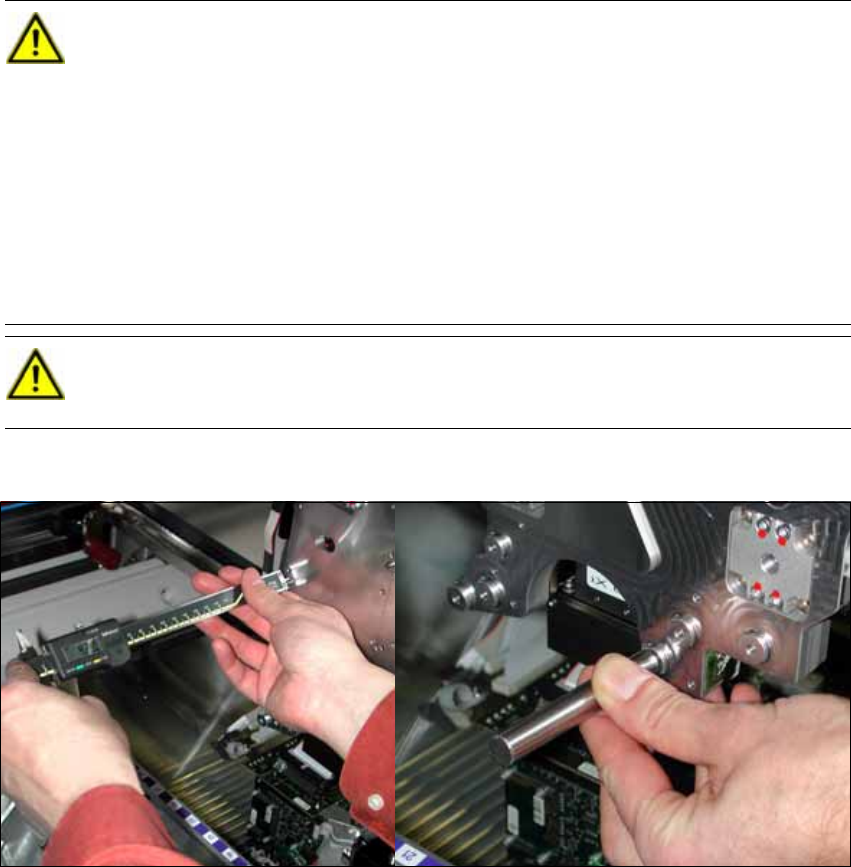
X Check the length of each pin of the head (2 items represented in dark green in the
figure) with a caliper or the testing tool for pin length 4 (-0.2) mm [03075779-xx].
These pins must not protrude more than 4 mm (-0,2 mm) from the head plate. If the
adjustment aid lays flush on the head plate without a gap the pin has been driven
deep enough into the head plate and can stay there.
CAUTION:
If pins with wrong lengths are used there is a danger of destroying the CPP head. 2
Head Reconfiguration Kit 2 Assembly Instructions Head Reconfiguration Kit CPP for the SIPLACE X Series
Issue 03/2010 2.7 Installing the CPP Placement Head
83
fig. 2.7.1 Scheme of the CFK06 head plate
4 screws to fix
the CPP head
All index pins
for C&P, CPP
and Twin head
Sealing
head plate
4.5 -0.2 mm
4.0 - 0.2 mm
2 Assembly Instructions Head Reconfiguration Kit CPP for the SIPLACE X Series Head Reconfiguration Kit
2.7 Installing the CPP Placement Head Issue 03/2010
84
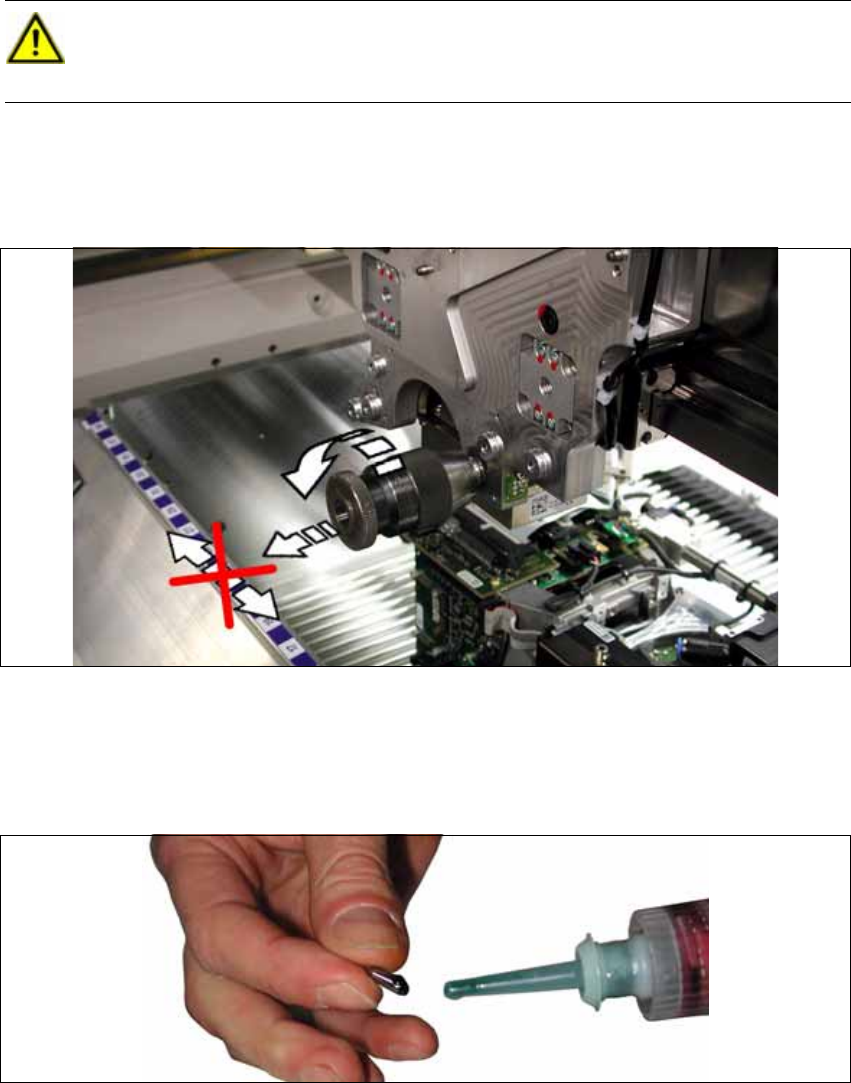
X If the pins protrude too far, proceed as follows:
– Chuck in the pin with the 0-6.5 drill chuck (removing the head pin) [03075733-xx].
– First loosen the pin by rotating the drill chuck.
– Now, pull the pin out of the head plate by rotating the drill chuck at the same time.
No shear forces must be exerted on the pin.
X Manually insert the new pins into the respective holes to check, if they fit. The hole at the head
plate is a dowel hole. The pin should sit backlash-free in the hole.
X Cover the new "DIN 6325 - 4 M6 x 10-ST" [00331299-xx] pin with Loctite 601 from the package
[00303394-xx].
CAUTION:
Place the drill chuck vertically! Lift the pin off vertically!
Do not scratch the head plate! Should it get scratched, grind the scratch carefully! 2