00194591_02.pdf - 第14页
3 Instal lation Installation Manual SIPLACE Setup Center RF 2.1 3.3 Installation of SIPLACE Setup Center and Possible Setup Types Edition 09/2005 EN 14 3.3 Inst allation of SIPLACE Setup Center and Possible Setup T ypes …

Installation Manual SIPLACE Setup Center RF 2.1 3 Installation
Edition 09/2005 EN 3.1 Important Preparations Prior to Installation (Software Configuration)
13
3 Installation
3.1 Important Preparations Prior to Installation
(Software Configuration)
All computers must have been set up and prepared appropriately in advance of the complete in-
stallation of SIPLACE Setup Center to function correctly.
These preparatory measures demand knowledge about the administrative functions of Windows
and SQL Server. Please contact your system administrator for assistance if required. 3
3
Important
The following steps are essential before conducting the installation of SIPLACE Setup Center: 3
– Installation of Windows 2000 Server (SP3 or SP4) or Windows 2000 Workstation (SP3 or SP4)
or Windows 2003 with SP1 or Windows XP with SP1a.
– Furthermore, you require Windows 2000/2003/XP administrative rights and write rights for
all computers on which you are installing SIPLACE Setup Center.
3.2 MSDE Installation
If the database decision of SIPLACE Setup Center Database (5.1.1) is made to use a MSDE in-
stallation, this must be done prior installing SIPLACE Setup Center. Installing MSDE is done by
executing the file \3rdpartyinstaller\MSDE\SETUP_Step.cmd on the Setup CD. 3
If the TCP port 1433 is not available then the alternate installer
\3rdpartyinstaller\MSDE\SETUP_Step_dynamic_port.CMD must be used. 3
For more details please refer to the following file \3rdpartyinstaller\MSDE\readme.txt. 3
Note
This installer will create a MSDE instance with the name “SIPLACE_MSDE”. 3
3 Installation Installation Manual SIPLACE Setup Center RF 2.1
3.3 Installation of SIPLACE Setup Center and Possible Setup Types Edition 09/2005 EN
14
3.3 Installation of SIPLACE Setup Center and Possible
Setup Types
Three setup types are available for installation to install the required system components on the
specific computer. 3
The following setup types can be selected: 3
– SIPLACE Setup Center GUI
– SIPLACE Setup Center Database
– SIPLACE Setup Center Complete
3.3.1 Starting Installation - First Steps
These steps are identical for all setup types. The subsequent steps only differ once you have se-
lected the setup type you require. 3
Run through the following steps to start the installation and then refer to the relevant section for
your specific setup type. 3
3.3.1.1 Step 1
→ Insert the SIPLACE Setup Center installation CD into the CD-ROM drive. The installation rou-
tine starts automatically.
→ You can also start the installation by running the Setup.exe program located in the root direc-
tory on the installation CD.
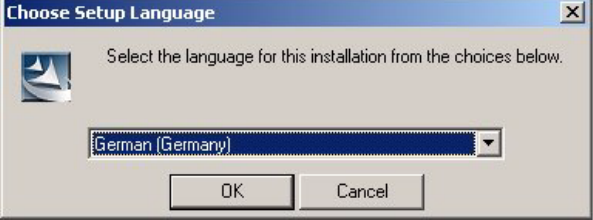
This starts the user-controlled installation of SIPLACE Setup Center; you are prompted to se-
lect the installation language. 3
3
Fig. 3.3 - 1 "Choose Setup Language" dialog box
→ Select the language you want.
→ Click OK.
Installation Manual SIPLACE Setup Center RF 2.1 3 Installation
Edition 09/2005 EN 3.3 Installation of SIPLACE Setup Center and Possible Setup Types
15
Note
This decision only relates to the language used during the installation routine. 3
3.3.1.2 Step 2
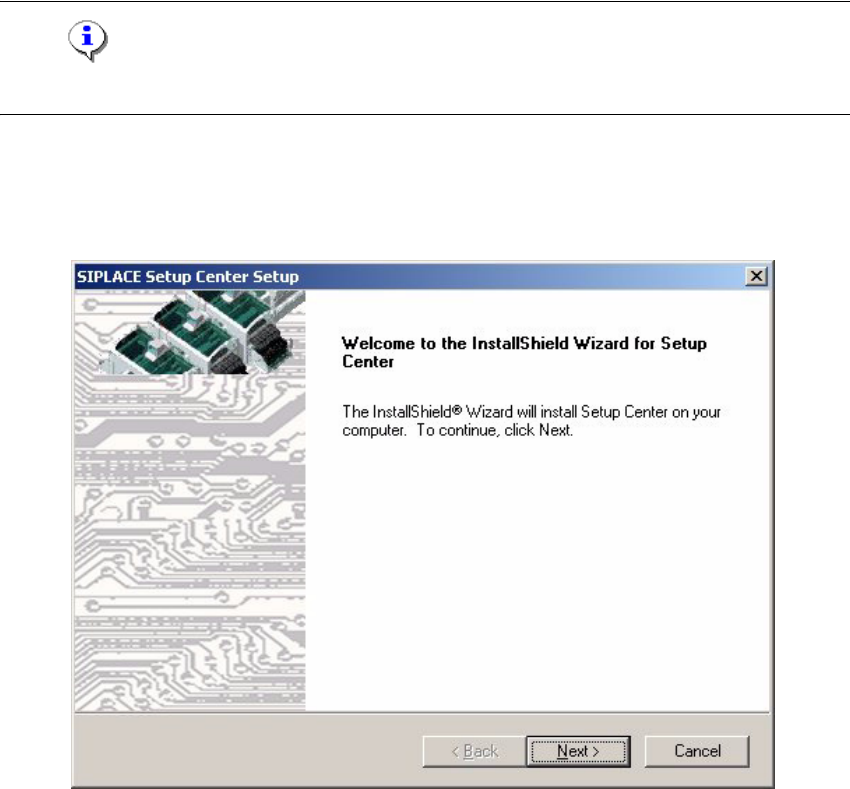
→ The InstallShield Wizard will guide you through the program setup process.
3
Fig. 3.3 - 2 InstallShield Wizard box for SIPLACE Setup Center
→ Click Next.