00194591_02.pdf - 第8页
1 Introduction Installation Manual SIPLACE Setup Center RF 2.1 1.4 Navigation Guide for Installation Edition 09/2005 EN 8 Note A hard disk with 500 MB or more free space should be used for inst allation (with out the ope…

Installation Manual SIPLACE Setup Center RF 2.1 1 Introduction
Edition 09/2005 EN 1.3 System Requirements
7
1.3 System Requirements
The following hardware is required for a successful SIPLACE Setup Center installation. 1
1.3.1 SIPLACE Setup Center GUI
The same Hardware is recommended as used for SIPLACE Pro Client installations. 1
The following Software is required: 1
– Windows 2000 Server or Windows 2003 Server or Windows 2000 Workstation, or Windows XP
Professional
– Microsoft .NET Framework 1.1
– SIPLACE Pro Interface 2.x or 3.x
Note
A hard disk with 500 MB or more free space should be used for installation (without the operating
system installed there should be at least 1 GB free space). 1
1.3.2 SIPLACE Setup Center Database
The same Hardware is recommended for SIPLACE Setup Center Database as used for SIPLACE
Pro Server. 1
The following Software is required: 1
– Windows 2000 Server, or
– Windows 2003 Server
– Windows 2000 Workstation + service packs, or
– Windows XP Professional + service packs
– Microsoft SQL2000 with SP3a, or
– Microsoft MSDE 2000, SP4
– Microsoft .NET Framework 1.1 + service pack 1
1 Introduction Installation Manual SIPLACE Setup Center RF 2.1
1.4 Navigation Guide for Installation Edition 09/2005 EN
8
Note
A hard disk with 500 MB or more free space should be used for installation (without the operating
system installed there should be at least 1 GB free space).
The size of the database will grow constantly as additional data is stored, this should be taken into
consideration. 1
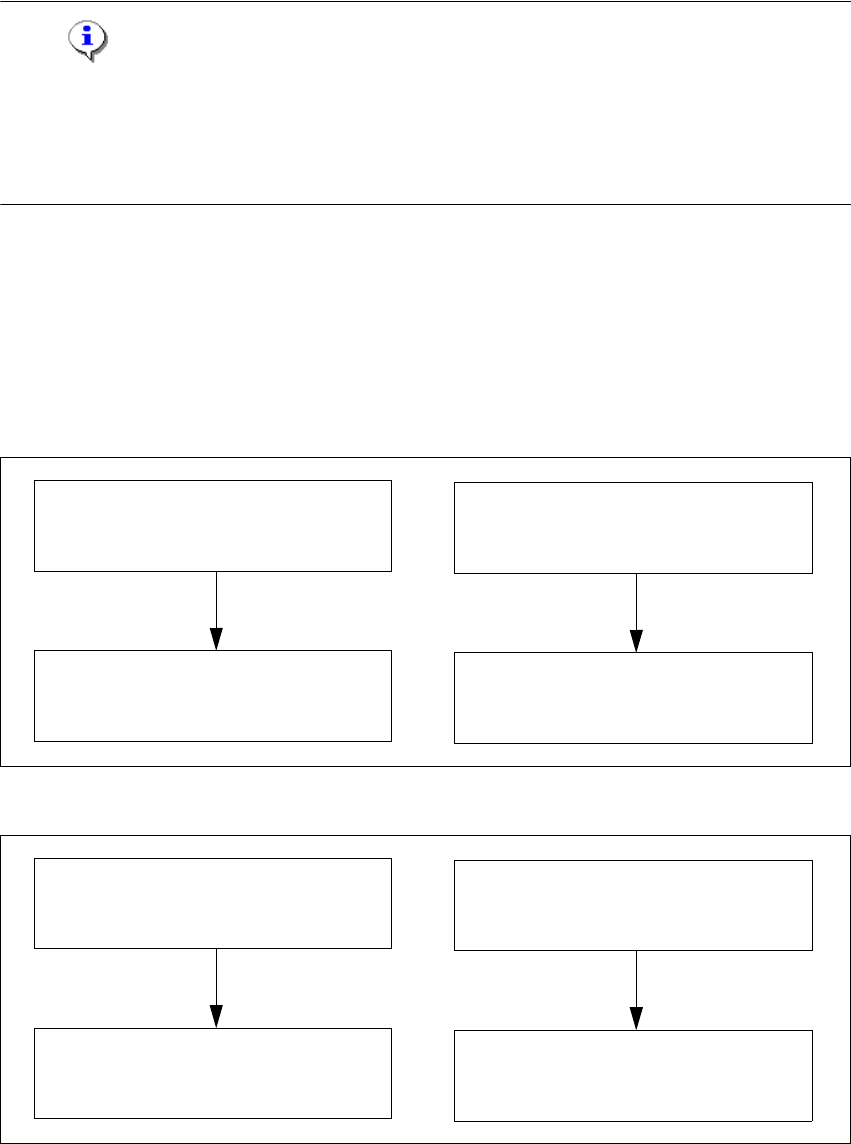
1.4 Navigation Guide for Installation
Please use the following documents to lead you through the installation procedure for SIPLACE
Setup Center. 1
1
1
Fig. 1 - 1 Navigation Guide for Installation
1
Fig. 1 - 2 Navigation Guide for Installation
SIPLACE Pro Desk
Installation of SIPLACE Pro 2.0 SP1
(00193435-02)
SIPLACE Setup Center 2.0
Getting Started
(00194592-01)
SIPLACE Pro Desk
Installation of SIPLACE Pro 2.1
(00194673-01)
SIPLACE Setup Center RF2.1
Getting Started
(00194592-02)
SIPLACE Pro Desk
Installation of SIPLACE Pro 3.0
(001934570-01)
SIPLACE Setup Center 2.1
Getting Started
(00194592-02)
SIPLACE Pro Desk
Installation of SIPLACE Pro 3.1
(00194673-01)
SIPLACE Setup Center RF2.1
Getting Started
(00194592-02)

Installation Manual SIPLACE Setup Center RF 2.1 2 System Components and Configurations
Edition 09/2005 EN 2.1 Overview of System Components
9
2 System Components and
Configurations
2.1 Overview of System Components
A complete installation of SIPLACE Setup Center consists of the following components. 2
– SIPLACE Setup Center GUI
– SIPLACE Setup Center Database
– Database Backup Tool
In addition, the following tools can be installed: 2
– Setup Selection Assistant
– SIPLACE Pro Trace Config Assistant
2.1.1 System Configuration
There are several different recommended installation scenarios for SIPLACE Setup Center. The
installation depends on the working area where SIPLACE Setup Center will be used and on other
conditions as described below. 2
2.1.1.1 SIPLACE Setup Center Database
The most important decision before the first installation is which type of data management is used.
The following decision tree should give you support with this decision. Please read through the
questions thoroughly and follow the appropriate result path. As a result you get the recommended
kind of installation for the SIPLACE Setup Center database. 2