00194591_02.pdf - 第9页
Installation Manual SIPLACE Setup Center RF 2.1 2 System Components and Configurations Edition 09/2005 EN 2.1 Overview of System Components 9 2 System Component s and Configurations 2.1 Overview of System Component s A c…
1 Introduction Installation Manual SIPLACE Setup Center RF 2.1
1.4 Navigation Guide for Installation Edition 09/2005 EN
8
Note
A hard disk with 500 MB or more free space should be used for installation (without the operating
system installed there should be at least 1 GB free space).
The size of the database will grow constantly as additional data is stored, this should be taken into
consideration. 1
1.4 Navigation Guide for Installation
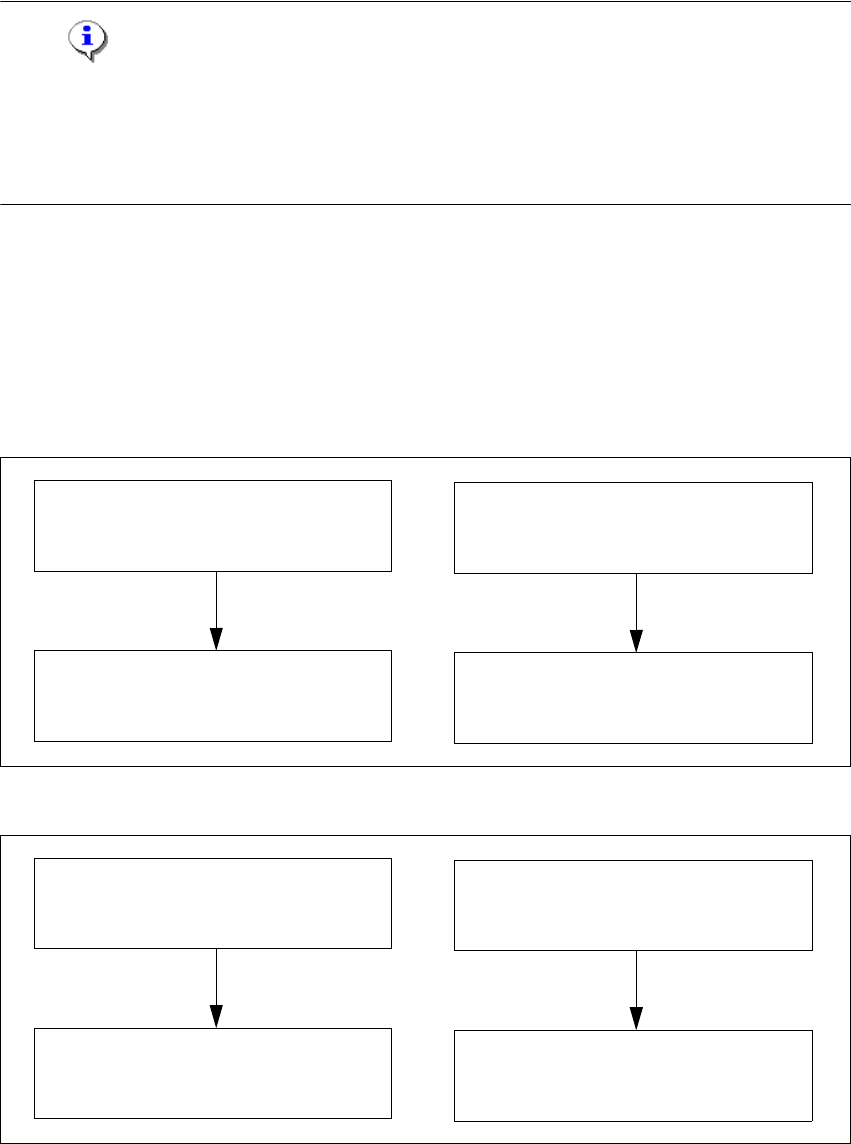
Please use the following documents to lead you through the installation procedure for SIPLACE
Setup Center. 1
1
1
Fig. 1 - 1 Navigation Guide for Installation
1
Fig. 1 - 2 Navigation Guide for Installation
SIPLACE Pro Desk
Installation of SIPLACE Pro 2.0 SP1
(00193435-02)
SIPLACE Setup Center 2.0
Getting Started
(00194592-01)
SIPLACE Pro Desk
Installation of SIPLACE Pro 2.1
(00194673-01)
SIPLACE Setup Center RF2.1
Getting Started
(00194592-02)
SIPLACE Pro Desk
Installation of SIPLACE Pro 3.0
(001934570-01)
SIPLACE Setup Center 2.1
Getting Started
(00194592-02)
SIPLACE Pro Desk
Installation of SIPLACE Pro 3.1
(00194673-01)
SIPLACE Setup Center RF2.1
Getting Started
(00194592-02)

Installation Manual SIPLACE Setup Center RF 2.1 2 System Components and Configurations
Edition 09/2005 EN 2.1 Overview of System Components
9
2 System Components and
Configurations
2.1 Overview of System Components
A complete installation of SIPLACE Setup Center consists of the following components. 2
– SIPLACE Setup Center GUI
– SIPLACE Setup Center Database
– Database Backup Tool
In addition, the following tools can be installed: 2
– Setup Selection Assistant
– SIPLACE Pro Trace Config Assistant
2.1.1 System Configuration
There are several different recommended installation scenarios for SIPLACE Setup Center. The
installation depends on the working area where SIPLACE Setup Center will be used and on other
conditions as described below. 2
2.1.1.1 SIPLACE Setup Center Database
The most important decision before the first installation is which type of data management is used.
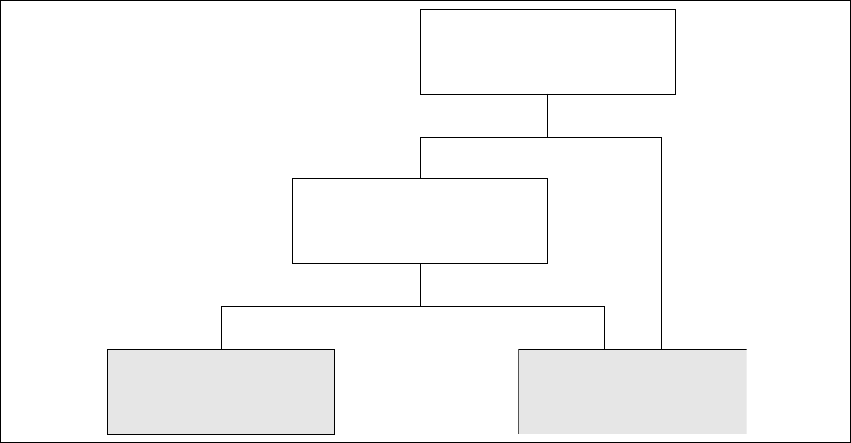
The following decision tree should give you support with this decision. Please read through the
questions thoroughly and follow the appropriate result path. As a result you get the recommended
kind of installation for the SIPLACE Setup Center database. 2
2 System Components and Configurations Installation Manual SIPLACE Setup Center RF 2.1
2.1 Overview of System Components Edition 09/2005 EN
10
2
Fig. 2 - 1 Decision Tree for SIPLACE Setup Center Database
Questions:
– Do the packaging units have Unique ID barcodes?
Each packaging unit in the factory must be marked with a unique barcode. It is possible that
the unique ID is part of a combined barcode. 2
– Do you validate the setup in a pre-setup area?
The pre-setup area is used to validate the setup for correctness and completeness. The vali-
dated tables are docked to the production line(s) for use. 2
– Local database (MSDE)
This scenario does track the numbers of components on each packaging unit. The current
number of components are "remembered" when the packaging unit is teared down. If the pack-
aging unit is moved to another line the other Setup Center system does not know this reel and
will start with the start quantity. Therefore the operator need to check each partially fractured
packaging unit he gets from the stock and need to adjust the quantity if necessary. 2
This scenario offers a higher amount of operation safety, because the SIPLACE Setup Center
and a local MSDE database are installed to different computers for each production line. If one
component of SIPLACE Setup Center encounters an error, only one production line is af-
fected. 2
– Central database
The SIPLACE Setup Center database can be installed to any available Microsoft SQL Server
2000 (SP3a). In this case, the customer is responsible to set up a backup & recovery strategy
and must provide an operating Microsoft SQL Server 2000 (SP3a). 2
No Yes
No Yes
Local Database
(MSDE)
Central Database
Do you validate the setup
in a pre -s etup area ?
Do the packaging units
have Unique ID barcodes ?