00198051-01_IM_SetupCenter_8.0_EN.pdf - 第10页
Navigation Guide for Installation SIPLACE Setup Center 10 Installation Manual SIPLACE Setup Center 8.0
Navigation Guide for Installation
SIPLACE Setup Center
Installation Manual SIPLACE Setup Center 8.0 9
2
2 Navigation Guide for Installation
Navigation Guide for Installation
2.1
2.1 SIPLACE Setup Center
SIPLACE Setup Center
The installation procedure is divided into several parts (see the following Figure):
1. Setup Center Application
▪ Setup Center Application Installation
– SIPLACE Setup Center Complete
– SIPLACE Setup Center GUI
– SIPLACE Setup Center GUI Server
–Custom
▪ Setup Center "Forced Setup Verification"
2. Hardware
▪ Barcode scanner installation
▪ Docking station installation
▪ Scanner connection, see SIPLACE Setup Center User Guide
3. Settings
▪ Station software, see SIPLACE Setup Center User Guide
▪ Setup Center Configuration, see SIPLACE Setup Center User Guide
▪ SIPLACE Pro, see SIPLACE Setup Center User Guide
▪ Barcode Label Wizard, see SIPLACE Setup Center User Guide
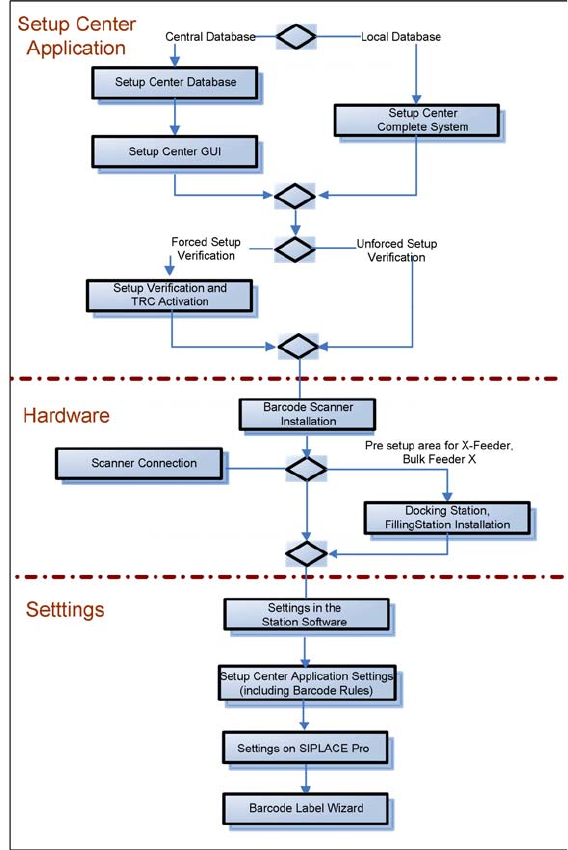
Navigation Guide for Installation
SIPLACE Setup Center
10 Installation Manual SIPLACE Setup Center 8.0

System Components and Configurations
3.1.1 Setup Center System Components
Installation Manual SIPLACE Setup Center 8.0 11
3
3 System Components and Configurations
System Components and Configurations
3.1
3.1 System Components
System Components
3.1.1
3.1.1 Setup Center
Setup Center
A complete installation of SIPLACE Setup Center requires:
▪ SIPLACE Pro Interface and SIPLACE Pro Desk
SIPLACE Setup Center consists of the following components:
▪ SIPLACE Setup Center GUI
▪ SIPLACE Setup Center Database
3.1.2
3.1.2 Scanner System
Scanner System
3.1.2.1
3.1.2.1 Datalogic Scanner
Datalogic Scanner
Setup Center supports the following barcode reader from Datalogic.
Narrowband 433MHz or 910MHz
The scanners use the narrowband radio frequency 433MHz or 910MHz for communication with the cra
-
dle. Communication between the cradle and Setup Center is via RS232 or USB.
(1)
The scanners Dragon M101 and M131 are technically comptabible with the PowerScan M8300 and
are therefore operated in Setup Center as "Datalogic PowerScan 8000 family".
Bluetooth
TM
The scanners use Bluetooth
TM
with 2.4 GHz range for communication with the cradle. Communication
between the cradle and Setup Center is via RS232 or USB.
Barcode
reader type
1D-Barcode 2D-Barcode Cradle type RS232 Inter
-
face
USB Inter
-
face
Max. num
-
ber of scan
-
ner per
cradle
Dragon
M101
(1)
Yes No OM-Dragon Yes No 32
Dragon
M131
(1)
Yes No OM-3030 Yes No 32
PowerScan
M8300
Yes No BC-8030 Yes Yes 32
PowerScan
M8500
Yes Yes BC-8030 Yes Yes 32
PowerScan
M9500
Yes Yes BC-9030 Yes Yes 16
Barcode
reader type
1D-Barcode 2D-Barcode Cradle type RS232 Inter
-
face
USB Inter
-
face
Max. num
-
ber of scan
-
ner per
cradle
PowerScan
BT8300
Yes No BC-8030-BT Yes Yes 4