00198051-01_IM_SetupCenter_8.0_EN.pdf - 第11页
System Components and Configurations 3.1.1 Setup Center System Components Installation Manual SIPLACE Setup Center 8.0 11 3 3 S y s t e m C o m p o n e n t s a n d C o n f ig u r a t io n s System Components and Configur…
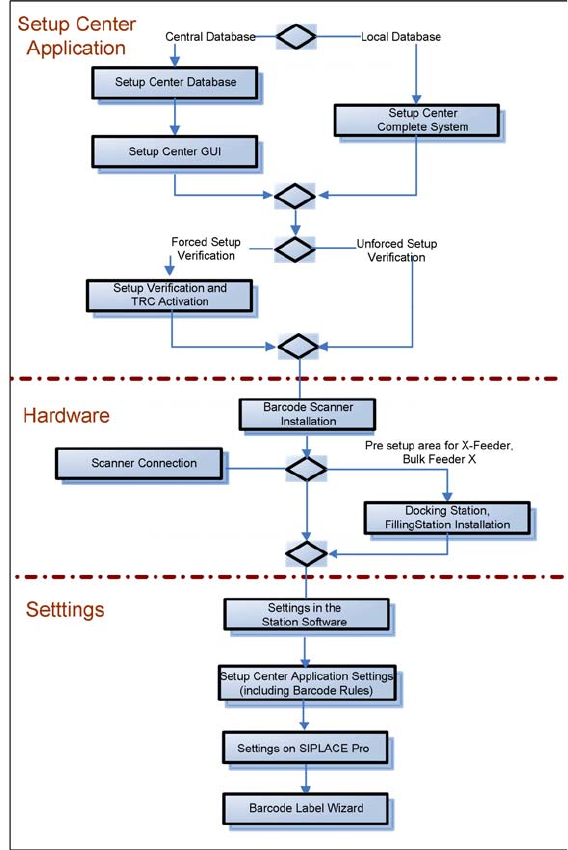
Navigation Guide for Installation
SIPLACE Setup Center
10 Installation Manual SIPLACE Setup Center 8.0

System Components and Configurations
3.1.1 Setup Center System Components
Installation Manual SIPLACE Setup Center 8.0 11
3
3 System Components and Configurations
System Components and Configurations
3.1
3.1 System Components
System Components
3.1.1
3.1.1 Setup Center
Setup Center
A complete installation of SIPLACE Setup Center requires:
▪ SIPLACE Pro Interface and SIPLACE Pro Desk
SIPLACE Setup Center consists of the following components:
▪ SIPLACE Setup Center GUI
▪ SIPLACE Setup Center Database
3.1.2
3.1.2 Scanner System
Scanner System
3.1.2.1
3.1.2.1 Datalogic Scanner
Datalogic Scanner
Setup Center supports the following barcode reader from Datalogic.
Narrowband 433MHz or 910MHz
The scanners use the narrowband radio frequency 433MHz or 910MHz for communication with the cra
-
dle. Communication between the cradle and Setup Center is via RS232 or USB.
(1)
The scanners Dragon M101 and M131 are technically comptabible with the PowerScan M8300 and
are therefore operated in Setup Center as "Datalogic PowerScan 8000 family".
Bluetooth
TM
The scanners use Bluetooth
TM
with 2.4 GHz range for communication with the cradle. Communication
between the cradle and Setup Center is via RS232 or USB.
Barcode
reader type
1D-Barcode 2D-Barcode Cradle type RS232 Inter
-
face
USB Inter
-
face
Max. num
-
ber of scan
-
ner per
cradle
Dragon
M101
(1)
Yes No OM-Dragon Yes No 32
Dragon
M131
(1)
Yes No OM-3030 Yes No 32
PowerScan
M8300
Yes No BC-8030 Yes Yes 32
PowerScan
M8500
Yes Yes BC-8030 Yes Yes 32
PowerScan
M9500
Yes Yes BC-9030 Yes Yes 16
Barcode
reader type
1D-Barcode 2D-Barcode Cradle type RS232 Inter
-
face
USB Inter
-
face
Max. num
-
ber of scan
-
ner per
cradle
PowerScan
BT8300
Yes No BC-8030-BT Yes Yes 4

System Components and Configurations
System Configuration 3.1.3 Forced Setup Verification
12 Installation Manual SIPLACE Setup Center 8.0
3.1.2.2
3.1.2.2 Motorola / Symbol
Motorola / Symbol
Setup Center supports the following barcode reader from Motorola / Symbol.
WLAN
Communication between the Motorola / Symbol scanner via WLAN with 2.4 GHz and 5GHz. Setup Cent
-
er supports simultaneous operation with multiple scanners.
▪ 1D barcode: MC3090, MC3190
▪ 1D and 2D barcode: MC 67, MC70, MC75, MC3090, MC3190
3.1.3
3.1.3 Forced Setup Verification
Forced Setup Verification
The software CD "SIPLACE Setup Center" activates the forced setup verification and the component lev
-
el indicator at the SIPLACE placement machine.
The forced setup verification monitors the verification status of individual tracks. Non-verified tracks are
disabled by setup center.
The component level indicator identifies the component fill level for each track, and updates the fill level
for each track at the end of each PCB. Further, it manages threshold values for each track and stops the
pick up process, if a threshold is reached.
3.1.4
3.1.4 Docking Station E-,X- and SX
Docking Station E-,X- and SX
The docking station is the link between the E-, X- and SX changeover table and the E- and X feeder and
forms the communication point between Setup Center PC and feeders/changeover tables. Docking sta
-
tions supply the feeders with compressed air and energy. Data transfer is via a CAN bus cable.
3.1.5
3.1.5 FillingStations for SIPLACE Bulk Feeder X
FillingStations for SIPLACE Bulk Feeder X
The FillingsStation is a separate device needed to refill the SIPLACE Bulk Feeder X Cartridges.
The FillingsStation is the link between the Cartridge and the Setup Center PC. Data transfer is via LAN
cable.
3.2
3.2 System Configuration
System Configuration
There are several different recommended installation scenarios for SIPLACE Setup Center. The instal
-
lation depends on the working area where SIPLACE Setup Center will be used and on other conditions
as described below.
3.2.1
3.2.1 SIPLACE Pro
SIPLACE Pro
It is recommended that at least the SIPLACE Pro Interface (SPI) is installed on the system. Further in
-
formation about this is given in the according installation steps for SIPLACE Setup Center GUI.
NOTICE
A docking station is required additionally for the pre-setup of E-, X- and SX-tables.