20121120111955_KY8030_2_Maintenance_Manual_Eng_ver1 - 第31页
Maintenance Manual | 31 1.2.6. C ONVEYOR PCB C HECK S ENSOR Figure 1-7. PCB Check Sensor Item Description Item Description 1 PCB Check Sensor 3 Position Sensor Bracket 2 Sensor Bracket 4 In/Out Sensor Bracket 1. Cut th…

30 | KY-8030 2
3DSolderPasteInspectionSystem
Version 1.0
KOH YOUNG TECHNOLOGY INC.
screwdriver.
5. AssembletheRollerwithscrewdriverandcombineRingBelt.
6. AssembletheBeltGuide.
7. ChecktheBeltTensionandsettotheappropriateTensionwithTensionerifitisloosen.
8. SupplypowerandchecktheRingBeltrotationstatebyturningontheRingBeltTransfer
Motor
attheI/Oscreen.
ÚNote
If Ring Belt is damaged and there isno spare Ring Belt, the damagedRing Belt can be temporarily
connectedbyheatingbothends.
AsRingBeltisanelasticbody,theTensionshouldbeadjustedbyusingTensionerinevery3month.
Maintenance Manual | 31
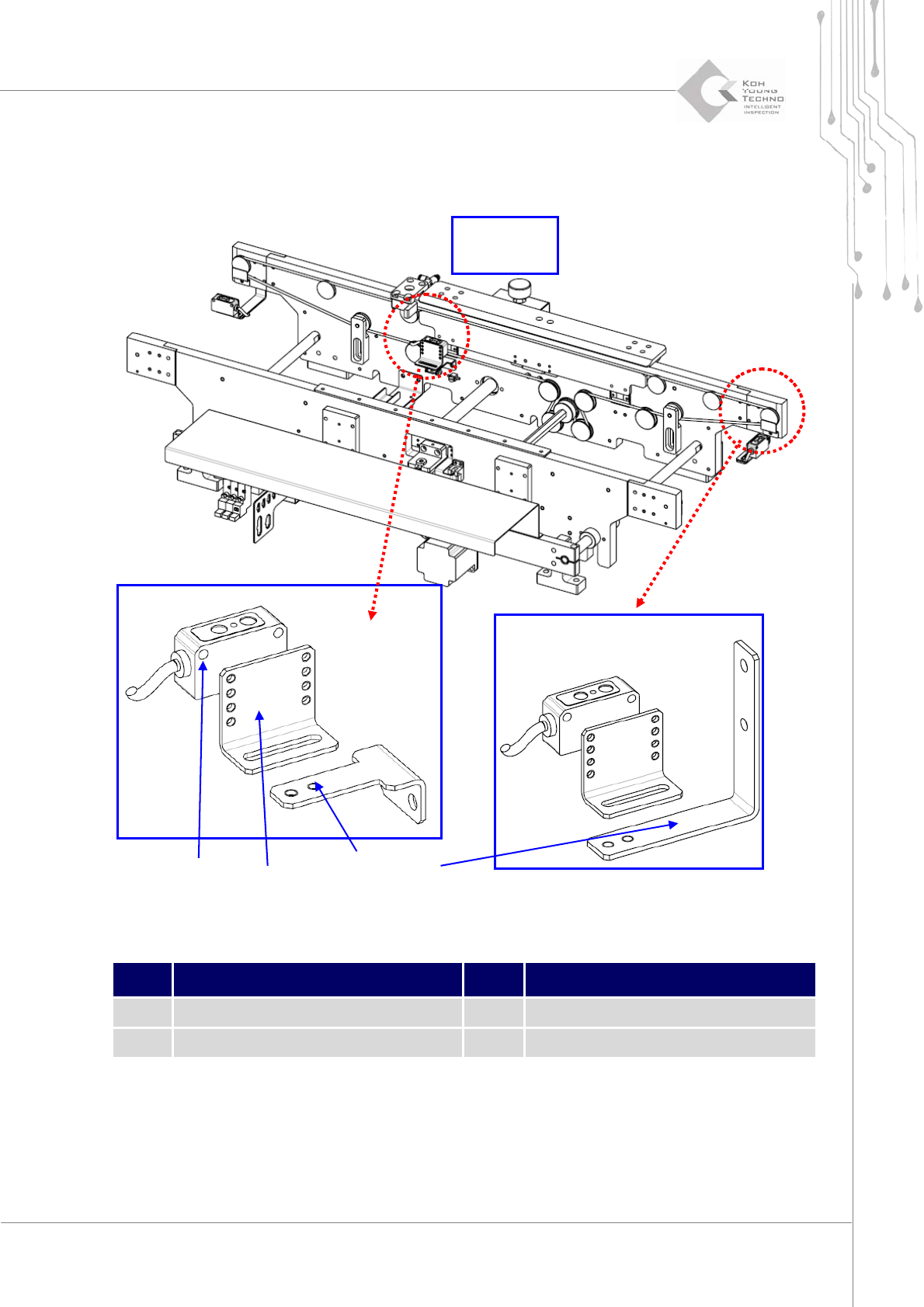
1.2.6. CONVEYOR PCB CHECK SENSOR
Figure 1-7. PCB Check Sensor
Item Description Item Description
1 PCB Check Sensor 3 Position Sensor Bracket
2 Sensor Bracket 4 In/Out Sensor Bracket
1. Cutthepower/theairsupplyandpressemergencyswitch.
2. OpentheFrontDoor/WindowanddisassembleRearCover/RightSideCover.
3. DisassembleConnectorofPCBCheckSensor.
② ① ④ ③
Checking
Position

32 | KY-8030 2
3DSolderPasteInspectionSystem
Version 1.0
KOH YOUNG TECHNOLOGY INC.
4. Disassemble PCB Check Sensor from Sensor Bracket and assemble new PCB Check
SensortoSensorBracket.
5. FixPCBCheckSensorConnectorcheckingI/ONumber.
6. SupplypowerandcheckifthePCBCheckSensorisoperatingproperlyatI/Oscreen.
ÚNote:IfPCBisnotdetectedproperly,spintoadjustSensorandSensorBracketasthediagram.