KE-3010_SPE_EN - 第35页
- 30 - 5.2.4. Component verification (Component Verificat ion Sy stem /CVS fact ory - set option) This function is provided to inspect componen ts to be placed before production and at the restart afte r components run o…
- 29 -
5.2. Option
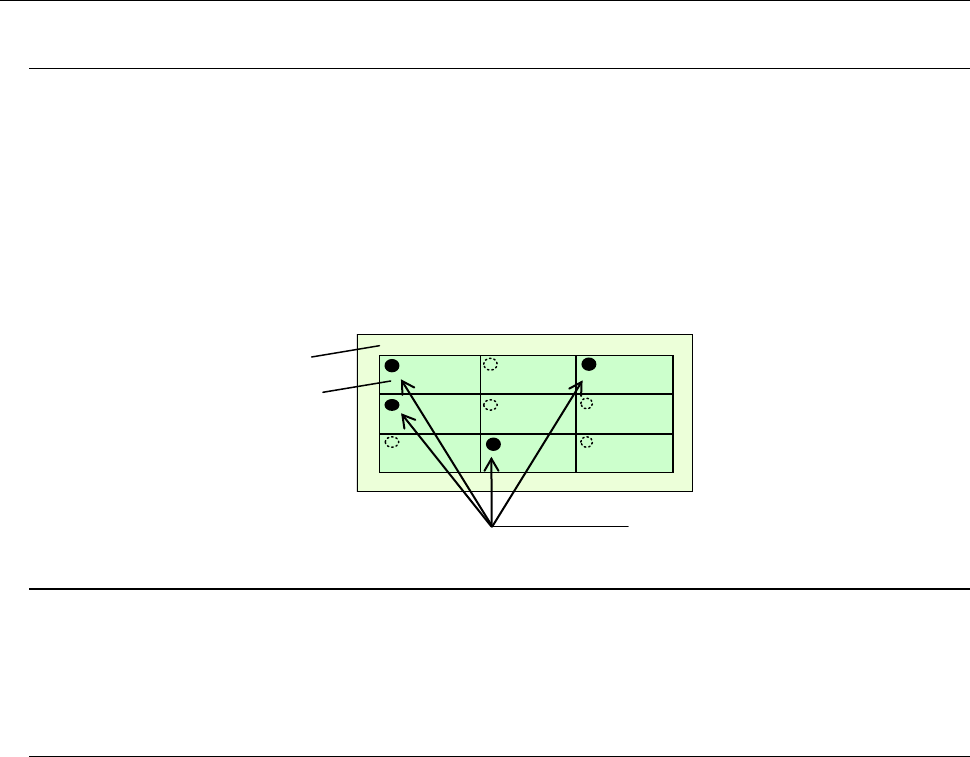
5.2.1. Bad mark reader (Bad Mark Reader/BMR factory-set option)
A bad mark is given to a circuit on a multi-circuit PWB to prevent any component from being
placed on the circuit.
The minimum diameter of a bad mark is 2.5 mm or more and the color of a mark should be
highly contrasted with the color of a board. The brightness can be switched when the color
of a board is bright (looks white).
When you use an optional bad mark reader, the time for recognizing one bad mark can be
shortened by approximately 0.1 seconds with comparing with the time taken with the
standard OCC.
5.2.2. Feeder overall change table system (factory-set option)
This function allows a group of feeders to be attached or detached onto/from the main unit at
a time. Since this function enables changeover from the current feeders to the next feeders
even during production of PWBs, it shortens the time required for changeover.
5.2.3. None-stop operation (factory-set option)
This is the function for continuing PWB production without interrupting it although
components run out on the reference side when the same type of components are set on the
front side and the rear side.
PWB production is normally performed with using components set on the reference side
bank (front side or rear side) only. When components run out on the reference side, the
machine picks up components from only the opposite side bank to continue the current PWB
production. Therefore, you can replenish the machine with components even during PWB
production.
Board
Circuits
Bad marks

- 30 -
5.2.4. Component verification (Component Verification System/CVS factory-set
option)
This function is provided to inspect components to be placed before production and at the
restart after components run out, and detect errors such as component, polarity, feeder
setting position and other errors in advance. Up to six components are checked at the same
time.
Components applicable to this check:
Applicable component type
- Square chip
- Laminated ceramic capacitor
- Tantalum chip capacitor
- Aluminum electrolytic capacitor
- Chip film capacitor
- 2-pin diode
Inspection conditions
- Component that have two electrodes: one on the bottom and
another on the opposite side
- Component whose electrode distance is 10 mm or less
- Component whose external dimensions are □ 10.00 mm or less
- For a single measurement, a 0402 component or larger
components
- For simultaneous measurement,
a 1005 component or larger
components
(The longer side shall be 0.95 mm or longer.)
* Diodes are limited to general commutating diodes (other than light-emitting diodes and
zener diodes).
Check items:
1) Resistance value Measurement range: 10 Ω to 1 MΩ
Measurement accuracy: ± 5 %
2) Electrostatic capacitance Measurement range:100 pF to 100 μF
Measurement accuracy: ± 20 %
3) Diode polarity Measurement range: Forward voltage 1.8 V or less
Open voltage 0 to 4.3 V or less
Nozzle:
The following nozzles exclusively designed for the CVS are required to use the verification
function.
Standard nozzles: 500CVS, 502CVS, 503CVS, 504CVS, 505CVS
For a melf: 565 (510 nozzle for a CVS), 566 (511 nozzle for a CVS)
5.2.5. SOT Direction Check Function (Factory-Set Option)
This function uses the left OCC to check the component supply angle by placing a 3-terminal
SOT component on the SOT direction check table before production or the restart after
components run out.
Applicable components:
- Component dimensions: 1.6 mm to 4.0 mm x 4.0 mm
- Electrode dimensions: Length 0.2 mm to 1.0 mm
Width 0.1 mm to 1.0 mm

- 31 -
5.2.6. Simple load control function (Factory-Set Option)
Since this function allows you to perform a load check when a nozzle is assigned, you can
analyze a malfunction such as a nozzle sliding error. In addition, it can pick up/place a
component on a load cell to inspect the shock load applied to the component when the
component is picked up/placed on a board.
When you use an optional 6*1 or 6*2 type of load control nozzle, you can use the stroke and
the spring pressure to easily control the load applied to a component when it is placed on a
board. By replacing an attachment on the tip of a nozzle with another one, you can inspect
the load applied to various types of components.
- Load range: 6*1 type of nozzles: 98 to 135 g (1.0 to 1.32 N)
6*2 type of nozzles: 146 to 270 g (1.43 to 2.65 N)
- Precision: ± 7.5% (2N or more)
± 0.15 N (Less than 2 N)
- This function allows you to turn on or off vacuum at the same time picks up/places a
component to easily measure the load imposed during pick-up/placement of a component.
- The load can be displayed as a waveform.
5.2.7. Rear Side Operation Unit (Factory-Set Option)
The liquid crystal display monitor, keyboard and mouse are attached on the rear of the main
unit to secure the same efficiency as that of the front operation unit (this operation unit is
equipped with the front/rear operation switch).
5.2.8. Feeder position indicator (Feeder Position Indicator/FPI factory-set option)
This function uses LEDs to notify an operator of the feeder position to be checked if the
stocked components run out or a feeder error occurs during production of PWBs. This
feature shortens the time spent for replacing a feeder and improves the operability of the
KE-2000 series of products.