00191297-02.pdf - 第207页
User Manual S-23 HM 6 Vision functions Software Vers ion SR.405.xx 05/99 Iss ue 6.5 Teach Fiducial 205 NOTE: 6 Buttons a re activ e when the text on the button i s bla ck (rathe r than gray ). This m eans that y ou ca n …
6 Vision functions User Manual S-23 HM
6.5 Teach Fiducial Software Version SR.405.xx 05/99 Issue
204
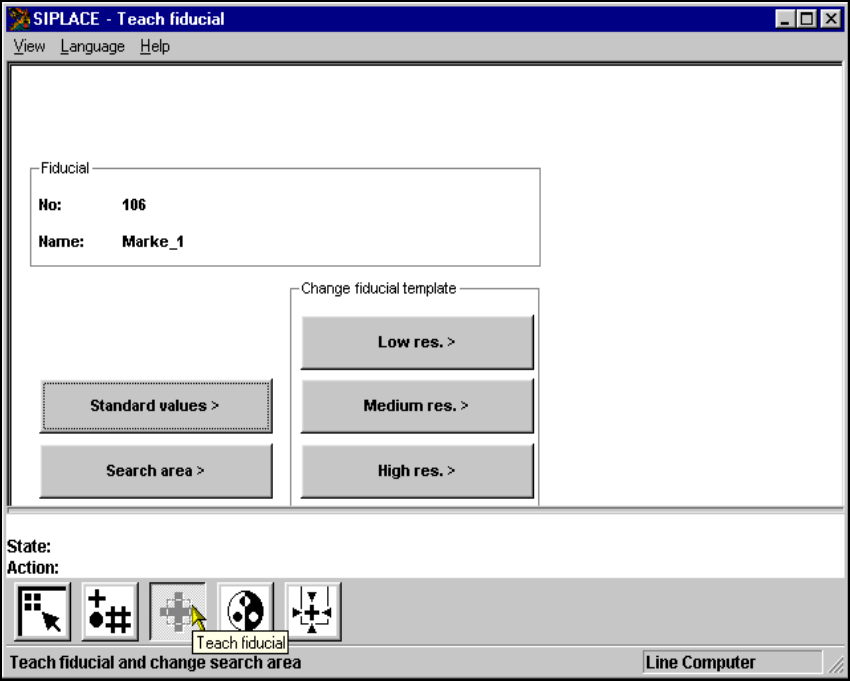
6.5.4 Teach Fiducial Menu
As the diagram shows, the Teach fiducial menu offers the following options: 6
– Standard values
– Search area
– Change search area with
– low resolution,
– middle resolution and
– high resolution
6
Fig. 6.5 - 13 Teach fiducial menu, options

User Manual S-23 HM 6 Vision functions
Software Version SR.405.xx 05/99 Issue 6.5 Teach Fiducial
205
NOTE: 6
Buttons are active when the text on the button is black (rather than gray). This means that you can
launch the associated function by clicking on the button with the mouse.
The Search area button will, for example, only be active if you have 6
– already loaded a fiducial or
– created a new fiducial.
A model must already exist for the selected fiducial. 6
If a new fiducial number has been input then you can select the Standard values options. If you
have loaded an existing fiducial all options will be accessible. In the menu the following options
will be available: 6
– Changing the parameters of the fiducial structure fields (template)
– Changing the parameters of the search area
– Teaching with standard values
Fiducial structure field parameters are 6
–width,
– height and
– camera resolution
Search area parameters are 6
– width and
–height
The parameters are stored in a list in the station computer. This list is initialized with default and
current values when the Load fiducial option is launched. 6
If you change a parameter, a teach command will be generated in the machine controller (MC).
The only parameter block which will be added to the teach command in the general parameters
will be the block which has been changed. 6
For this reason the machine controller generates three different teach commands: 6
– Teach with standard values
– Teach the search area
– Teach the fiducial structure field (template)
6 Vision functions User Manual S-23 HM
6.5 Teach Fiducial Software Version SR.405.xx 05/99 Issue
206
6.5.4.1 Standard Values Option
When this option is selected 6
– the menu is closed.
– the teaching process is launched.
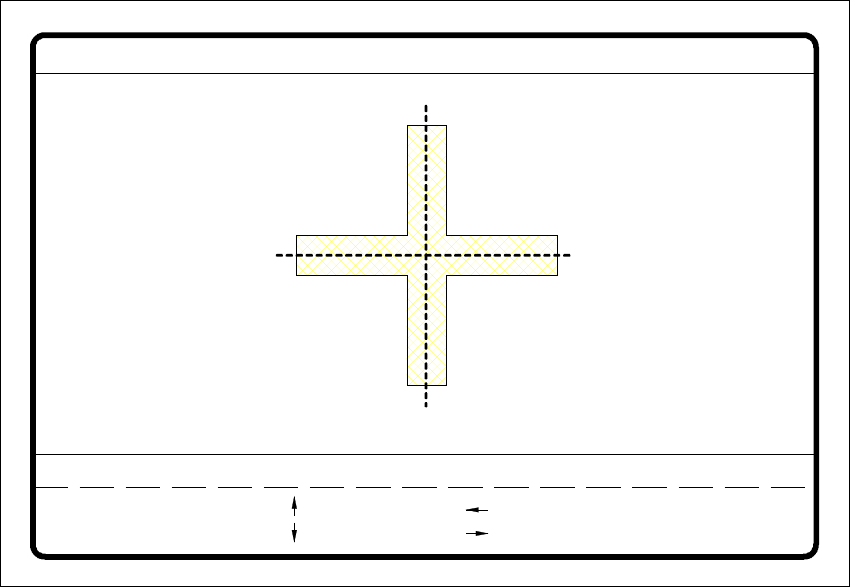
– the video image is shown with fiducial, fiducial structure field and uniqueness value.
– header and footer with commentary, measurement results, key assignments and command se-
quences will be displayed.
The teaching process will now be launched with the standard values. The result of the teaching
process is the uniqueness value which is shown in the header of the video image. This value pro-
vides information on the differentiation quality of the fiducial with respect to other structures in the
vicinity of the fiducial. The figure displayed may range between 6
0 = unsatisfactory and
100 = very good differentiation capability. 6
Practice shows that a uniqueness value of at least 60 must be achieved for fiducials and ink dots. 6
6
Fig. 6.5 - 14 Teach fiducial menu, Teach with standard values video image
teach
1..6 : x/y step
Fiducial No. = 8 Uniqueness = 70
Ret :
Standard values
x/y step width = ...
: x axis +
: x axis -
: y axis +
: y axis -