00191297-02.pdf - 第215页
User Manual S-23 HM 6 Vision functions Software Vers ion SR.405.xx 05/99 Iss ue 6.5 Teach Fiducial 213 6.5.5.1 T ransforms 1 to 5 Option When you select this opti ons, 6 – t he menu c loses, – the vide o imag e is d ispl…

6 Vision functions User Manual S-23 HM
6.5 Teach Fiducial Software Version SR.405.xx 05/99 Issue
212
To make it easier for you to assess the range of brightness or the contrast, these gray-scale values
have been converted with the help of transformation tables into color as is shown below: 6
NOTE 6
In order to achieve a good uniqueness value the contrast difference between the fiducial and its
surroundings should be at least 75. For example, if the background is green the fiducial should be
orange. 6
If the contrast is unsatisfactory you can select in the menu between five pre-programmed trans-
formation tables in order to obtain a color image which is capable of supplying the necessary in-
formation. In addition, you can also program a transformation table yourself. 6
NOTE 6
When the color presentation is changed the fiducial will be taught at the same time. 6
Gray scale Allocated color
0black
30 violet
50 blue
77 blue-green
100 green
127 brown
150 red
175 orange
200 yellow
255 white
Tab. 6.5.1
User Manual S-23 HM 6 Vision functions
Software Version SR.405.xx 05/99 Issue 6.5 Teach Fiducial
213
6.5.5.1 Transforms 1 to 5 Option
When you select this options, 6
– the menu closes,
– the video image is displayed,
– the teach command is given, and
– header and footer with color table option, fiducial number and the uniqueness value are dis-
played.
6
Fig. 6.5 - 18 Contrast sensitivity menu, Transforms 1-5 video image
È Press Esc to quit this option.
Fiducial No. = 8 Uniqueness = 70
Disp. with transform 2
6 Vision functions User Manual S-23 HM
6.5 Teach Fiducial Software Version SR.405.xx 05/99 Issue
214
6.5.5.2
Program Transform 5
Option’
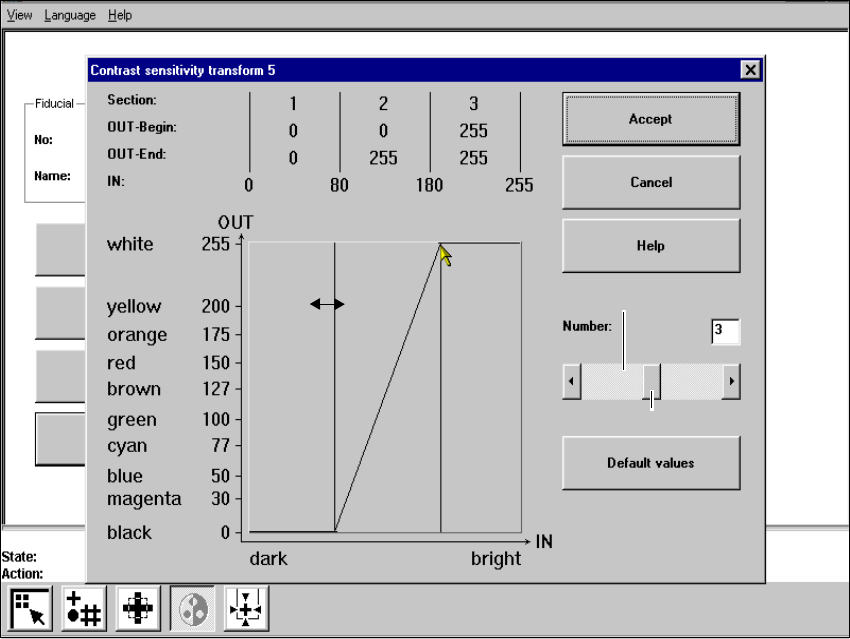
When this option is activated the Contrast sensitivity transform 5 option box opens. 6
6
Fig. 6.5 - 19 Contrast sensitivity menu, Contrast sensitivity transform 5 option box
You can select the following parameters: 6
– Number of sections which the transformation table should have: a number between 1 and 5
– Choice of paired values: with 5 sections 10 value pairs are permitted.
Layout of the Contrast sensitivity transform 5 option box 6
Numerical presentation of Transform 5 6
The numerical values are indicated in the upper part of the option box. These are: 6
Section: Number of sections 6
OUT Begin: OUT End: Ranges of values for the transformation of the individual sections 6
IN: Range limits of the individual sections 6
Scroll field
Scroll bar