00191297-02.pdf - 第257页
User Manual S-23 HM 6 Vision functions Software Vers ion SR.405.xx 05/99 Iss ue 6.6 Test Component 255 Poi nt s mark ed wit h re d plus s igns (+) : 6 outside the c ircle: Contras t < 0, ball is darke r than the backg…
6 Vision functions User Manual S-23 HM
6.6 Test Component Software Version SR.405.xx 05/99 Issue
254
The number of balls to be measured and the pattern tolerances define the size of the search win-
dow. The rough position and the skew of the component are determined for each corner of the
component via a search window. This measurement method can be identified by 6
– the synthetic model being shown in pixel resolution at the lefthand edge of the video image,
and
– the 4 windows at the corners of the component.
Procedure: 6
– The algorithm defines 4 dark blue corner windows on the basis of the pattern tolerances and
the balls defined in the package form file. The default search value is 5 balls.
– A detection algorithm runs with the aim of detecting all balls corresponding to this type. Those
found will be marked with light blue crosses.
– The balls defined in the package form file are determined by the search algorithm. The balls
found are marked with a white outline. If defined balls are not found an error message will ap-
pear on the screen.
– From these data the rough position and the skew of the component are determined. The mea-
sured position of the component is marked with white crosshairs.
Rectangle: 6
dark blue: 4 search windows, depending on the pattern tolerances and
the number of balls 6
Cross: 6
white: Ball model candidates found 6
Overlays: 6
white: Balls found which are defined in the package form file 6
Crosshairs: 6
white: Results of position recognition -> x and y angles 6
Star: 6
white: Center of the component ->Position 6
Synthetic model representation at the lefthand edge of the video image: 6
Image: Model in pixel resolution 6
User Manual S-23 HM 6 Vision functions
Software Version SR.405.xx 05/99 Issue 6.6 Test Component
255
Points marked with red plus signs (+): 6
outside the circle:
Contrast < 0, ball is darker than the background 6
within the circle:
Contrast > 0, ball is lighter than the background 6
Points marked with yellow minus signs (-): 6
The difference between the plus and minus signs represents
the radial tolerance. 6
2. Ball-driven mode 6
See Section 6.6.4.14 on page 273 for a definition of the measuring methods. 6
The method works with high precision and is thus suitable for precisely determining the position
of all defined balls. As a higher precision search, ball mode will follow grid mode. 6
This measurement method can be identified 6
– by the synthetic model being shown in pixel resolution at the lefthand edge of the video image,
– by there being a window around every ball (separate window) or
Procedure: 6
All of the balls defined in the package form file are surveyed. Geometric criteria are used here in
the selection of the window mode: 6
– If the balls are relatively far apart the separate window mode will be selected. The default win-
dow mode is the separate window mode.
Window: 6
dark blue: Over a single ball in each case (separate window) 6
Over a row or over all balls (combined window) 6
Cross: 6
white: Measured ball candidates which are defined in the package form file. 6
Crosshairs: 6
white: Results of position recognition -> x and y angles 6
Star: 6
white: Position of the component 6
6 Vision functions User Manual S-23 HM
6.6 Test Component Software Version SR.405.xx 05/99 Issue
256
Synthetic ball model representation 6
in pixel resolution on the lefthand edge of the video image 6
A description will be found in the Grid-driven mode section. 6
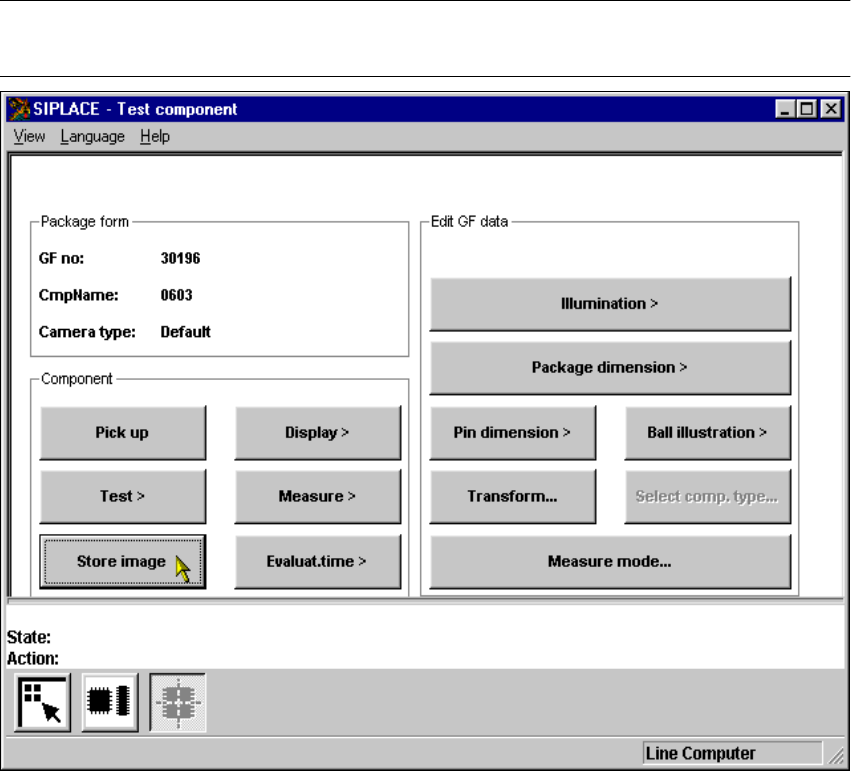
6.6.4.5 Store image Option
NOTE 6
You cannot click on this option until a package form number has been loaded. 6
Fig. 6.6 - 22 Test component menu, Store image option
This menu is used to store the generated video image as a file on the hard disk of the machine
controller. The file name and path are preset to: 6
D:\TMP\MVSBILD.MVS 6
For further analysis at Siemens AG, copy the file from the hard disk of the machine controller onto
a diskette and send it to the PL EA Service Department. 6