00191297-02.pdf - 第399页
User Manual SIPLACE S-23 HM 12 Station Extensions - Software Software Vers ion SR.405.xx 05/99 Iss ue 12.2 GEM Inte rface 397 12.2.2.3 Setting the GEM/SECS Parameters CAUTION The parameters illustr ated in th e figure be…
12 Station Extensions - Software User Manual SIPLACE S-23 HM
12.2 GEM Interface Software Version SR.405.xx 05/99 Issue
396
Control 12
(See also section 12.2.2.5) 12
– Off-line
It is not possible to send or receive messages.
– Local
In the "Placement Program" view, the user can "upload" placement programs from the station
computer to the host computer (See also section 12.2.2.6).
No placement programs can be downloaded from the host computer to the station computer.
– Remote
In the "Placement Program" view, the user can upload placement programs from the station
computer to the host computer and "download" from the host computer to the station computer.
Spooling 12
(See also section 12.2.2.5) 12
– Yes
If the connection to the host computer is lost, the station will collect in a spooling file all mes-
sages intended for the host computer. Once the connection is re-established, the host can pick
up these messages from the station. The quantity of messages which can be stored is limited
by the size of the spooling file (20 MB).
– No
If the connection to the host computer is lost, all messages intended for the host computer will
be lost.
Spool full action 12
– Overwrite
If there is no more space available in the spooling file, the oldest, stored message is overwritten
by the latest, current message.
– Ignore message
If there is no more space available in the spooling file, all new incoming messages will be dis-
carded
– Limit monitoring
Not currently relevant.
12
È Click the Accept button to save the settings.
È Click the SECS Parameters... button if you want to modify the SECS parameters (see also
section 12.2.2.3).
User Manual SIPLACE S-23 HM 12 Station Extensions - Software
Software Version SR.405.xx 05/99 Issue 12.2 GEM Interface
397
12.2.2.3 Setting the GEM/SECS Parameters
CAUTION
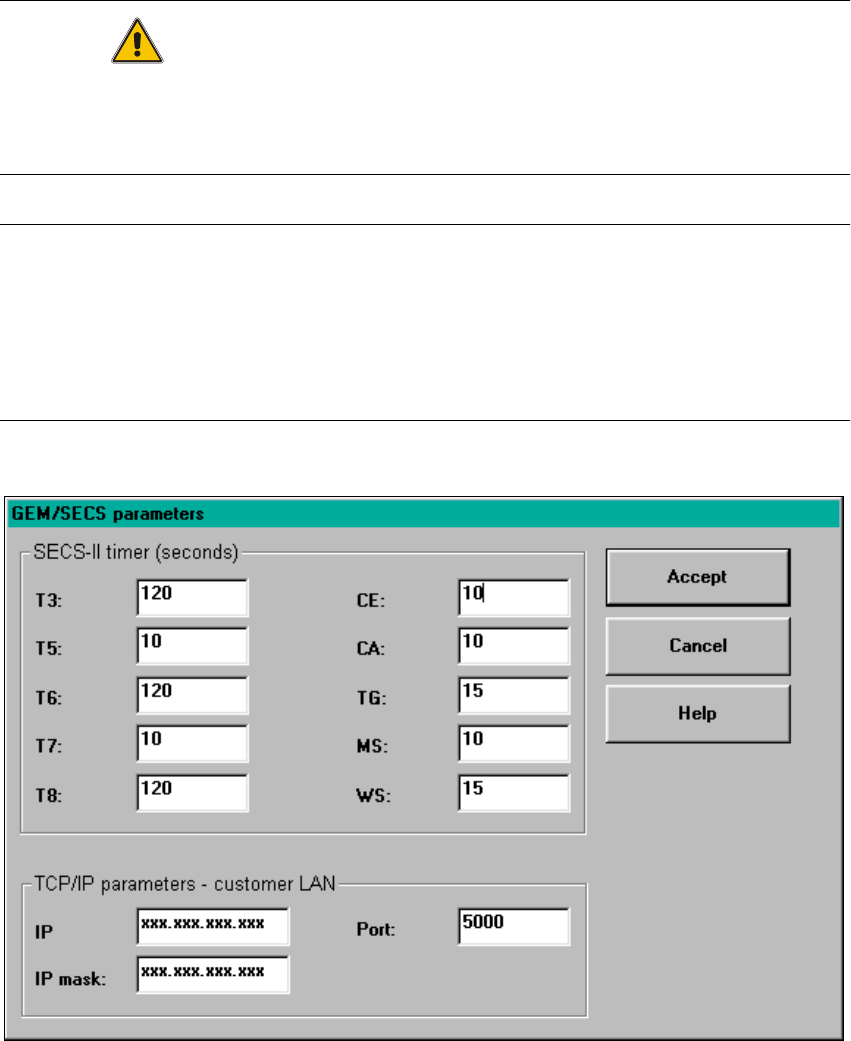
The parameters illustrated in the figure below have been tested and are recommended.
They must be set as defaults in order to optimize transfer from the host computer to the line com-
puter. 12
NOTES
Changing the parameters has the following effects on the day-to-day operation of the
GEM interface:
When a timeout value or the TCP/IP port number is changed, the GEM link to the host computer
is briefly interrupted. The GEM software is closed down when the IP address or IP screen is
changed. The GEM software cannot be used until the station is switched on again. 12
12
Fig. 12.2 - 3 "GEM/SECS parameters" window
12 Station Extensions - Software User Manual SIPLACE S-23 HM
12.2 GEM Interface Software Version SR.405.xx 05/99 Issue
398
Possible settings: 12
T3: Reply timeout 12
When a primary message is sent to the host computer, the station waits for up to the number of
seconds specified for T3 for the secondary message from the host computer.
Range of values: 1 - 120 seconds 12
T5: Connect separation timeout 12
This parameter determines the waiting time between successive attempts to establish a connec-
tion. This is only important if the station has been configured as the ACTIVE ENTITY.
Range of values: 1 - 240 seconds 12
T6: Control transaction timeout 12
After sending the message "Connect.req" or "Linktest.req" to the host computer, the station waits
for up to the number of seconds specified for T6 for the "Connect.rsp" or "Linktest.rsp" message.
The TCP/IP link is then interrupted.
Range of values: 1 - 240 seconds 12
T7: NOT SELECTED timeout 12
Once the TCP/IP connection has been established, the station configured as the PASSIVE EN-
TITY waits for up to the number of seconds specified for T7 for the "Select.req" message from the
host computer. The TCP/IP link is then interrupted. A successful exchange of "Select.req" and
"Select.rsp" forms the basis for the conversion of the TCP/IP connection into an HSMS connection.
Range of values: 1 - 240 seconds 12
T8: Network intercharacter timeout 12
Reception of an individual HSMS message must take no longer than the number of seconds spec-
ified for T8. Otherwise the TCP/IP link will be interrupted.
Range of values: 1 - 120 seconds 12
CE: Connection Establishment Timeout 12
After sending a TCP/IP connect command, a station which has been configured as an ACTIVE
ENTITY waits for up to the number of seconds specified for CE for a connection to be established
successfully or for a status message. After this time, it is assumed that the command was not re-
ceived correctly. 12