00198574-01_Process_Foundation_DEK_Micron_EN - 第19页
4 Process Hardware 4.3 Stencil Process Foundation DEK Micron-Series 12/2017 19 Damage ● Most stencils are damaged before their po- tential lifetime is reached, often as a result of poor storage or handling ● A heavily us…
4 Process Hardware
4.3 Stencil
18 Process Foundation DEK Micron-Series 12/2017
4.3 Stencil
The stencil defines the volume and shape of the deposit, and the importance of a well-maintained
stencil cannot be over-emphasised. A good stencil will give high and predictable yields, will
minimise the need to clean and hence increase throughput, and reduce both downtime and
consumables use. A damaged or worn stencil may dramatically reduce yields and demand
constant cleaning and inspection, adding considerable costs to the manufacturing process. A poor
stencil, once identified, should be replaced immediately as the cost of replacement is negligible in
relation to lost production.
Good Stencil (Well designed/ good condition)
●
Excellent Results
●
Few Failures
●
Predictable Yields
Bad Stencil (Poor design/ damaged)
●
Lots of stencil wiping/ cleaning
●
Lots of bridging and open circuits
Stencil Condition
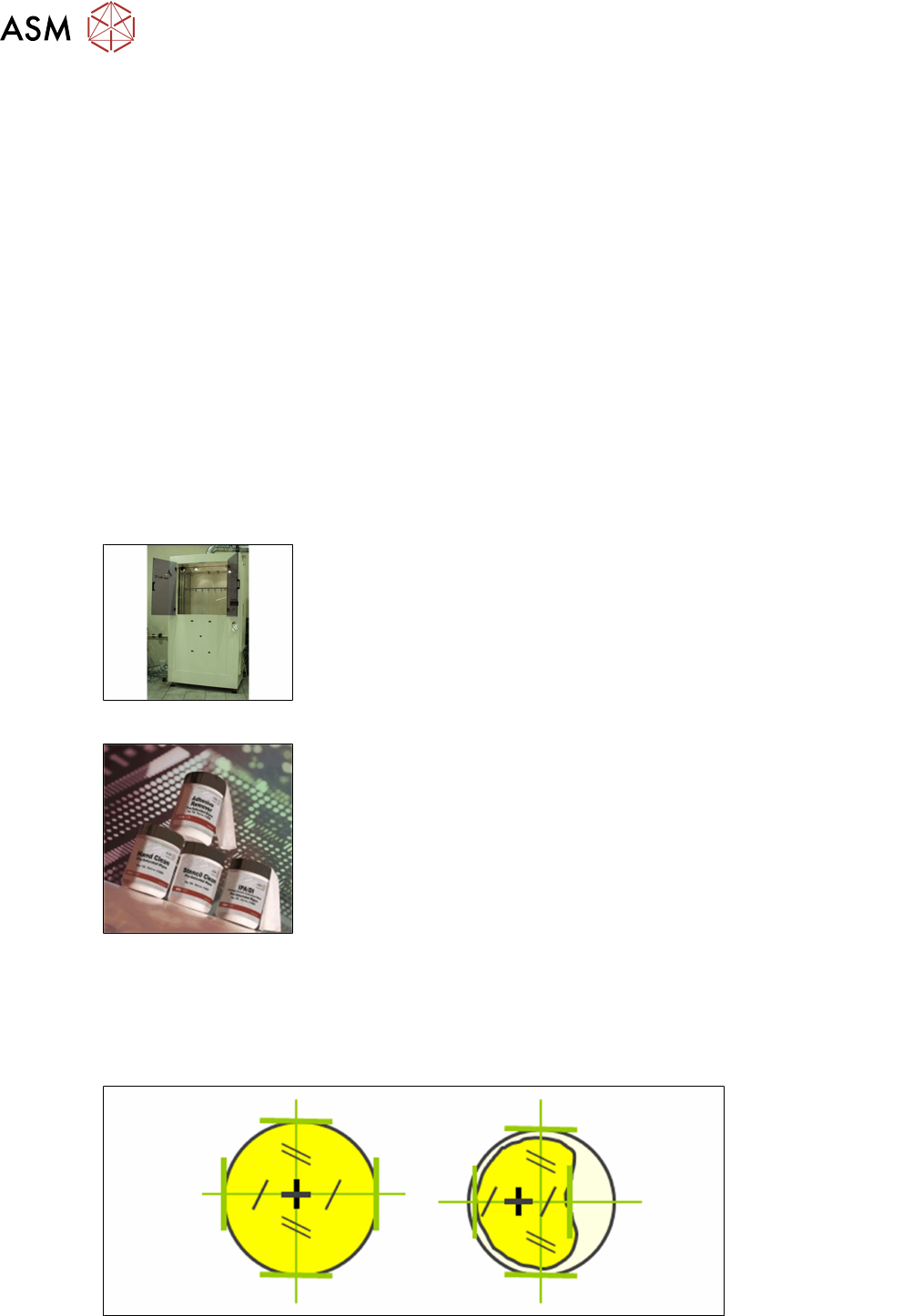
Cleanliness – Screen Wash Machine
●
Dirty apertures are one of the main causes of process defects
●
Stencils should be cleaned thoroughly in an automatic washing
machine prior to storage and possibly even at shift change
●
Remember that the under-screen cleaner supplied with the machine
is for regular, small cleaning only and cannot clean the top surface
Cleanliness – Manual
●
For manual cleaning, use a lint-free cloth. Solvent-soaked cloth in
each hand, clean both sides simultaneously
Fiducial Condition
●
The condition of the fiducials has a direct bearing on the alignment repeatability and accuracy
●
Any misalignment can cause bridging and stencil smear and increase the frequency of under-
screen cleaning
●
The stencil should be inspected regularly and damaged fiducials repaired
4 Process Hardware
4.3 Stencil
Process Foundation DEK Micron-Series 12/2017 19
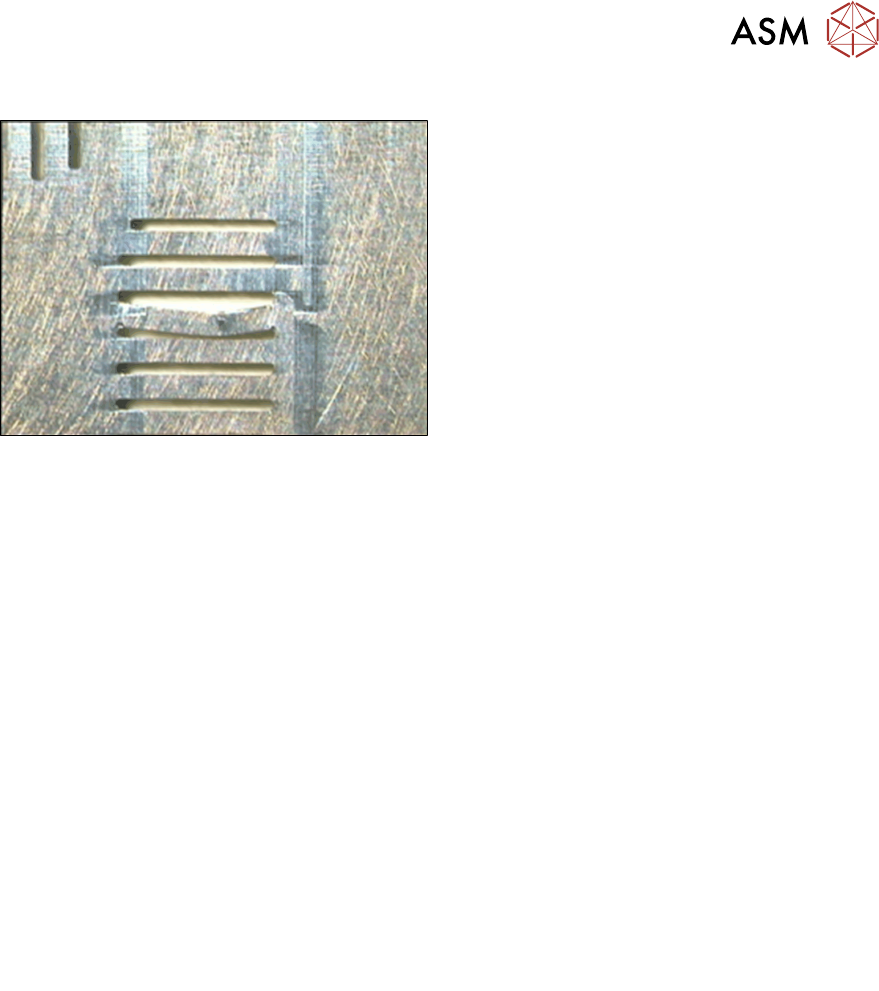
Damage
●
Most stencils are damaged before their po-
tential lifetime is reached, often as a result
of poor storage or handling
●
A heavily used stencil may exhibit a "coin-
ing" effect where there is an outline of the
board pressed on the stencil surface
●
Metal squeegees can cause surface dam-
age and wear
●
The metal bars between QFP apertures
can be very thin and can eventually break,
leading to bridging
Best Working Practices
●
Write or etch the stencil image number on the frame, or colour code it, to ease identification
and matching with production check sheets
●
Store stencils vertically in a rack or cupboard so that there is minimal risk of damage from
feet, trolleys or objects placed against them
●
In the absence of an automatic washing machine, a manual clean can be performed with
solvent and lint free clothes
●
Maintain automatic washing machines regularly and remove any build up of waste material
Exercise
1. List as many ways that you can think of to extend the lifetime of your stencils
……………………………………………………………………………………………………………
……………………………………………………………………………………………………………
……………………………………………………………………………………………………………
……………………………………………………………………………………………………………
2. List as many ways that you can think of to maintain the print quality from your stencils
……………………………………………………………………………………………………………
……………………………………………………………………………………………………………
……………………………………………………………………………………………………………
……………………………………………………………………………………………………………
4 Process Hardware
4.4 Print Material
20 Process Foundation DEK Micron-Series 12/2017
4.4 Print Material
There are many types of material that can be screen-printed and many varieties and different
manufactures of each type. Materials include solder paste, fluxes, ink, adhesive, silver epoxy and
encapsulation. Basically, any materials that exhibit the correct viscosity can be screen-printed. This
course cannot go into specific details about each material type but can offer general guidelines and
good working practices based on the following factors:
Safe Use
●
Avoid any activities that may transfer the material to your mouth (wash your hands before
eating, drinking etc.)
●
Avoid direct contact with your skin
●
Wear gloves
Quality
Affected by:
●
Environment
●
Age
●
Storage conditions
●
Contamination (i.e. IPA)
●
Handling (i.e. stirring, kneading, gathering up tramlines)
Material Loading
●
Start with enough material to ensure a rolling motion during the print stroke
– Too little: material will not fall from squeegee
– To much: material characteristics will change over time, reducing performance
●
Approximately 15mm diameter for solder paste
●
Add small quantities of material regularly.
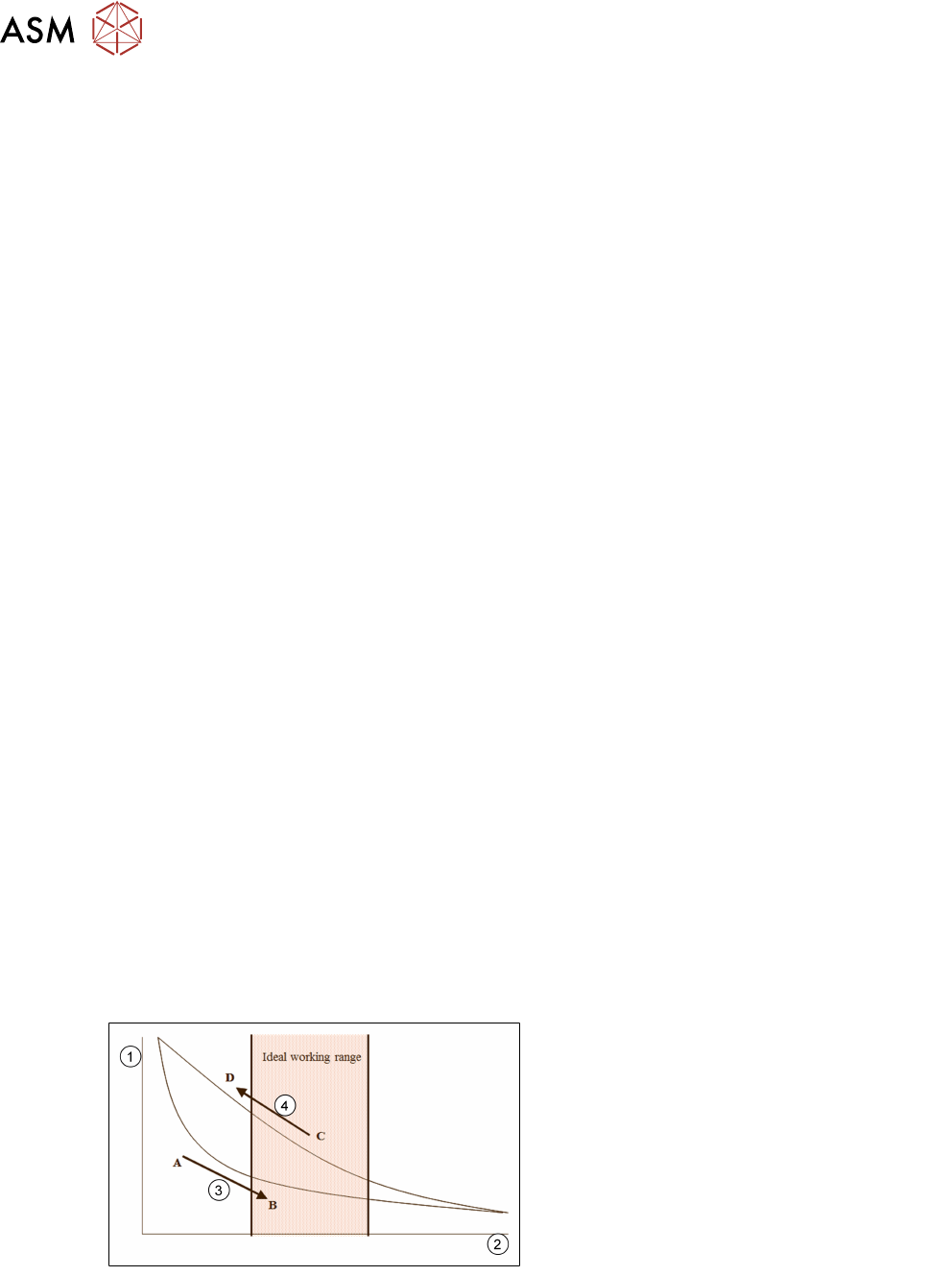
Maintaining Print Performance
●
Many print materials – such as solder paste – decrease in viscosity (become more liquid)
when they are stirred, and during printing
●
Some increase in viscosity (get thicker) when stationary
●
If this kind of material has been inactive for some time, use the ‘knead’ function
●
Keep within the optimum operating range as indicated in the chart below
Maintaining print performance:
1. Viscosity
2. Print strokes/ min
3. To go from A-B (i.e. to reach working
viscosity) may take several print strokes
4. To go from C-D (i.e. from working to non-
working) may only take a few minutes of
paste inactivity