00198574-01_Process_Foundation_DEK_Micron_EN - 第34页
5 Product File and Machine Setup 5.5 Achieve best Alignment Using Print Offsets 34 Process Foundation DEK Micron-Series 12/2017 5.5 Achieve best Alignment Using Print Offsets Importance of Good Alignment The most robust …
5 Product File and Machine Setup
5.4 Setup Video models
Process Foundation DEK Micron-Series 12/2017 33
5.4 Setup Video models
The video model option is useful when there are no synthetic fiducials on the board or stencil, or
when the fiducials are very poor quality. The secret of success is to pick an area of the image that
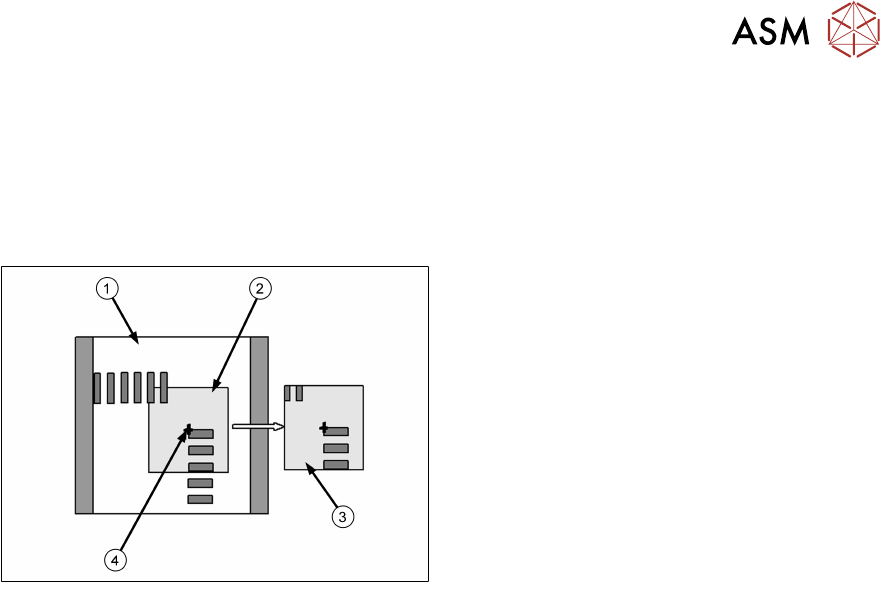
is unique within the field of view, as shown below.
The image below is using the corner of a component and, of course, it will have a corresponding
set of apertures on the stencil to align to.
1. Field of View
2. Sample Window
3. Learned Model
4. Alignment Point
Problems and Limitations
Video models should never be considered as a first choice for alignment as there are several
disadvantages:
●
Due to the normal practice of using aperture reduction, the alignment point of the stencil video
model is unlikely to match that of the board. Therefore, the need to program print offsets is
common when using video models.
●
The stencil capture score may deteriorate rapidly once the stencil is contaminated with paste.
Although this can often be corrected with lighting adjustment, it is sometimes necessary to
use the under-screen cleaner more often than is desirable, sometimes after every print!
●
On a heavily populated board it is often difficult to find an area that contains a unique image.
The software may detect multiple possible targets within the field of view. If this happens it
may help to increase the Accept Score so that only the true video model will be captured.
Exercise
Create a new board file based on the one you created previously, give it the name "Video" and ID
"Video Model Practice". Set up two pairs of video models.
5 Product File and Machine Setup
5.5 Achieve best Alignment Using Print Offsets
34 Process Foundation DEK Micron-Series 12/2017
5.5 Achieve best Alignment Using Print Offsets
Importance of Good Alignment
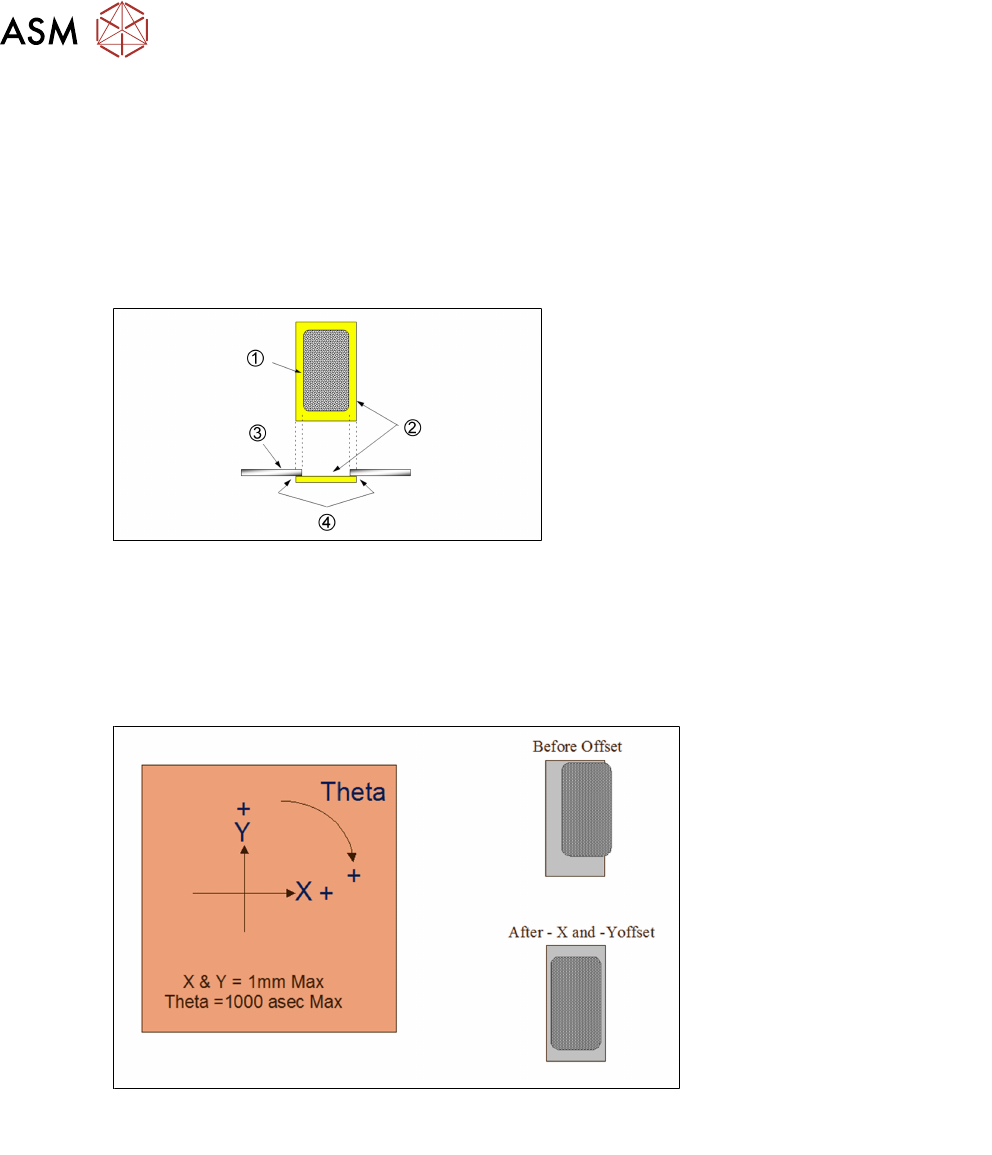
The most robust process will be maintained if the print deposit is centered within the pad. The
correct alignment of the pad and stencil aperture is essential to ensure a good gasket seal between
board and stencil.
With a good gasket the danger of bridging is reduced and the under stencil cleaning frequency will
be kept to a minimum.
1. Paste deposit
2. Land
3. Stencil
4. Gasket seal
Applying Offsets
If the first print of a new product reveals a print misalignment there are two immediate checks to
make. One is to ensure that offsets have not been copied over from a previous product file; another
is to check the fiducial set-up. If these are correct then it is possible that there is an inherent
mismatch between stencil and board. Small compensations can be made with print offsets. Align
the most critical components where practical – otherwise average out the errors across the board.
It is good practive to cure any theta offset fist before attempting to adjust X and Y.
Note: Offsets greater than 0.5mm or 500asec should be treated with suspicion.
Fixed Offsets
●
Stencil to board mismatch
●
Poor fiducial set-up, or video models being used
●
Print gap (i.e. wrong board thickness, stencil adhesive strip)
●
Machine needs calibration – escalate to trained maintenance technician
5 Product File and Machine Setup
5.5 Achieve best Alignment Using Print Offsets
Process Foundation DEK Micron-Series 12/2017 35
Random Offsets
●
Transport rails too wide
●
Board clamps damaged
●
Missing, damaged or misplaced tooling
●
Stencil damaged or stretched
●
Machine broken or needs calibration – escalate to trained maintenance technician
●
Board to board variations, particularly on thin, routed boards on second side after reflow
●
Boards with resist-defined pads (be sure it is a print offset, not a resist offset!)
●
Fiducials that have poor repeatability
Exercise
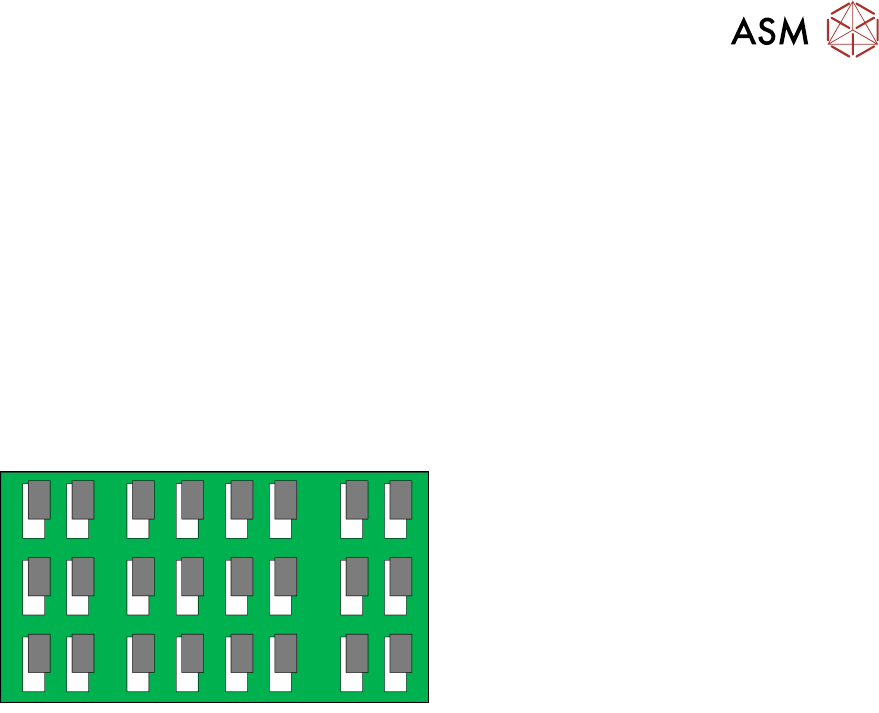
For the deposit shown here indicate by circling, which offset(s) would be required to
achieve perfect alignment:
X+ X-
Y+ Y-
ɵ+ ɵ-
Exercise
Modify one of the video model fiducial reference points to create a print offset. Then adjust it back
again using the offset parameters.