00195376-05_SM_D1_D1i_D2_D2i_EN.pdf - 第102页
Service Work PCB conveyor system 4.3.10 Repl acing the Stepping Moto r of the W idth Adjustment System [00367174] 102 Service Manual SIPLACE D1/D1i/D2/D2i Removal/Installation See also 6.7.1 Set ting the Te nsion of …
Service Work
4.3.10 Replacing the Stepping Motor of the Width Adjustment System [00367174] PCB conveyor system
Service Manual SIPLACE D1/D1i/D2/D2i 101
4.3.10
4.3.10 Replacing the Stepping Motor of the Width Adjustment System [00367174]
Replacing the Stepping Motor of the Width Adjustment System [00367174]
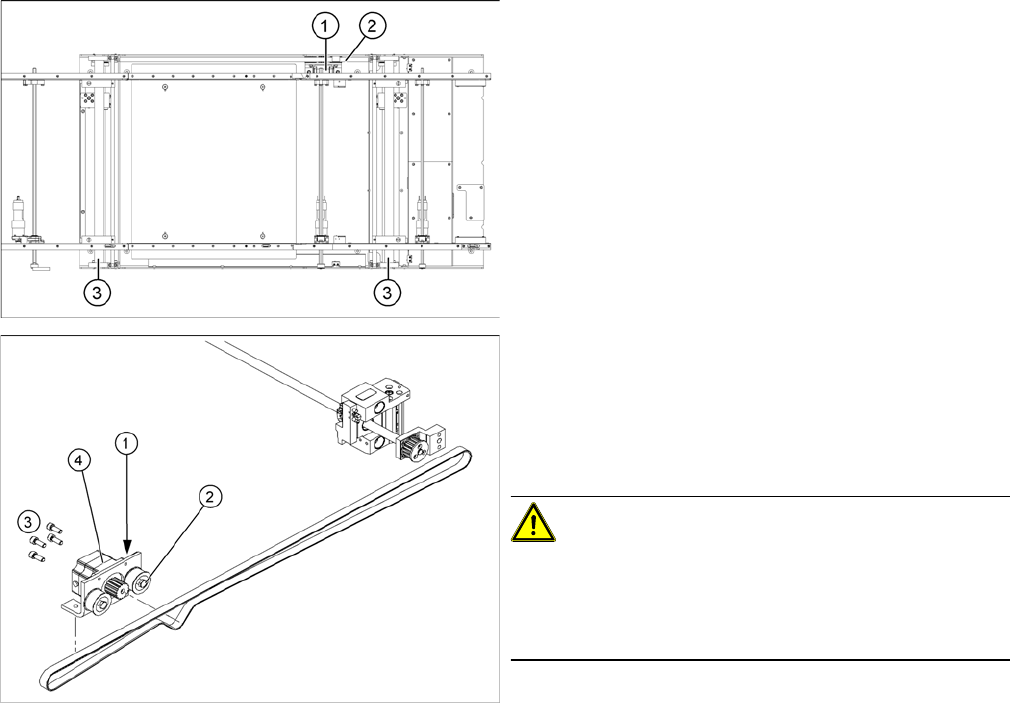
Overview
Legend
1. Width adjustment stepping motor
2. Toothed belt for the drive
3. Adjustment unit 1 and 2
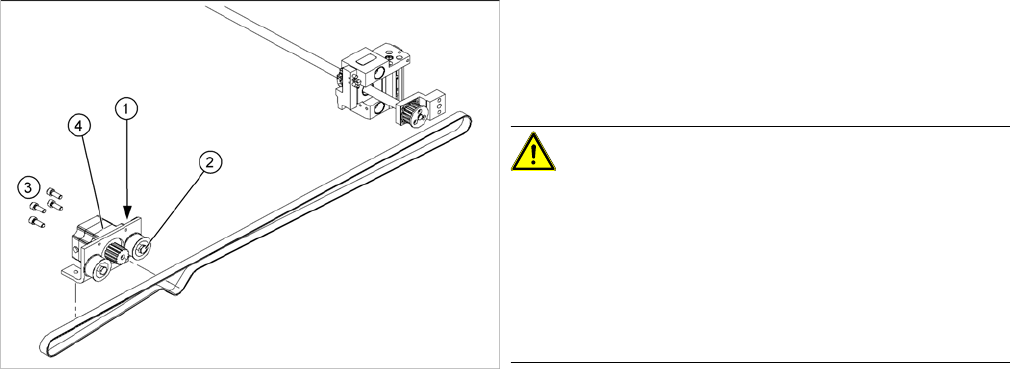
Legend
1. Loosening the eccentric axle on the deflection pulley
2. Locknut on the eccentric axle
3. Fastening screws for stepping motor
4. Stepping motor [00367174-xx]
CAUTION!
Do not damage the toothed belt!
During the following removal and installation of the motor,
the toothed belt for the width adjustment drive must not
be stretched or kinked!
► Move the PCB conveyor to the position which gives
you best access to the stepping motor of the width
adjustment system.
► Move the Y gantries into the area outside the PCB
conveyor.
► Switch off the machine and secure it to prevent unau-
thorized reactivation.
Service Work
PCB conveyor system 4.3.10 Replacing the Stepping Motor of the Width Adjustment System [00367174]
102 Service Manual SIPLACE D1/D1i/D2/D2i
Removal/Installation
See also
6.7.1 Setting the Tension of the Conveyor Toothed Belt and the Width Adjustment Unit [ ➙ 261]
► Loosen the screws fastening the lifting table plate and
remove the lifting table plate from the lifting table unit.
► Loosen the eccentric axle (1) on the deflection pulley
and relieve the tension on the drive toothed belt (5).
CAUTION!
Parallelism of conveyor side: Toothed belt must not come
off!
When relaxing the toothed belt, make sure the belt does
not come off (skip) the toothed disks at the 2 adjustment
units. This would cause incorrect alignment of the adjust-
ment units. Secure these positions with a suitable tool
(screw clamp etc.)
► Remove the 4 fastening screws (3) and then lift out
the stepping motor (4).
► Unplug the connection cable in the cable duct.
► Fit the new stepping motor and reconnect the system
to the electrical system.
► Tension the drive toothed belt.
► Position the measuring point of the belt tension de-
vice at the strand center (i.e. the longest distance be-
tween two toothed disks) of the conveyor toothed
belt.
► Adjust the tension of the drive toothed belt.
Service Work
4.3.11 Replacing the Limit Switch for the End Position Width Adjustment System [00316831-xx] PCB conveyor system
Service Manual SIPLACE D1/D1i/D2/D2i 103
4.3.11
4.3.11 Replacing the Limit Switch for the End Position Width Adjustment System [00316831-xx]
Replacing the Limit Switch for the End Position Width Adjustment System [00316831-
xx]
Overview
Parts
▪ Limit switch on the assembly tub
▪ Limit switch for width adjustment 1
▪ Limit switch for width adjustment 2
▪ Limit switch for width adjustment - at the conveyor
edge
The microswitch [00316831-xx] is used for all limit switch-
es.
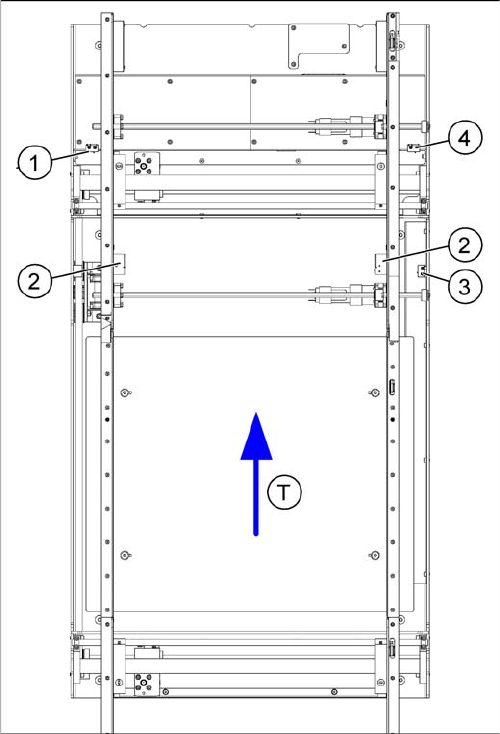
Legend
1. Limit switch 1 for width adjustment system of the ad-
justment unit
2. Limit switch for width adjustment system (for side)
3. Limit switch for assembly tub (for side)
4. Limit switch 2 for width adjustment system of the ad-
justment unit
▪ T = transport direction
Limit switch in placement area:
There are 2 limit switches below the conveyor sides, in
the placement area. The limit switch is designed to pre-
vent the conveyor edges hitting one another or the con-
veyor base.
Limit switch on the output conveyor:
In the vicinity of the output conveyors, you will find two
limit switches for the adjustment unit. They serve to se-
cure the transport area and to initialize the adjustment
unit during width adjustment.