00195376-05_SM_D1_D1i_D2_D2i_EN.pdf - 第59页
Service Work 4.1.6 Computer Unit - Replacing Parts Electrical System Service Manual SIPLACE D1/D1i/D2/D2i 59 4.1.6 4 . 1 . 6 C o m p u t e r U n it - R e p la c in g P a r t s Computer Unit - Replacing Parts 4.1.7 4 . 1 …
Service Work
Electrical System 4.1.5 Replacing the Servo Card
58 Service Manual SIPLACE D1/D1i/D2/D2i
4.1.5
4.1.5 Replacing the Servo Card
Replacing the Servo Card
See also
4.5.8 Replacing the Servo Amplifier [00353446] [ ➙ 176]
4.1.5.1
4.1.5.1 Servo Card Positions for SIPLACE D1
Servo Card Positions for SIPLACE D1
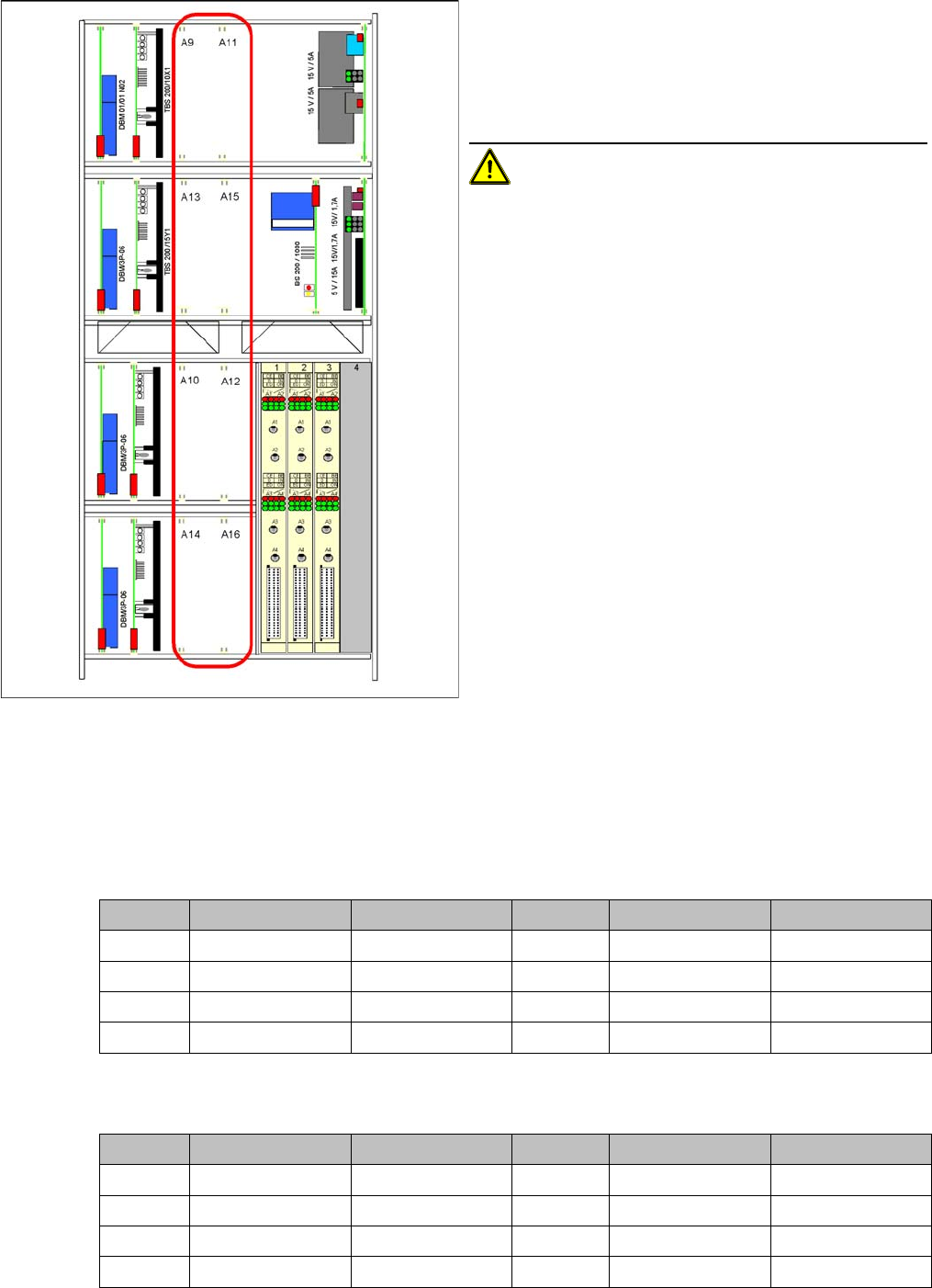
Servo cards for D1
4.1.5.2
4.1.5.2 Servo Card Positions for SIPLACE D2
Servo Card Positions for SIPLACE D2
Servo cards for D2
Servo cards in axis unit
Item numbers
▪ Servo board (servo amplifier) for Z axis of P&P head
[00353446-xx]
▪ Servo card for DP axis P&P head [00353447-xx]
Removal/Installation
CAUTION! The TBS servo cards may only be
used for the star axis of the DLM3 head.
► End all placement operations with the machine.
► Switch the placement system off at the main switch.
► Open the axis unit.
► Open the locking bracket and remove the required
servo card, by moving the release lever up and down.
► Insert the new servo card and push the assembly in
(you will feel a slight resistance) until it engages.
► Switch the machine on again.
C&P head P&P head C&P head P&P head
A9 -Z axisA11 Z axis -
A13 -DP axisA15 Star axis -
A10 --A12 --
A14 DP axis - A16 --
Gantry 1 C&P head Gantry 2 C&P head
A9 Star axis A11 Z axis
A13 - A15 -
A10 Star axis A12 Z axis
A14 DP axis (gantry 1) A16 DP axis (gantry 2)
Service Work
4.1.6 Computer Unit - Replacing Parts Electrical System
Service Manual SIPLACE D1/D1i/D2/D2i 59
4.1.6
4.1.6 Computer Unit - Replacing Parts
Computer Unit - Replacing Parts
4.1.7
4.1.7 CAN Bus Terminator Board for Changeover Table [03046863-xx]
CAN Bus Terminator Board for Changeover Table [03046863-xx]
Removal/Installation
Jumper setting for CAN terminator circuit
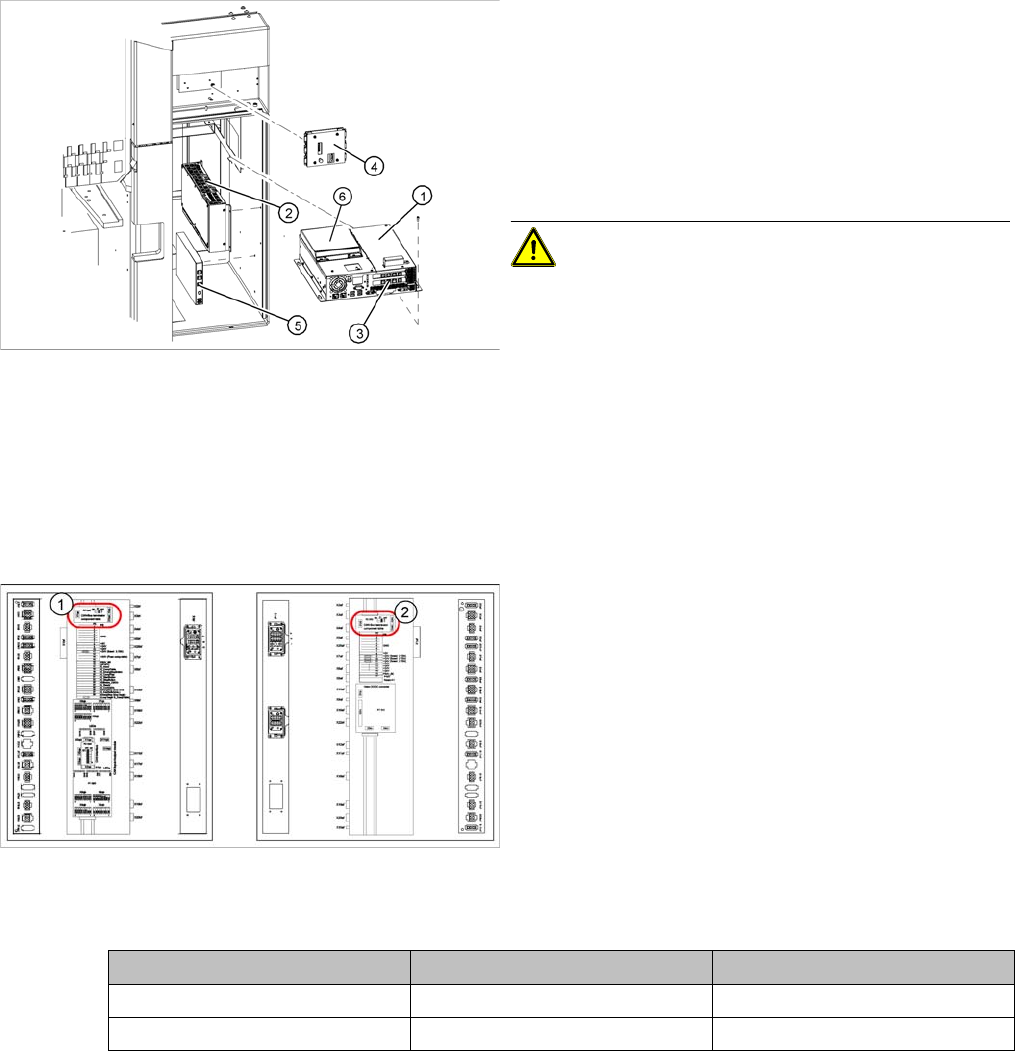
Legend
1. Station computer (Box PC) [03032341-xx]
2. Machine Controller (Micro Box PC) [03047697-xx]
3. Hotlink interface [03032343-xx]
4. Video multicoupler [03040316-xx]
5. USB hub 2.0 [03032344-xx]
6. Portable USB DVD/CD drive [03051205-xx]
CAUTION! If necessary, perform data backup
before replacing any parts.
► Detach all connections to the relevant part and label
these for easier reconnection, later.
► Loosen any fixtures and remove the part.
► Fit the new part by following the above instructions in
reverse order and configure the part, where required.
Legend
1. CAN Bus terminator board - changeover table in main
distributor (transport direction to left)
2. CAN Bus terminator board - changeover table in sub-
distributor (transport direction to right)
► Detach all connections to the board to be replaced.
Label these for easier reconnection, later.
► Remove the board.
► Fit the new board and reestablish all connections.
► Set the jumper on the board according to the relevant
sector, as shown in the following table:
Jumper Subdistributor Main distributor
1ONOFF
2ONON
Service Work
Electrical System 4.1.8 Replacing the CAN Interface Board [03032346-xx]
60 Service Manual SIPLACE D1/D1i/D2/D2i
4.1.8
4.1.8 Replacing the CAN Interface Board [03032346-xx]
Replacing the CAN Interface Board [03032346-xx]
Removal/Installation
4.1.9
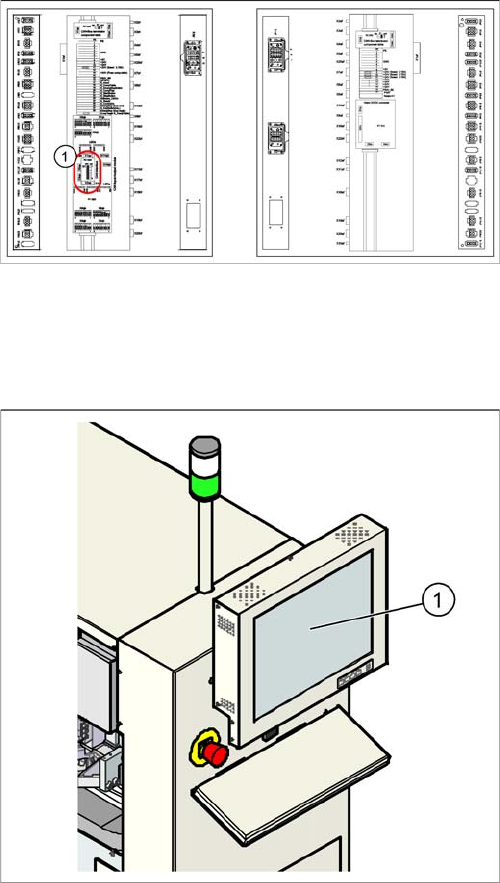
4.1.9 Replacing the Monitor 1/2 [03040876-xx]
Replacing the Monitor 1/2 [03040876-xx]
Removal/Installation
Legend
1. CAN interface board in main distributor
► Switch off the machine.
► Open the main distributor.
► Unscrew the board and unplug all connections. Label
these for easier reconnection, later.
► Remove the board.
► Insert the new board and reestablish all connections.
► Unplug the connections (24 V voltage supply, video,
USB).
► Unscrew the old monitor (1) and fit the new monitor.
► Calibrate the touchscreen function of the new moni-
tor.