PT200中级培训.pdf - 第22页
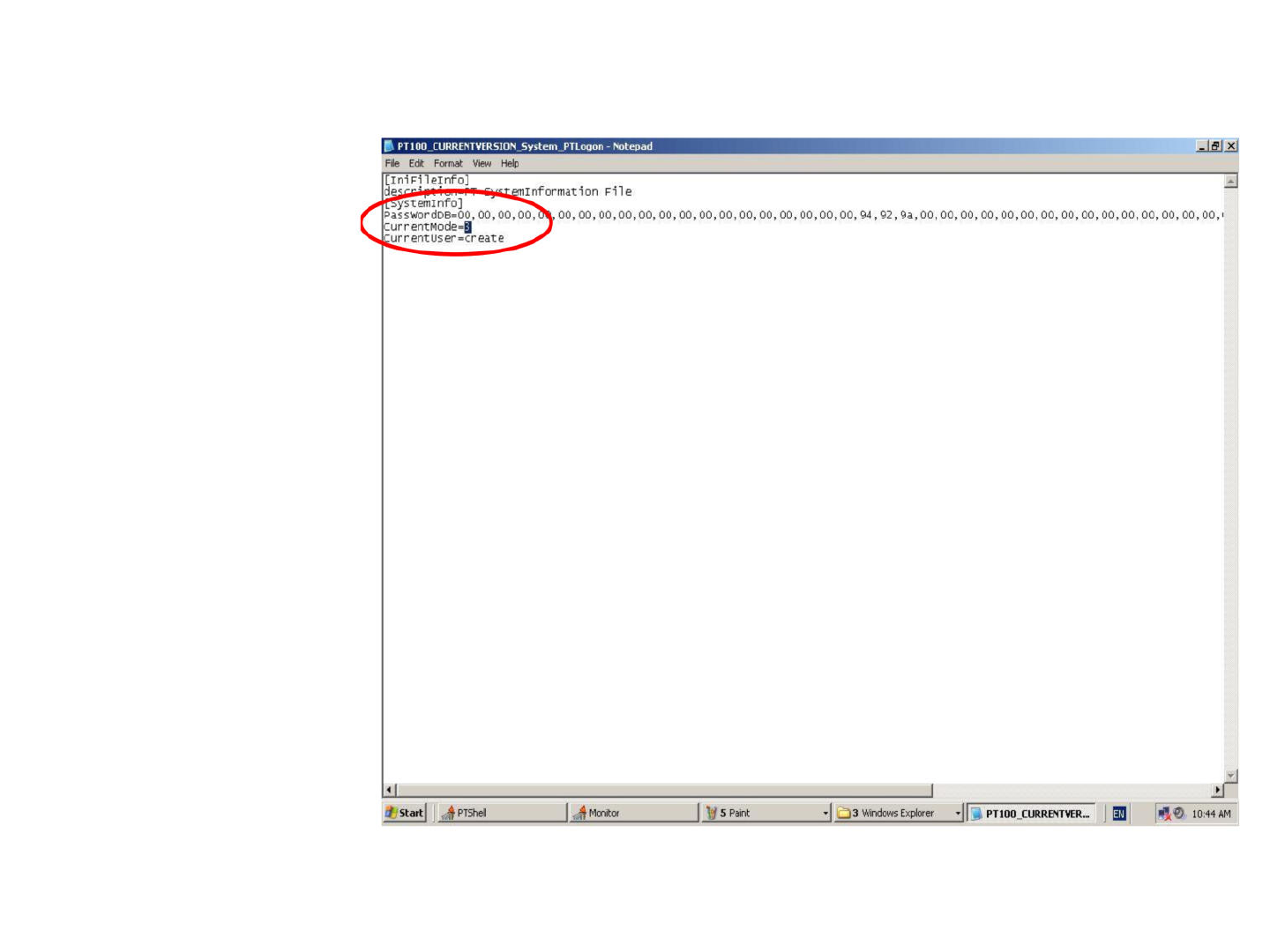
1 将 1 处原来的 2 改为 3 即可设置成工程师模 式了 注意:重启后此模 式将不再存在,如 需要,可重新设置 B PT 1 00_CURRENTVERSION_System_PTLogon - Notepad File Edit Format View Help xl iminformation File T?yst eminfo] PassWordDB=00, 00, 00, 00,、 00, 00, 00, 00, 00, 0…
二、PT200的一些基本参数设置
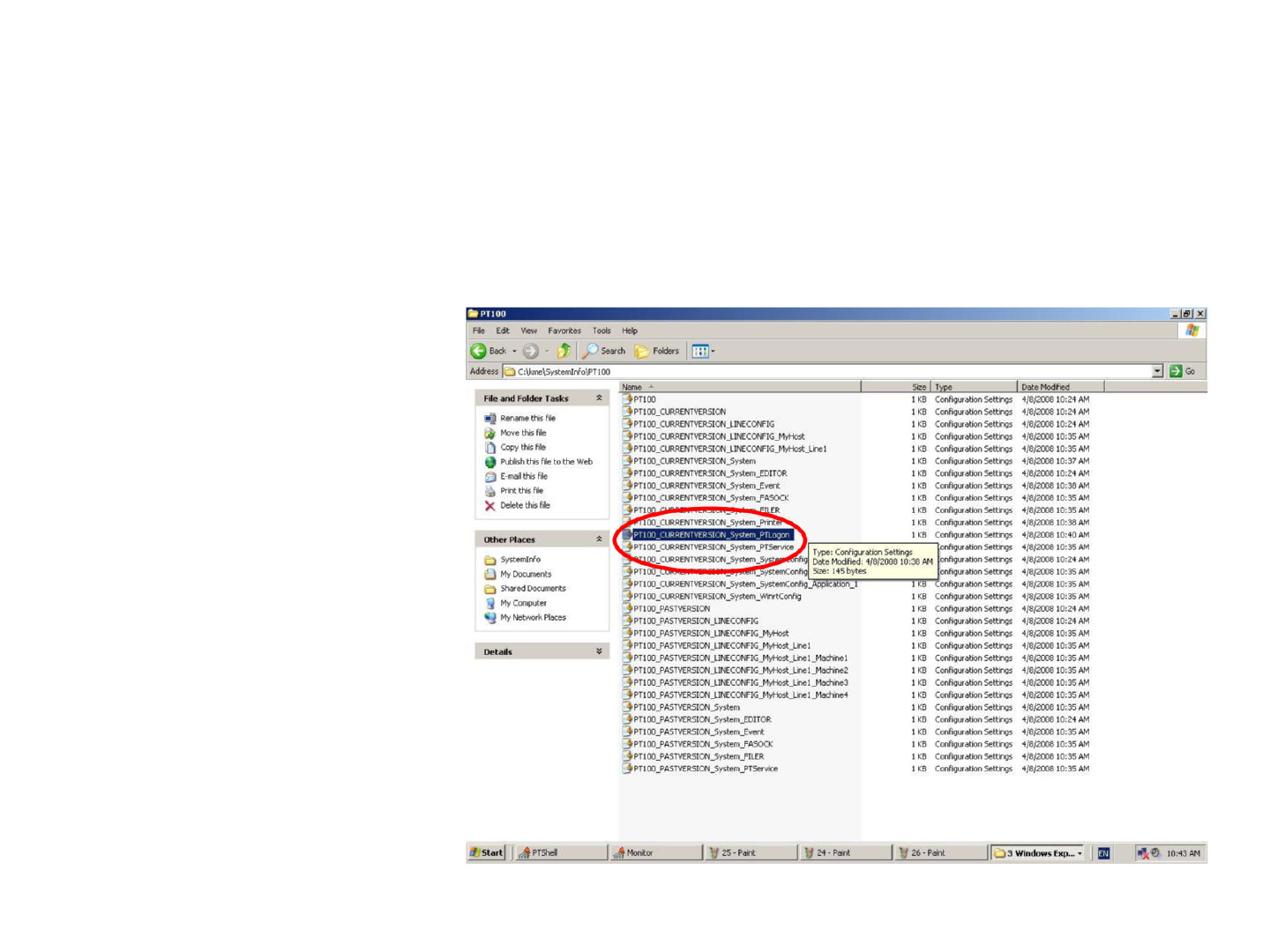
1.工程师权限的设置
打开C盘下KME文件夹中的SystemInfo,再打开PT100文件夹,打开
如图所示的文件即可。
打开1处
1
Size
Type
Type:
Configuration
Settings
E
Date
Modified:
4/8/2008
10:38
AM
onfiguration
Settings
J>PT100j
Size:
145
bytes
rSystemConfig
PT1
00_CURRENTVERSION_System_PTLogon
1
KB
1
KB
1
KB
1
KB
1
KB
1
KB
1KB
1
KB
1
KB
1
KB
1
KB
1
KB
>
PT1
00_CURRENTVERSION_System_PTService
^jjLLQO_CURRENTVERSION_Sysl:em_Systai^
onfiguration
Settings
Configuration
Settings
Configuration
Settings
Configuration
Settings
Configuration
Settings
Configuration
Settings
Configuration
Settings
Configuration
Settings
Configuration
Settings
Configuration
Settings
Configuration
Settings
Configuration
Settings
Configuration
Settings
Configuration
Settings
Configuration
Settings
Configuration
Settings
Configuration
Settings
Configuration
Settings
Configuration
Settings
Configuration
Settings
Configuration
Settings
Configuration
Settings
Configuration
Settings
Configuration
Settings
Configuration
Settings
Configuration
Settings
Configuration
Settings
Configuration
Settings
Configuration
Settings
onfiguration
Settings
Date
Modified
4/8/2008
10:24
AM
4/8/2008
10:24
AM
4/8/2008
10:24
AM
4/8/2008
10:35
AM
4/8/2008
10:35
AM
4/8/2008
10:37
AM
4/8/2008
10:24
AM
4/8/2008
10:38
AM
4/8/2008
10:35
AM
4/8/2008
10:35
AM
4/8/2008
10:38
AM
4/8/2008
10:40
AM
4/8/2008
10:35
AM
4/8/2008
10:24
AM
4/8/2008
10:35
AM
4/8/2008
10:35
AM
4/8/2008
10:35
AM
4/8/2008
10:24
AM
4/8/2008
10:24
AM
4/8/2008
10:35
AM
4/8/2008
10:35
AM
4/8/2008
10:35
AM
4/8/2008
10:35
AM
4/8/2008
10:35
AM
4/8/2008
10:35
AM
4/8/2008
10:35
AM
4/8/2008
10:24
AM
4/8/2008
10:35
AM
4/8/2008
10:35
AM
4/8/2008
10:35
AM
4/8/2008
10:35
AM
Name
^PTICIO
3
PT1
00_CURRENTVERSION
3
PT1
00_CURRENTVERSION_LINECONFIG
号
PT
1
00_CURRENTVERSION_LINECONFIG_MyHost
J>
PT1
00_CURRENTVERSION_LINECONFIG_MyHost_Linel
3
PT1
00_CURRENTVER5ION_5ysl:em
』
PT1
00_CURRENTVER5ION_System_EDITOR
?
PT1
00_CURRENTVER5ION_System_Event
3
PT1
00_CURRENTVERSION_System_FASOCK
J^!o^URRENTVERSION_System_Printe^^
»
PT1
00_CURRENTVERSION_System_SystemConfig_AppIicatiofri
1
KB
PT1
00_CURRENTVERSION_System_WinrtConfig
1
KB
PT
100_P
AST
VERSION
1
KB
3
PT1
00_PA5TVER5ION_LINECONFIG
1
KB
_>
PT1
00_PA5TVERSION_LINECONFIG_MyHost
1
KB
J
PT1
00_PASTVERSION_LINECONFIG_MyHost_Line
1 1
KB
3
PT1
00_PASTVER8ION_LINECONFIG_MyHost_Line
l_Machinel
1
KB
3
PT1
00_PA5TVER8ION_LINECONFIG_MyHost_Line
l_Machine2
1KB
3
PT1
00_PASTVERSION_LINECONFIG_MyHost_Une
l_Machine3
1
KB
多
PT1
00_PASTVERSION_LINECONFIG_MyHost_Line
l_Machine4
1
KB
PT1
00_PASTVERSION_5ystem
1
KB
PTl
00_PASTVERSION_System_EDITOR
1
KB
J>
PTl
00_PASTVERSION_System_Event
1
KB
3
PTl
00_PASTVERSION_System_FA5OCK
1
KB
3
PTl
00_PASTVERSION_System_FILER
1
KB
$
PTl
00_PASTVERSION_System_PTService
1
KB
Other
Places
Systeminfo
My
Documents
Shared
Documents
My
Computer
My
Network
Places
,
Start]
.僚
PTShell
|
i
•寻
Monitor
V
25
-
Paint
U
24
-Paint
|
26
-Paint
1
1
J
3
Windows
Exp...
1
副|
咬⑥
10:43
AM
Details
File
and
Folder
Tasks
剪
Rename
this
file
$
Move
this
file
Copy
this
file
Publish
this
file
to
the
Web
_j
E-mail
this
file
3
Print
this
file
V
Delete
this
file
a
o
1
将1处原来的2改为3
即可设置成工程师模
式了
注意:重启后此模
式将不再存在,如
需要,可重新设置
B
PT
1
00_CURRENTVERSION_System_PTLogon
-
Notepad
File
Edit
Format
View
Help
xl
iminformation
File
T?yst
eminfo]
PassWordDB=00,
00,00,
00,、
00,00,00,00, 00,00,00,00, 00,00,00,00, 00,00,00,
94,92,9a,
00,
00,00,00,00, 00,00,00,00, 00,00,00,00, 00,00,
।
currentMode=3
J
cur
rent
us
er
=cr
eate
[iniFileinfo]
7
二
rr'
—
i
「
陷
Monitor
V
5
Paint
/
Start
|
脩
PTShell
|
I
二
3
Windows
Explorer
寸
巧
PT
100
一
CURRENT
VER
一
泉
...
副
残⑦
10:44
AM
2. Line的设置
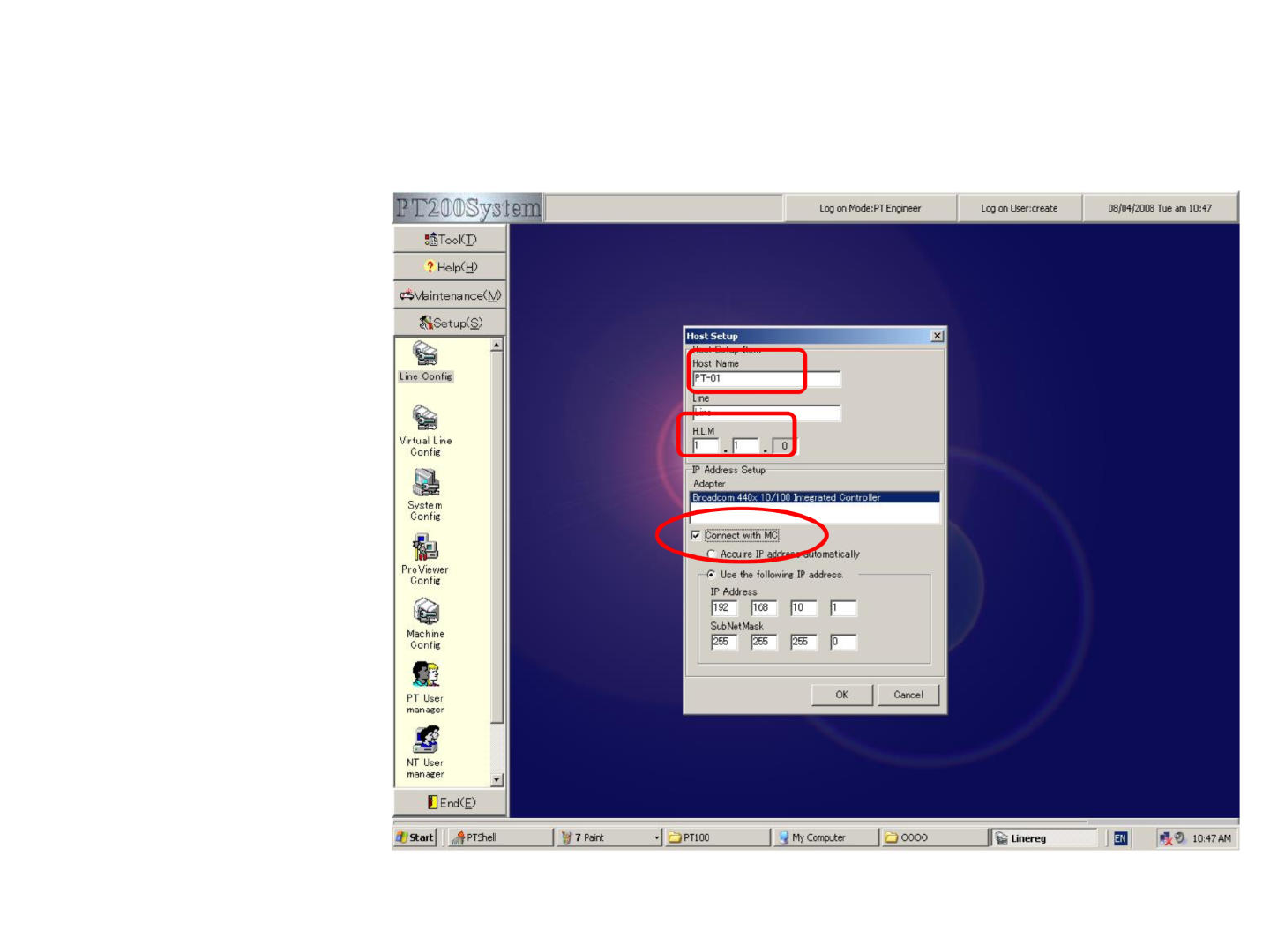
点击PT200菜单中的setup,打开Line Config,进行如下设置。
1处Host Name必须与我
们前面设的电脑名一致
2处line名可自行设置
3处勾选表示其IP地址可
自动连接到我们前面所
设置的IP地址
1
2
3