00197962-01_2nd_HMI_and_Tower_Light_en - 第37页
Installing the 2 Tower Light Kit or the 3 Tower Light Kit Tools Required Assembly Instructions SIPLACE E 37 3 3 I n s t a llin g t h e 2 T o w e r L ig h t K it o r t h e 3 T o w e r L ig h t K it Installing the 2 Tower …
Installing a Second Human Machine Interface
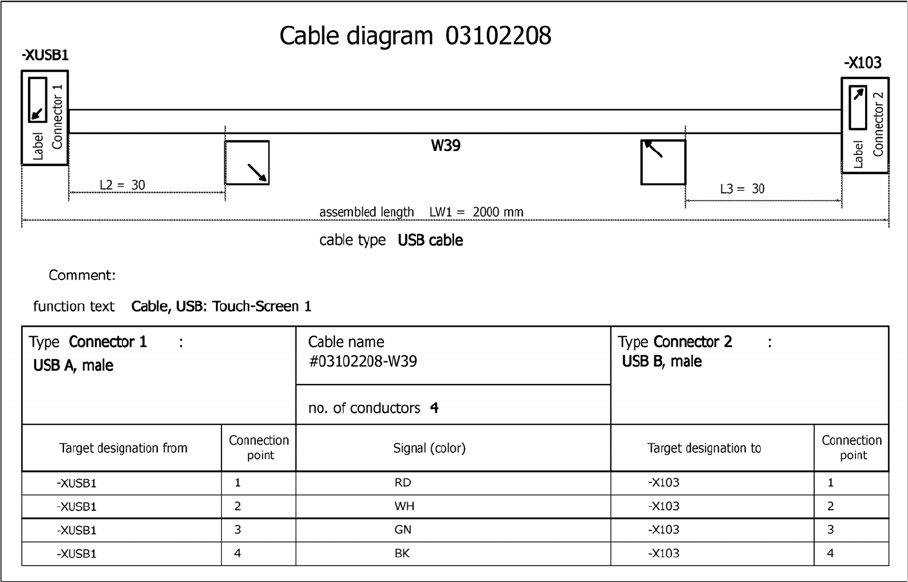
Circuit Diagrams for the 2nd HMI Installation Kit 2.6.8 Cable, USB: Touch Screen 1/2
36 Assembly Instructions SIPLACE E
2.6.8
2.6.8 Cable, USB: Touch Screen 1/2
Cable, USB: Touch Screen 1/2
Cable, USB: touch screen 1/2, 03102208-010102FX3
Installing the 2 Tower Light Kit or the 3 Tower Light Kit
Tools Required
Assembly Instructions SIPLACE E 37
3
3 Installing the 2 Tower Light Kit or the 3 Tower Light Kit
Installing the 2 Tower Light Kit or the 3 Tower Light
Kit
This section describes how to replace the standard (one) tower light kit in SIPLACE E series machines
with the 2 tower light option or the 3 tower light option.
3.1
3.1 Tools Required
Tools Required
▪ Phillips M4 screwdriver
3.2
3.2 Parts
Parts
2 Tower Light kit [03110193-xx] for SIPLACE E series
3 Tower Light kit [03102106-xx] for SIPLACE E series
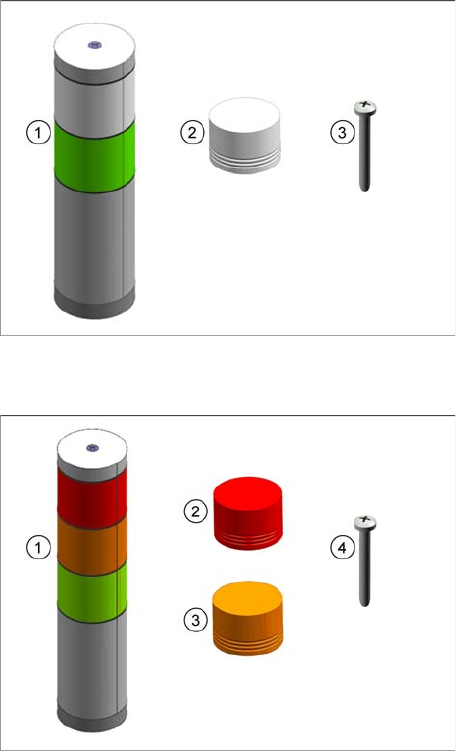
The installation kit consists of the following parts:
▪ (1) 2 Tower Light Kit [03110193-xx]
– (2) LED module (Clear) [03117710-xx]
– (3) Pan Head screw M4x75 (Patlite)
[03117711-xx]
The installation kit consists of the following parts:
▪ (1) 3 Tower Light kit [03102106-xx]
– (2) LED module (Red) [03117716-xx]
– (3) LED module (Amber) [03117717-xx]
– (4) Pan Head screw M4x105 (Patlite)
[03117715-xx]
Installing the 2 Tower Light Kit or the 3 Tower Light Kit
Installing the 2 Tower Light or 3 Tower Light Kits
38 Assembly Instructions SIPLACE E
3.3
3.3 Installing the 2 Tower Light or 3 Tower Light Kits
Installing the 2 Tower Light or 3 Tower Light Kits
Step 1:
► Ensure that the machine is in power-off state.
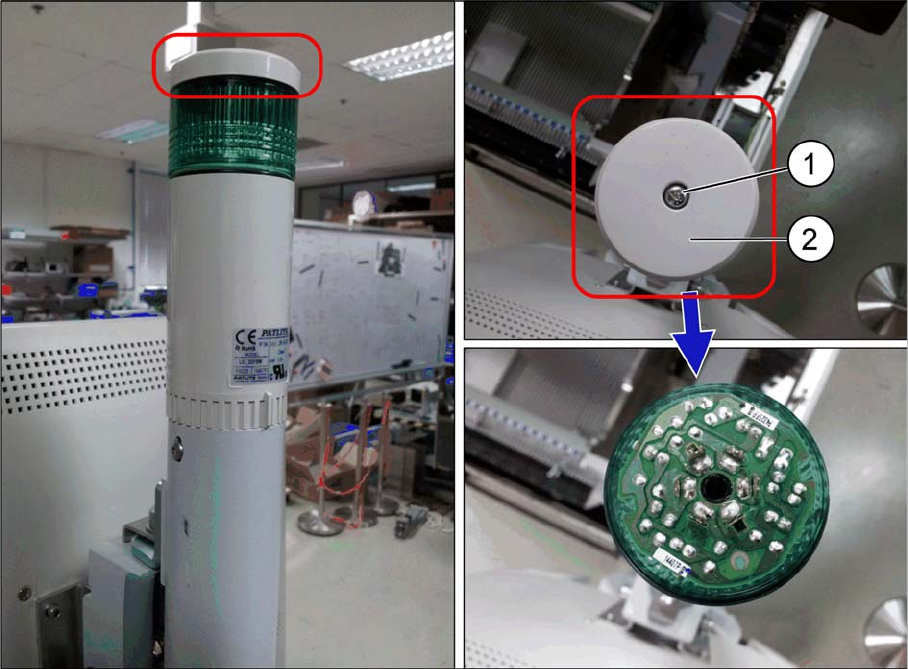
► Remove the M4x45 pan head screw (1) and the cover (2) on the top of the tower light.