00197447-01_AI_Innenraumbeleuchtung_X-Serie_S_de_en - 第40页
Installation Final Wo rk 40 Inner Illumination Innenraumbeleuchtu ng
Installation
Final Work
Inner Illumination Innenraumbeleuchtung 39
3.3
3.3 Final Work
Final Work
► Switch on the machine
► Move the component trolley into the machine.
► Close the cover.
Activating/Deactivating the light bar
The light bar is switched on and off via the station software. You can choose between two options: having
the light bar always switched on as long as the machine is not in production mode or switching the light
bar explicitly on when work has to be carried out in the machine.
For both options, proceed as follows:
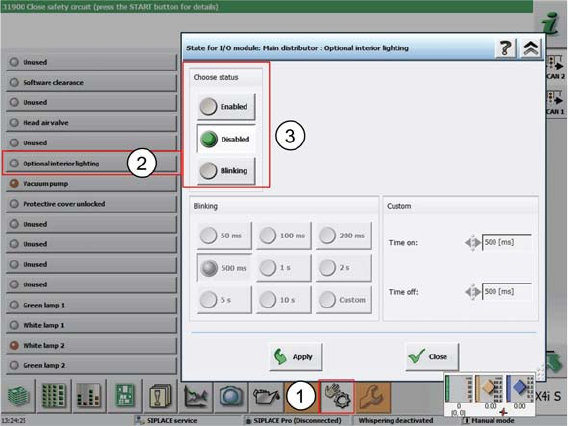
► In the stations software, select Manual operations (1).
► Select the individual function Optional interior lighting (2).
⇨ The dialog box for activating and deactivating the interior lighting (3) opens.
► In the Choose status field, select Enabled to activate the interior lighting.
⇨ The interior lighting will be switched on as long as the machine is not in production mode.
- or -
► Select Disabled.
⇨ The interior lighting will not be switched on at all.
► Confirm with Apply.
► If the light bar does not function as expected, check the cable connections and make sure that the
wiring is correct.
Installation
Final Work
40 Inner Illumination Innenraumbeleuchtung
acpage