00900057-02_IM_Performance_Monitor_2.1_EN.pdf - 第47页
ASM Performance Monitor 2.1 / Installation Manual 01/2021 Edition 47 6.4.2 AOI XML File Structure For the ASM Performance Monitor to be able to interpret data comin g from AOI machines, the AOI data must be delivered in …
ASM Performance Monitor 2.1 / Installation Manual 01/2021 Edition
46
6.4.1 Configuring AOI machine in SIPLACE Pro
Configure AOI machines in SIPLACE Pro as follows:
► Create an AOI Device as a Generic Line Device.
► Add the AOI Device to a line.
For SIPLACE Pro versions < 15.1, custom properties must be defined to identify the AOI machine.
For SIPLACE Pro versions ≥ 15.1, it is possible to use the corresponding object properties instead
of custom properties.
If you need to configure custom properties, proceed as follows:
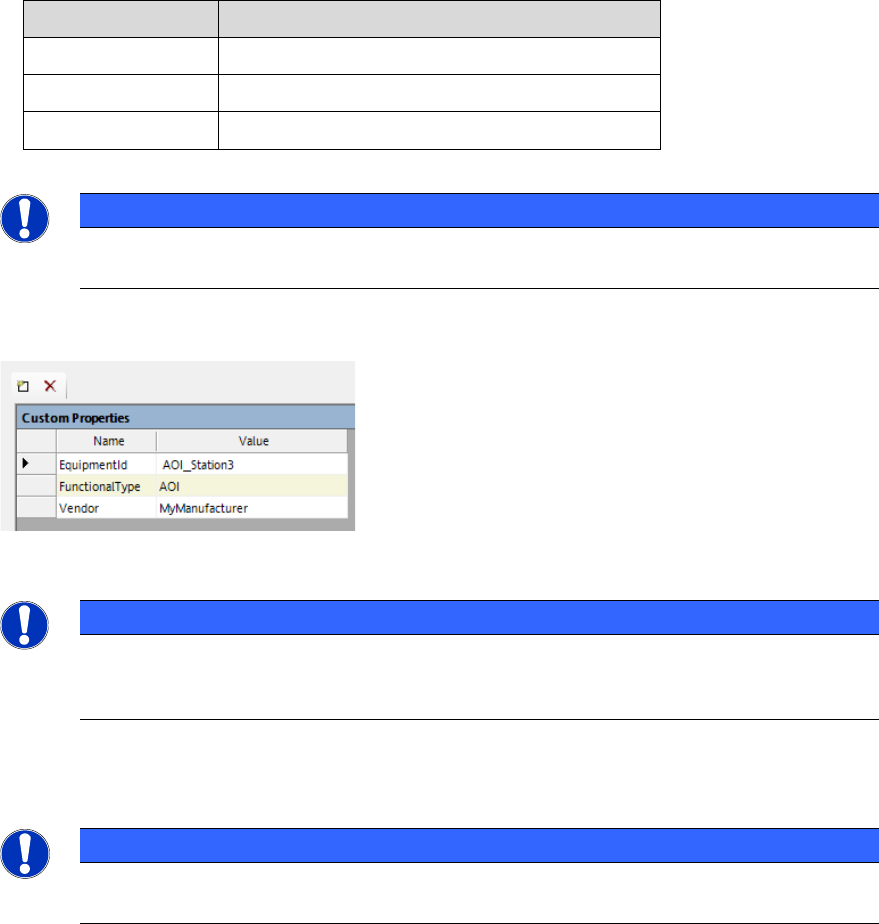
► In the Custom Properties of the AOI Device, add the following elements:
Name
Value
EquipmentID
Enter the EquipmentID of the AOI machine.
FunctionalType
Enter the functional type, e.g. AOI / AXI.
Vendor
Enter the AOI vendor.
Table 6-1: Custom Properties for AOI Device
NOTICE
The custom properties are case sensitive. Make sure to write the elements exactly as
they are given here.
Example:
Figure 6-2: Custom Properties example
NOTICE
The EquipmentID serves as a link between the SIPLACE Pro line and the AOI file.
Therefore, the EquipmentID in the Custom Properties or object properties and in the
AOI XML file need to be identical.
► Check if all line stations (including AOI machines) are listed in the OIB Factory Layout.
NOTICE
Any changes to the AOI machine in SIPLACE Pro or in the Factory Layout require a new
download as well as a restart of the AOI Adapter and APM Live Server.

ASM Performance Monitor 2.1 / Installation Manual 01/2021 Edition
47
6.4.2 AOI XML File Structure
For the ASM Performance Monitor to be able to interpret data coming from AOI machines, the AOI
data must be delivered in a form that can be interpreted by the AOI Adapter.
The following example shows the minimum attributes that must be provided:
<?xml version="1.0" encoding="utf-8"?>
<unitData xmlns:xsi="http://www.w3.org/2001/XMLSchema-instance"
xmlns:xsd="http://www.w3.org/2001/XMLSchema"
xmlns:notused="http://Asm.As.Apm.AOIAdapter/ImportFile"
equipmentClass="AOI"
starttime="2018-11-08T11:29:07" endtime="2018-11-08T11:29:47"
unit="S_2018_045726"
state="nok">
<processingParameters>
<parameter name="program" value="03126543-01_S" />
<parameter name="stationName" value="SQSNS3138" />
<parameter name="equipmentId" value="AOI13" />
<parameter name="orderNumber" value="276706" />
<parameter name="NOKComponentCount" value="100" />
<parameter name="TotalComponentCount" value="1140" />
</processingParameters>
<!-- Note: The subUnitData is required when panel counting is active -->
<subUnitData position="1" positionType="sequence" starttime="2015-09-
09T12:09:08+00:00" endtime="2015-09-09T12:09:10+00:00" state="nok"/>
<subUnitData position="2" positionType="sequence" starttime="2015-09-
09T12:09:09+00:00" endtime="2015-09-09T12:09:12+00:00" state="ok"/>
<subUnitData position="3" positionType="sequence" starttime="2015-09-
09T12:09:08+00:00" endtime="2015-09-09T12:09:10+00:00" state="inkout"/>
</unitData>
Explanation
ASPM Performance Monitor is using the Microsoft .NET Framework method
DateTimeOffset.TryParse() to obtain time values. Every time format accepted by this method is
supported. However, it is recommended to use the format “YYYY-MM-DDThh:mm:ss+00:00”.
Example: 2020-20-01T06:29:07-01:00 (the time zone here being UTC-1, CET time)
For the <unitData> tag, the value of the equipmentClass attribute must be identical to the value in
the file name.
– AOI: For optical inspection systems
– AXI: For X-Ray inspection systems
– AOXI: For combined optical and X-Ray inspection systems
– Classification: For classification stations
ASM Performance Monitor 2.1 / Installation Manual 01/2021 Edition
48
The <unitData> main tag contains a <processingParameters> subtag. The
<processingParameters> tag itself contains additional <paremeter> tags with name value pairs
with specific SPM information. The following <parameter> tags are included additionally:
– <parameter name="sequenceNumber" value="..."/>
The value contains an integer number with a unique sequence number. The number will be
increased by 1 for each new result file. The range is from 0 to 4294967296. If a counter overrun
occurs the counting will start again from 0.
– <parameter name="stationName" value="..."/>
The value contains a fixed character string read from the Windows registry of the system. This
is used to identify the system.
– <parameter name="equipmentId" value="..."/>
The value contains a fixed character string read from the Windows registry of the system. The
value must be unique among all the equipment.
– <parameter name="orderNumber" value="..."/>
The value contains a character string identifying the order number of the current production
order. The value is set during the inspection process.
– <parameter name="NOKComponentCount" value="..."/>
The value contains an integer number with the count of the failed components on the current
board.
– <parameter name="TotalComponentCount" value="..."/>
The value contains an integer number with the total count of components on the current board.
6.5 User Administration
When ASM Performance Monitor is installed, the required user roles are automatically created in
the User Manager.
The following user roles apply for ASM Performance Monitor:
– Performance Monitor Administrator
person who can modify system and parameter settings for ASM Performance Monitor.
This user has all the permissions to change anything in APM.
– Performance Monitor Supervisor
person who can modify parameter settings e.g. KPI targets, component costs and line
configuration, but no system settings.
– APM User
role for email subscriptions for ASM Performance Monitor.