00900057-02_IM_Performance_Monitor_2.1_EN.pdf - 第6页
ASM Performance Monitor 2.1 / Installation Manual 01/2021 Edition 6 1.3 Licenses The required licenses to be applied when using ASM Performan ce Monitor are listed in the following table: License License module Requireme…
ASM Performance Monitor 2.1 / Installation Manual 01/2021 Edition
5
1 Brief Description
ASM Performance Monitor 2.1 monitors the SMT lines and displays real time and historical data in
various forms that can be used to monitor, troubleshoot and optimize SMT production.
This installation manual provides instructions on installation and licensing of the ASM Performance
Monitor 2.1. It contains information on the scope of delivery and requirements for a successful
installation.
1.1 Scope of Delivery
● ASM Performance Monitor Basic License V2.x, item no. [00117502-xx] contains:
1 ASM Performance Monitor Server License (without connection to the SIPLACE stations)
● 1 CD Media Package ASM Performance Monitor V2.x item no. [00117501-02] containing:
– ASM Performance Monitor Med.Paket V2.x item no. [00117501-02]
– ASM Performance Monitor V2.1 item no. [00711501-02]
– Installation Manual ASM Performance Monitor 2.1 English, item no. [00900057-xx]
Additionally, the software belonging to R18-1 is available on the ASM Software Collection USB
Medium R18-1, item no. [00117883-xx], but please make sure to use the latest hotfixes /
servicepacks of the software. This USB stick contains all basic product packages of R18-1. The
following ASM products are relevant for ASM Performance Monitor:
– ASM Support Media
– ASM OIB
– ASM OIS
1.2 Languages
The setup dialogs, Installation Manual, Online Help and User Guide are available in English only.
The user interface is available in the following languages:
– German
– English
– Simplified Chinese
ASM Performance Monitor 2.1 / Installation Manual 01/2021 Edition
6
1.3 Licenses
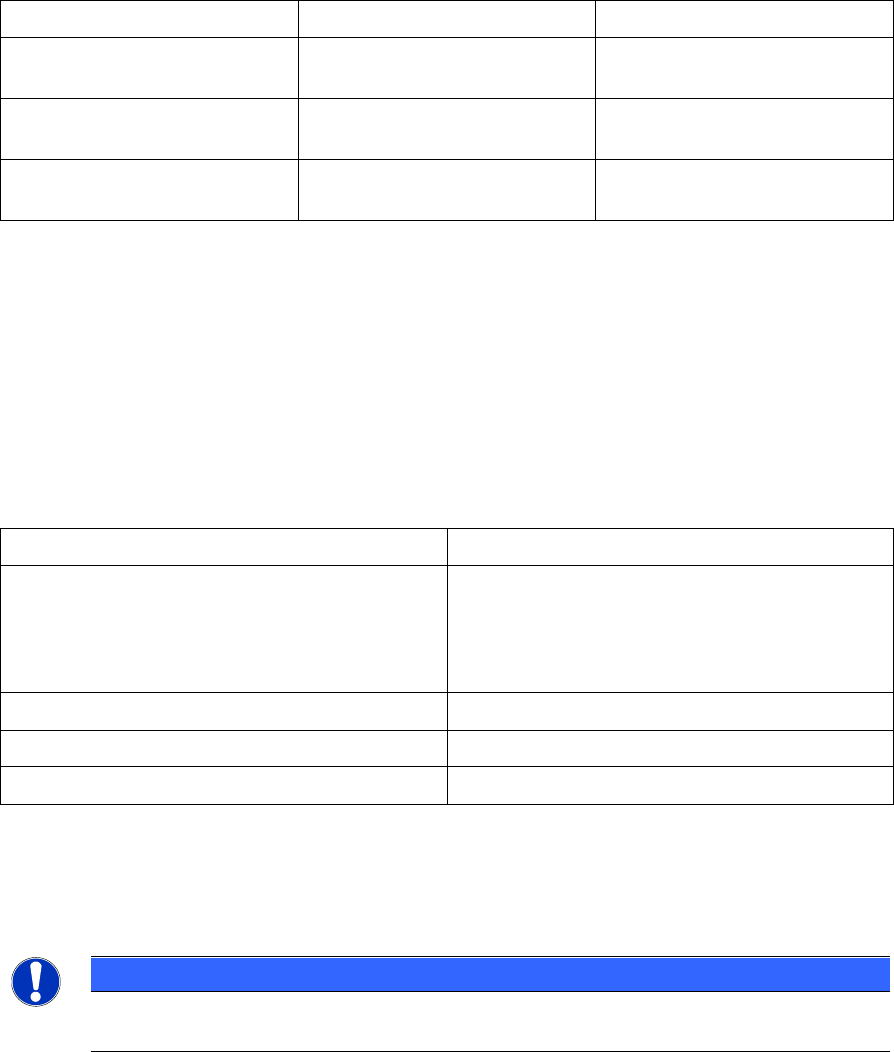
The required licenses to be applied when using ASM Performance Monitor are listed in the
following table:
License
License module
Requirement
ASM Performance Monitor
Server License
Performance Monitor Server
1 Factory license for all
deployment types
SIPLACE Placement Machine
License
Performance Monitor Machine
Connection - SIPLACE
1 Floating license per
SIPLACE placement machine
DEK Printer Machine License
Performance Monitor Machine
Connection - DEK
1 Floating license per DEK
printer machine
Table 1-1: Required licenses
The Factory license type is valid for the entire production run.
The Floating license type is fetched from a license server by the application and then released
again when the line monitoring is disabled.
1.4 Supported Hardware Components
The following machine types in combination with the listed station software version are supported:
Machine Type
Station Software Version
SIPLACE placement machines
Station software 7xx
Station software 6xx
Station software 5xx
Station software 4xx
E by SIPLACE placement machines
Station software ≥ 710.1 (Sirio platform)
DEK Printers
Station software V9 SP17
E by DEK placement machines
Station software V9 SP17
Table 1-2: Supported machine types and station software versions
For the ASM Performance Monitor to collect data, E by SIPLACE and E by DEK placement
machine must be configured in SIPLACE Pro and ASM OIS Deployment Environment.
Furthermore, DEK Printers and E by DEK placement machines must use Printer Programming.
NOTICE
For Station Software version < 710.1 (none-Sirio platforms) known issues and defects
are no longer fixed due to the station software versions being phased out.
ASM Performance Monitor 2.1 / Installation Manual 01/2021 Edition
7
2 Requirements
The following requirements must be met in order to be able to install ASM Performance Monitor:
– ASM Performance Monitor 2.1 is compatible to the ASM software products of R18-1.
NOTICE
System requirements
ASM Support Media checks the necessary system requirements of your system and
installs these. Amongst others, e.g. Microsoft .NET Framework, the ASM License
Manager, the ASM Error Reporter Service and the ASM Operation Manager.
The use of the ASM Support Media 2.7 (R18-1) is mandatory.
The system requirements (supported operating systems and database variants) and an
overview of the interoperable products can be found in the ASM Support Media 2.7
(R18-1) Software Version Description, item no. [00900052-xx].
– Windows administrative rights are required for all computers on which you are installing
ASM Performance Monitor.
– ASM OIS must have been installed on all line computers on which lines shall be monitored.
– ASM OIB must have been installed.
Preparing SQL server
– By default, ASM Support Media installs SQL Express editions only. The SQL Server Express
edition is not supported by ASM Performance Monitor.
► Therefore, install the SQL server edition (at least SQL Server Standard) manually instead
by following the steps described in the SQL installation documentation on ASM Support
Media, before using Prerequisite Analyzer for further preparation. We strongly recommend
that you follow the installation documentation on ASM Support Media, since it describes the
settings needed for ASM Line Software.
– The SQL server must be prepared with the SQL Server Integration Services (SSIS) feature.
WARNING
If you do not prepare the SQL server with the SSIS feature, the installation of
ASM Performance Monitor will fail.
► When preparing the SQL server, make sure the Integration Services option is activated in
the feature selection. The “scale out” sub-features of the integration services are not
required.
For further information, please refer to the Microsoft Support website on SQL Server Integration
Services, see https://docs.microsoft.com/en-us/sql/integration-services/install-windows/install-
integration-services. If problems should arise, please contact your system administrator.
– If you install the database on a remote computer, ASM Support Media must be executed on
this computer with the ASM Net – SQL Server Prerequisites – Apply ASM SQL settings
profile after the SQL server has been installed.