00900057-02_IM_Performance_Monitor_2.1_EN.pdf - 第9页
ASM Performance Monitor 2.1 / Installation Manual 01/2021 Edition 9 3 System Components and Configuration This chapter describes the system components of ASM Performa nce Monitor and a basic system configuration. 3.1 S y…
ASM Performance Monitor 2.1 / Installation Manual 01/2021 Edition
8
Database user accounts
– The APM_SSIS Windows user must be created before installing ASM Performance Monitor,
either as a “shadow account” on both the computer where ASM Performance Monitor is
installed and the SQL server (using the same password), or as a domain user.
– On the SQL server, the APM_SSIS database user must be associated with a database login
with sysadmin role assigned. Using BUILTIN\Administrators is not possible.
– During installation, the APM_SSIS user must be assigned the administrator role on the
computer where ASM Performance Monitor is installed. This can be changed after the
installation has been finished successfully.
– The APM_SSIS user needs the Log on as a service right on the computer where ASM
Performance Monitor is installed. For further information, please refer to the Microsoft Support
information for Windows security in Windows 10.
– On the Core Windows / SQL server, the APM_SSIS Windows user does not need any specific
rights and can be prepared as a “standard user”.
For further information on database users, please refer to section 4.14.2.
ASM Performance Monitor 2.1 / Installation Manual 01/2021 Edition
9
3 System Components and Configuration
This chapter describes the system components of ASM Performance Monitor and a basic system
configuration.
3.1 System Components Overview
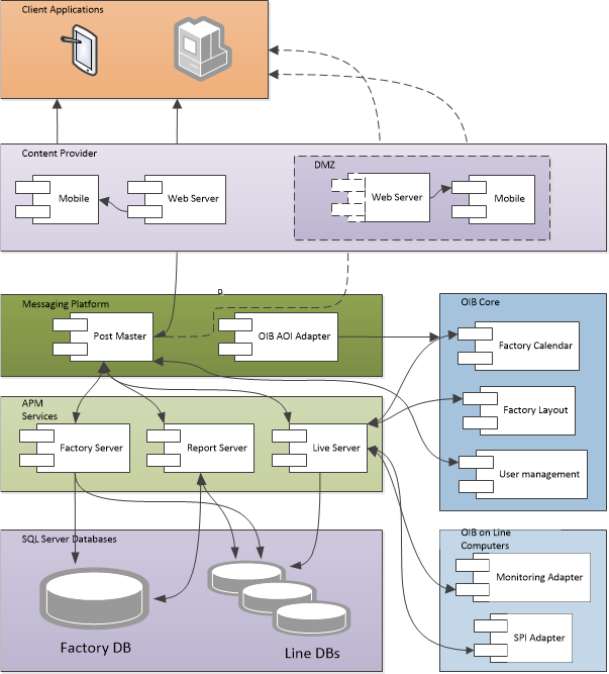
Figure 3-1: System Components - ASM Performance Monitor
ASM Performance Monitor 2.1 / Installation Manual 01/2021 Edition
10
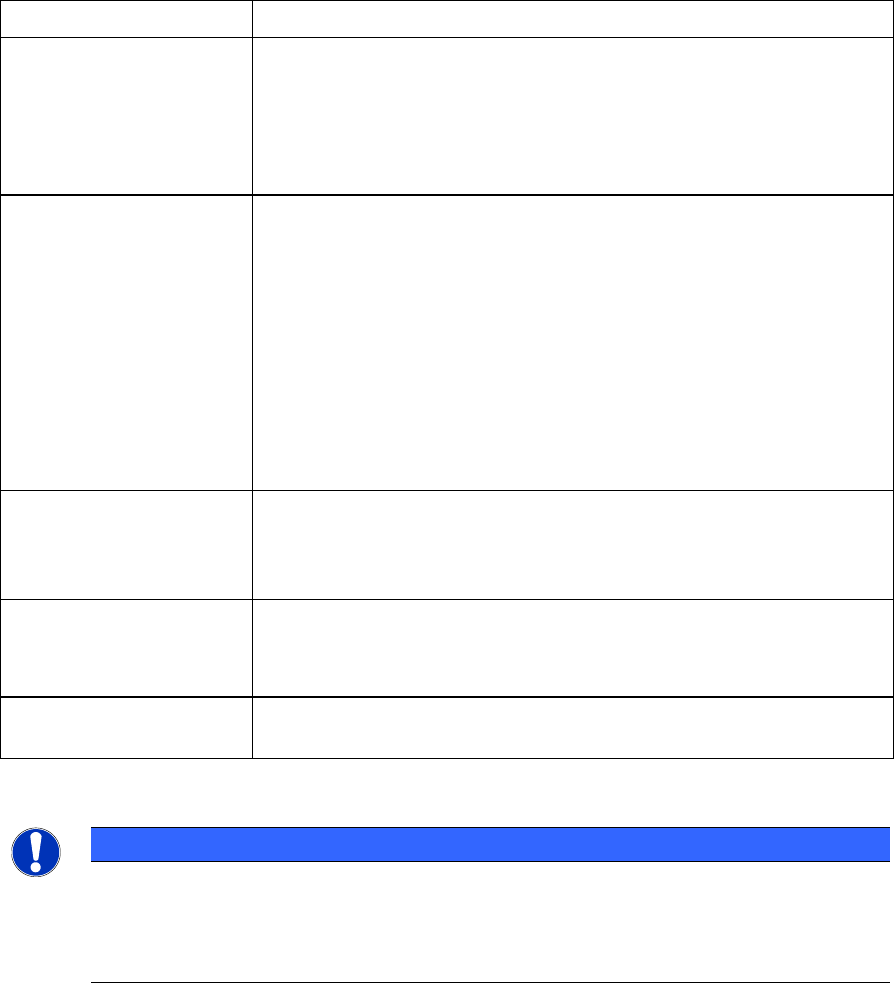
Components
Description
Client Applications:
Web Server
Consists of web services for providing the data for web and mobile
clients.
The Web Server can be additionally deployed in a DMZ (Demilitarized
Zone) to provide clients outside of the factory.
Services:
Post Master
Windows service; messaging platform for ASM Performance Monitor
and the contact point for all the other components. Post Master also
distributes the loads among the servers when additional servers are
added. It connects to OIB to retrieve the OIB Factory Layout.
Factory Server
Windows service that provides performance data at the Factory Level.
Report Server
Windows service that provides the performance data for individual
Lines. It is also responsible for the aggregation of data.
Live Server
Windows service that receives data from OIB and produces
performance data.
Databases:
Line DB
Each line has its own database.
Factory DB
Shared database among all components.
Optional Features:
AOI Adapter
Optionally, the AOI Adapter can be installed on another computer as
ASM Performance Monitor Server.
APM Mobile
Optionally, the APM Mobile web can be installed to connect mobile
devices.
Table 3-1: System components
NOTICE
OIB Core and ASM Performance Monitor Web Server must be installed on separate
physical servers.
It is further recommended to install Post Master, Live Server, Factory Server and Report
Server on separate servers to support scalability to a larger factory.