AltaPail II Bulk Melters Product Manual.pdf - 第131页
Advanced Software Me lter Configuration 7 -45 Part 1121836_03 E 1 1/2014 Nordson Corporation Resetting to System Defaults Use system res et to revert al l user defina ble software setti ngs back to factory defaults. NOTE…

Advanced Software Melter Configuration
7-44
Part 1121836_03
E 11/2014 Nordson Corporation
Using the diagnostic.nor File
If you are unable to resolve the melter issue yourself, it is recommended that
you contact, then send the diagnostic.nor file to your Nordson service
representative. Before doing so, make sure of the following:
S
You have a computer with an SD Card device with Read/Write
capabilities.
S
The computer has Internet access.
1. Refer to Figure 7-1 to locate and remove the Customer SD card, and
place it into your SD Card device that is connected to your computer.
2. Create an email, locate and attache the diagnostic.nor file located on the
SD Card and send it to your Nordson service representative.
3. When done, replace the Customer SD card back to the melter. Close the
access door, connect the electrical power to the melter at the local power
source, then switch the melter On.
NOTES:
S
You will not be able to open or view the diagnostic.nor file, as it is in a
Nordson propriety file format.
S
You only need to send the diagnostic.nor, file, as it includes the
EventLog data in addition to the other embedded melter software and
hardware data.
Advanced Software Melter Configuration
7-45
Part 1121836_03
E 11/2014 Nordson Corporation
Resetting to System Defaults
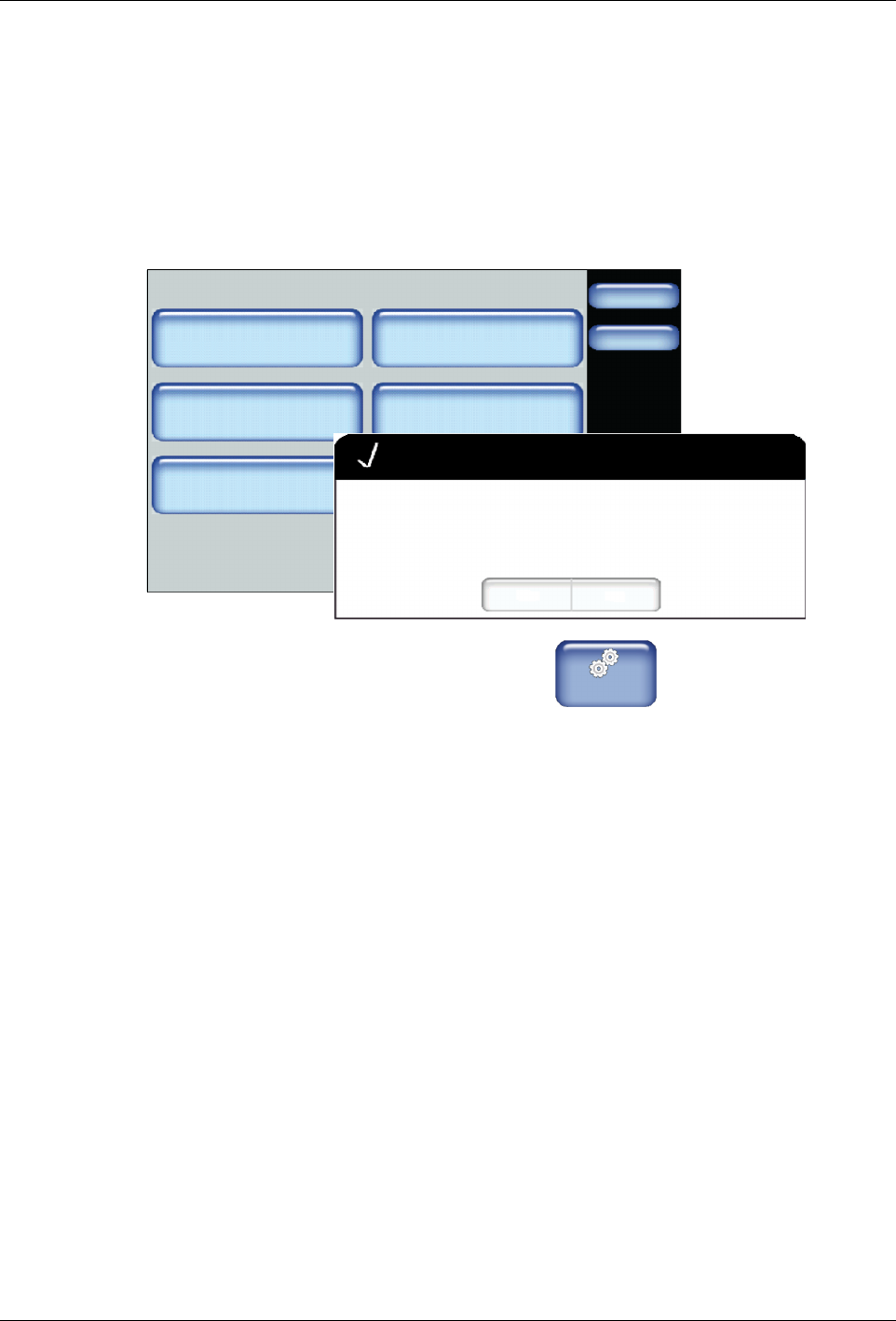
Use system reset to revert all user definable software settings back to factory
defaults.
NOTE:
S
Recipes are stored on the Internal SD card, and are therefore NOT
deleted or changed.
Administration
Done
Home
System Reset
Display/Save Diagnostics
Recipes
Lockout Communication
Reset Password Display System Data
Off
Confirm
Yes No
Are you sure you want to revert back to factory settings?
1. From the Home Display touch
Master
Controls
2. Touch System, then Administration.
3. Touch System Reset. A pop-up message appears.
4. Touch Yes to revert all user definable settings back to factory defaults.
5. Touch Done.
Advanced Software Melter Configuration
7-46
Part 1121836_03
E 11/2014 Nordson Corporation
Resetting Password Codes
Use Reset Password to revert all 3 levels of password codes back to their
default codes.
The following are the default password level numeric codes:
Level # Default Code Notes
1 1000
S
Cannot start with the number 0 (zero).
S
Can be one up to five numbers long.
S
The largest 5 digit number is 65535.
S
Each
level
must
have
a
unique
numeric
code.
2 2000
3 3000
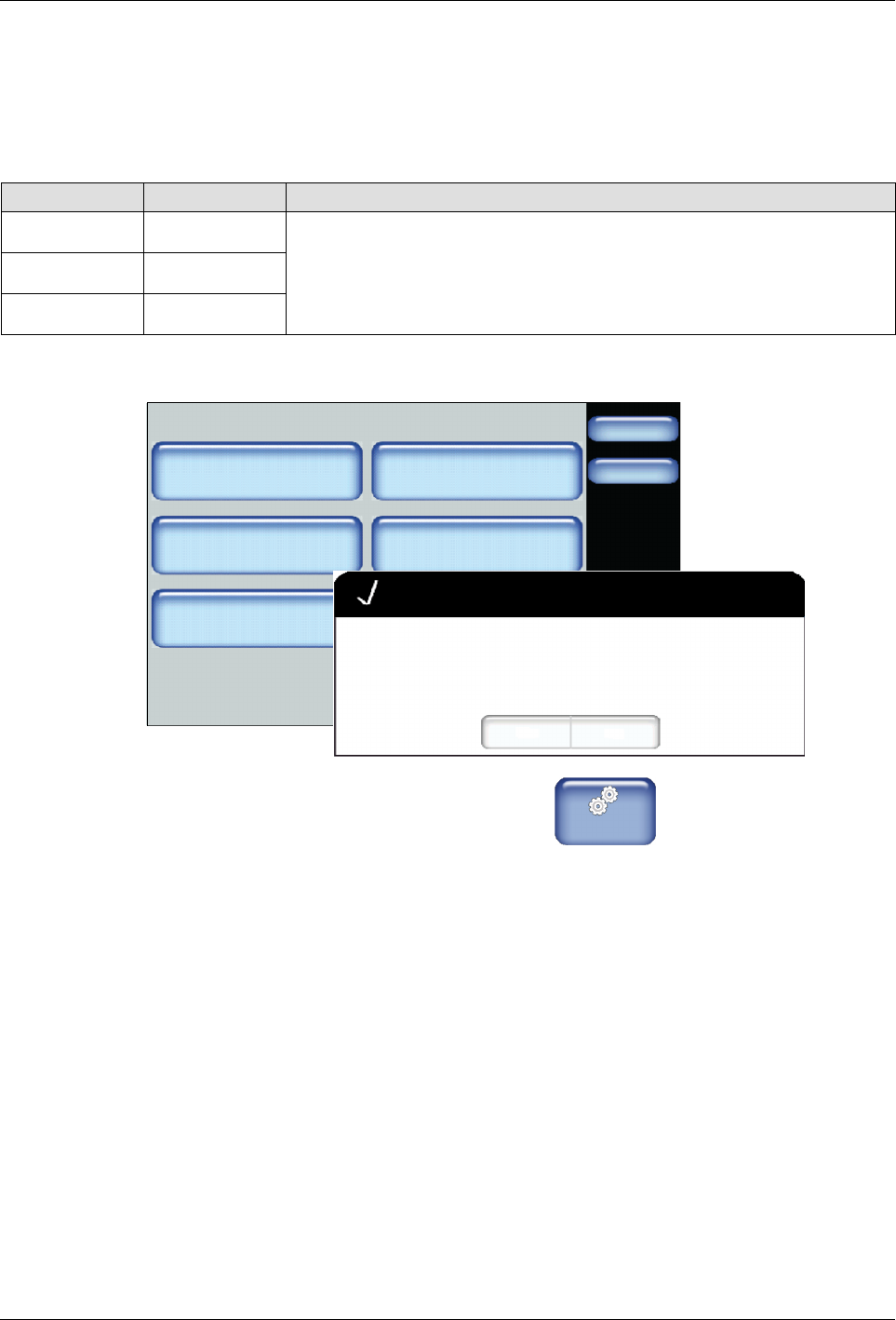
Administration
Done
Home
System Reset
Display/Save Diagnostics
Recipes
Lockout Communication
Reset Password Display System Data
Off
Confirm
Yes No
Are you sure you want to reset all passwords to factory default?
1. From the Home Display touch
Master
Controls
2. Touch System, then Administration.
3. Touch Reset Password. A pop-up message appears.
4. Touch Yes to revert all three password level codes to their default values.
5. Touch Done.