AltaPail II Bulk Melters Product Manual.pdf - 第75页
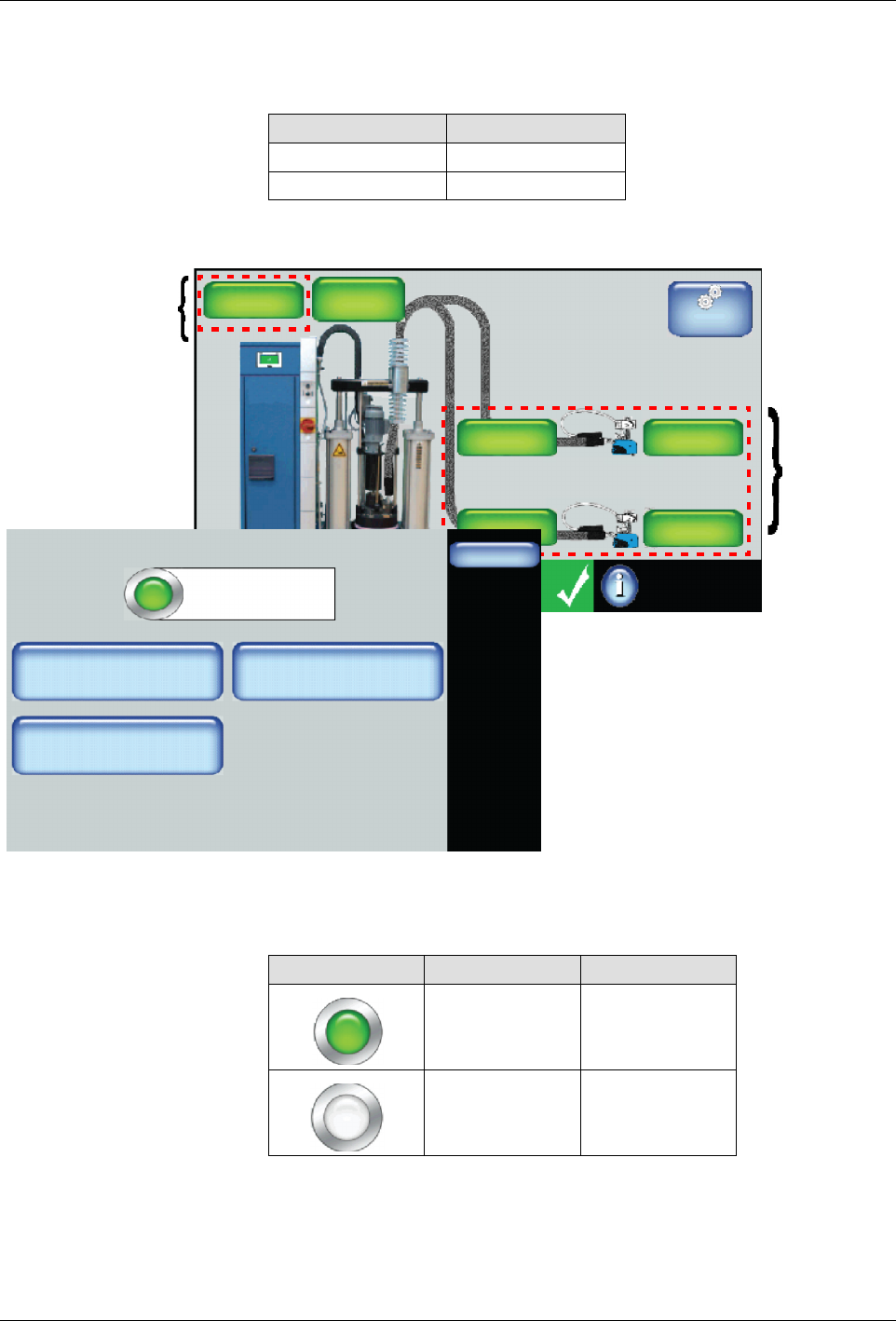
Basic Software Melter Configuration 6 -6 Part 1121836_03 E 1 1/2014 Nordson Corporation S The (internal zone) Platen and at leas t one externa l zone must be enabled for normal mel ter operation.
Basic Software Melter Configuration
6-5
Part 1121836_03
E 11/2014 Nordson Corporation
Enabling/Disabling Internal and External Zones
The following are default settings for internal and external zones.
Zone Default
Internal Enabled
External Enabled
Master
Controls
System Status:
Platen
176_C
176_C
Pump
GTL
32 RPM
Zone 1A
Ready/OK
Pump: On
Heaters:On
Password: Disabled
Recipes:
Nothing Loaded
176_C
Zone 1B
176_C
Zone 2A
176_C
Zone 2B
External
Zones
Internal
Zone
Zone 1A
Done
Zone State: Enabled
Adjust Set Point
Zone 1A
Change PID Type
Create/Modify Name
Hose
176_C
1. Access the Home screen and touch a platen or any other zone that you
want to enable or disable.
2. Touch the colored button to enable or disable the zone. Touch Done.
Button Color Description
Green On
White Off
3. Touch Done.
NOTES:
S
Enabling or disabling a zone takes effect when you touch Done.

Basic Software Melter Configuration
6-6
Part 1121836_03
E 11/2014 Nordson Corporation
S
The (internal zone) Platen and at least one external zone must be
enabled for normal melter operation.
Basic Software Melter Configuration
6-7
Part 1121836_03
E 11/2014 Nordson Corporation
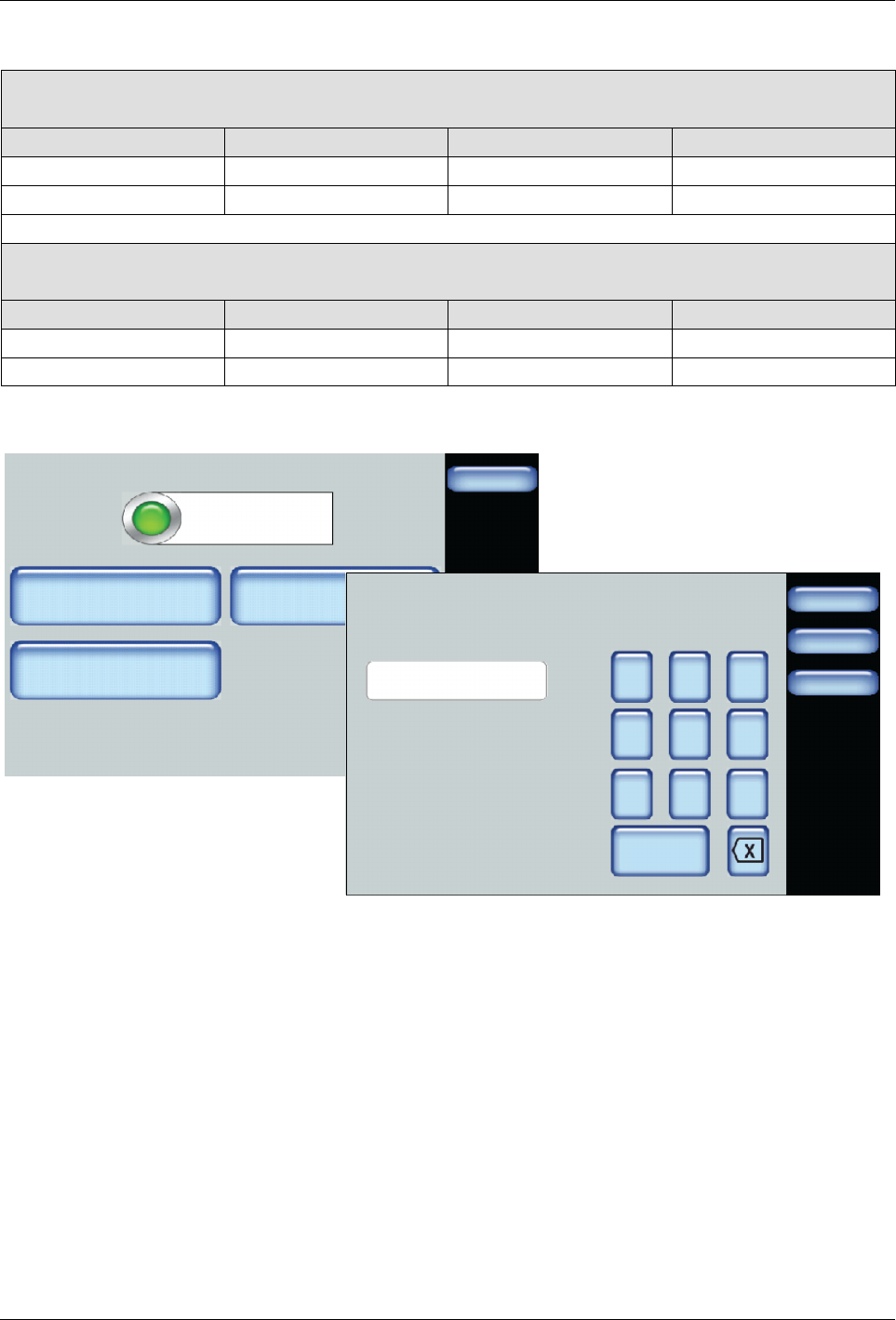
Modifying Zone Set Point Temperatures
For Melters:
7407039, 7407040, 7407041. 7407042, 7407668 and 7407669
Zone Default Minimum Maximum
Internal Zone (Platen) 176°C (350°F) 40°C (100°F) 176°C (350°F)
External Zones 176°C (350°F) 40°C (100°F) 176°C (350°F)
For Melters:
7407664, 7407665, 7407666, 7407667, 7407670 and 7407671
Zone Default Minimum Maximum
Internal Zone (Platen) 232°C (450°F) 40°C (100°F) 232°C (450°F)
External Zones 232°C (450°F) 40°C (100°F) 232°C (450°F)
Zone 1A
Done
Zone State: Enabled
Adjust Set Point
Zone 1A
Change PID Type
Create/Modify Name
Hose
176_C
Done
Cancel
7 8 9
4 5 6
1 2 3
0
Zone 1A Set Point
174
Home
1. Access the Home screen and touch a zone that you want to modify its
set point temperature.
2. Touch Adjust Set Point and enter the temperature you want for this
zone.
3. Touch Done.