GD450 说明书(中英文版) - 第17页
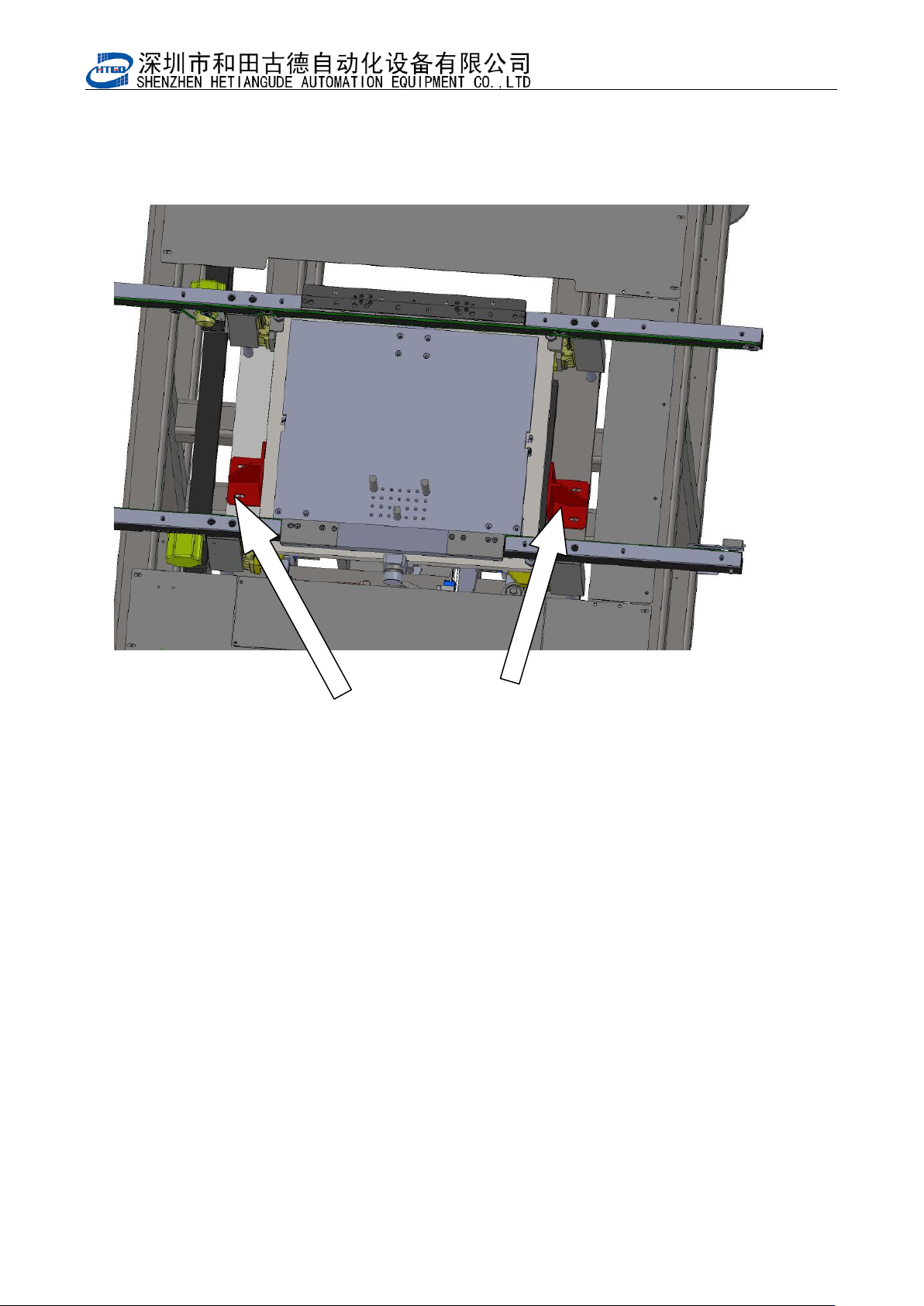
- 17 - 工作台固定板( 红色) Fixed plate on the tab l e (red section) 10. 开机前请务必详细阅读本《操作说明书》 。 Read help manual carefully before turn on the equip ment. 图 2-1 (松开工作台固定板) Pix 2-1(Loose the fixed plate on the table) 2.2 操作环境 Operati…

- 16 -
第二章 设备安装与调试
Chapter 2 Equipment installation and debugging
2.1 开箱 Open the equipment
开箱后,请您首先做好以下工作:
Do the following checks after opening the equipment
1. 对照《装箱清单》所列各项进行查验。
Recheck all in items on the packing list.
2. 检查机器各部分是否有损坏,包括另箱包装的显示器、键盘、鼠标及刮刀板等,并将
它们重新安装到印刷机上。
Check all the units, including the screen, keyboard, mouse and scraper board etc.
And assemble them on the printer.
3. 将运输导轨上的固定扎带剪开。
Cut off the fixed tie on the transmission rail.
4. 刮刀横梁固定在网框横杆上的,请将固定带剪开。
Scraper beam is fixed on the frame beam with the tie. Cut off the tie.
5. 请将网框横杆上的固定套松开,使网框支板能左右移动。
Loose the fixed sleeve on the frame beam so that the frame supporting board can
move left and right.
6. 将运输时安装的工作台固定板取下(如图 2 –1 示)。
Take off the fixed plate which is assembled inside the table during the
transportation.(see pix 2-1)
7. 检查各联接处是否有松动脱落,各运动部分传输皮带有无脱落。
Check all the connections are loosen or not and the transmission belts are loosen or
not.
8. 检查各直线导轨上的滑块有无滑脱。
Check the sliders on the linear rail slip or not
9. 检查电气元件是否固定、接触是否良好。
Check electronic components are fixed or not, connected or disconnected.
- 17 -
工作台固定板(红色)Fixed plate on the table (red section)
10. 开机前请务必详细阅读本《操作说明书》。
Read help manual carefully before turn on the equipment.
图 2-1(松开工作台固定板)
Pix 2-1(Loose the fixed plate on the table)
2.2 操作环境 Operating environment
环境温度:不论印刷机内有无工件,该机的工作环境温度最好在 23±5℃之间。
Temperature: No matter there are work pieces or not inside the printer, the operation
temperature is best between 23±5℃.
相对湿度:该系列机的工作环境相对湿度应<80%。
Relative humidity: The operation relative humidity of this serial of printer need be <80%.
储存条件:机器储存应防潮、防尘、防暴晒。在运输过程中,请尽量避免过高的湿度、震动、
压力及机械冲击。
Restore requirement: Dampproof, dustproof, anti-exposure. Avoid high humidity, shake,

- 18 -
pressure and mechanical shock during the transportation.
安装空间:见机器外形结构图。
Installation Space: See the pix of equipment appearance structure
2.3 设备安置及高度调整 Equipment location and height
adjustment
1. 将印刷机移动安置到选定位置。调节机器下部四个可调机脚(调整范围:±20mm),
确定所需的设备高度。
Place the printer in a selected location. Adjust the four adjustable mounts on the
bottom of the equipment ( adjustment range: ±20mm). Make sure the equipment
height.
2. 调水平。调整方法是:
Adjust the horizontal. Methods are following:
a) 使用精密水平仪(框式水平仪)进行测量。
Measure it with accurate spirit level (frame spirit level).
b) 通过四个可调机脚,对印刷机反复进行水平调整,直到其完全水平为止。
Adjust the four mounts, do the horizontal adjustment on the printer repeatedly until
it is totally horizontal.
c) 将可调机脚螺母锁紧。
Fasten the screws on the mounts.
2.4 电源气源 Power supply and air power
1) 请使用 AC 220V、50/60H
Z
具有额定电流的稳定电源,用户在使用本机器过程中如电
压不稳定,应自备稳压电源。
Stable power: AC 220V、50/60H
Z
and rated current. If the current is not stable
during the operation, please prepare a regulated power supply.
2) 请使用稳定的压力为 4.5e~6kgf/cm
2
的工业气源。
The stable pressure of industrial air power need be 4.5e~6kgf/cm
2.