GD450 说明书(中英文版) - 第20页
- 20 - 2.6 软件安装 Sof tware inst allation 2.6.1 软件功能简介 S of tw are introduction 本 软 件 是 和 田 古 德 自 动 化 设 备 有 限 公 司 最 新 推 出 的 GD450+ 全 自 动 视 觉 印 刷 机 控 制 软 件,具有 W indowsX P 视窗操作界面,功能强大,参数设定方便,操作简单且安全可靠,易 学、易用。 This GD450+ aut…
- 19 -
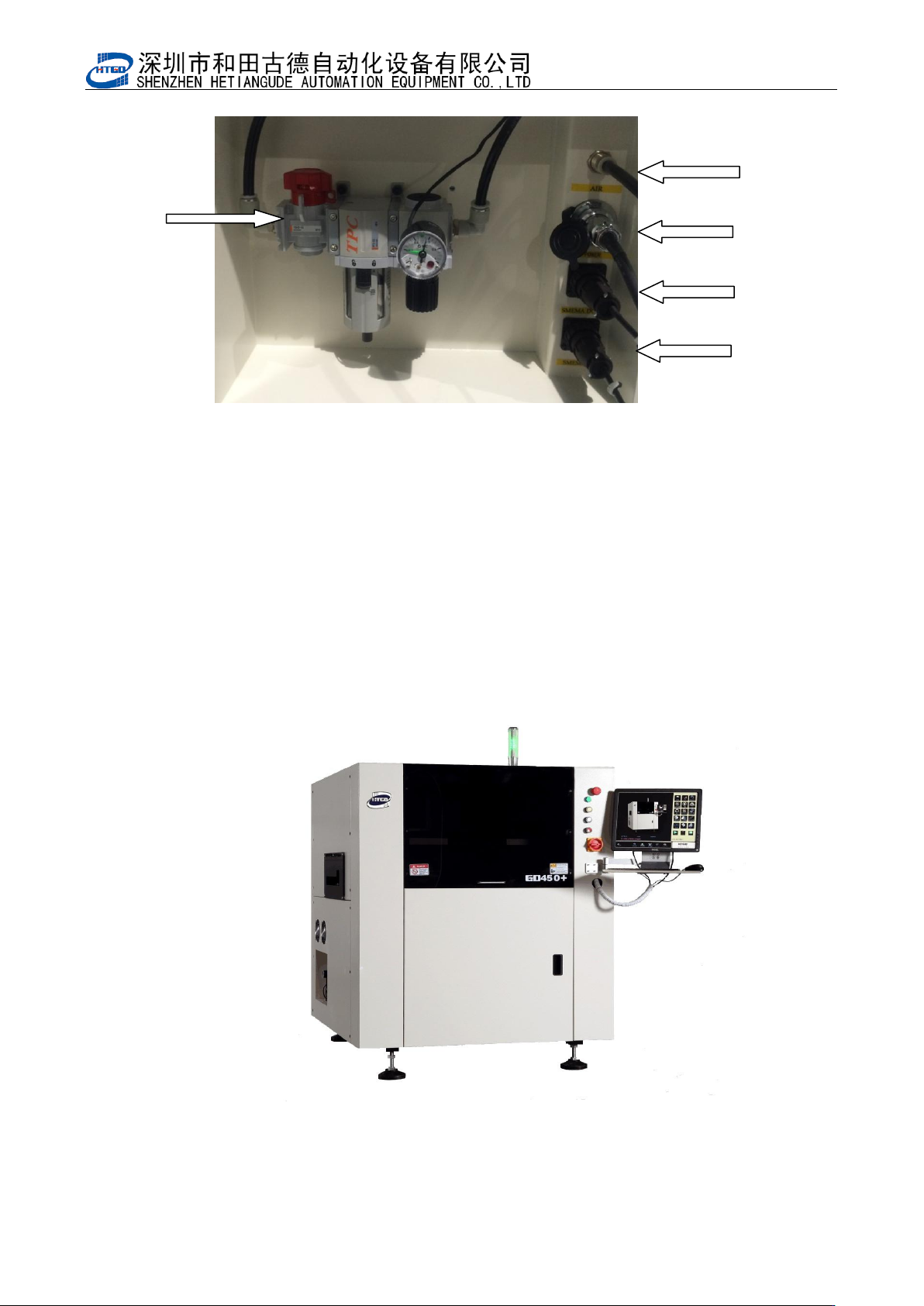
主 气 源 接 口
main air power port
主 电 源 接 口
main air power
port
图 2-2 电气源接口位置图
Pix 2-2 Power supply and air power port location
2.5 工控机控制系统安装 Installation of the industrial computer control
system
按图 2-3 将工控机控制系统中显示器、键盘及鼠标等安装到印刷机主机上,并与工控机
连接,然后接通电源。
Assemble the screen, keyboard and mouse etc on the printer and connect it with the
industrial computer and turn on the power supply.
图 2-3 印刷机外形图
Pix 2-3 Printer external view
气 源 开 关
air power switch
下 位 机 接 口
lower computer port
上 位 机 接 口
upper computer port

- 20 -
2.6 软件安装 Software installation
2.6.1 软件功能简介 Software introduction
本软件是和田古德自动化设备有限公司最新推出的 GD450+全自动视觉印刷机控制软
件,具有 WindowsXP 视窗操作界面,功能强大,参数设定方便,操作简单且安全可靠,易
学、易用。
This GD450+ automatic visual printing control software is researched by our company.
Windows XP interface powerful functions and safe. Easy to set parameter, learn and
operate.
此软件在 GD450+全自动视觉印刷机上的应用,实现了机电一体化的控制,大大地提高
了印刷机的自动化程度和控制精度,保证了印刷质量。
This software applied on the GD450+ automatic visual printer realizes the control of
mechanical and electrical integration. It improves the automatic level and control accuracy
of the printer and insures the printing quality.
本机器所用软件具有如下一些功能:
This equipment software owns following function:
1) 印刷参数设定
Printing parameter setting
2) 机器参数设定
Equipment parameter setting
3) 导轨宽度自动调节
Adjust the width of rail automatically
4) 视觉系统辨识及钢网与 PCB 板自动对准
Visual system identification, alignment of the stencil and PCB board
5) 网板与 PCB 板自动夹紧
Stencil and PCB board can clamp automatically
6) 网板自动清洗
Automatic cleaning of the stencil
7) I/O 故障自动检测并声光报警、提示故障原因
- 21 -
Automatic inspect the I/O fault and sound-light alarm and indicate the reason of the
fault
8) 报警记录
Alarm record
9) 生产设置
Production setting
10) 自动归零操作
Return to zero automatically
11) 在线 PCB 板计数
Online PCB board counting
12) 自动钢网定位
Automatic positioning of the stencil
13) 自动刮刀测高
Automatically measure the height of the scraper
2.6.2 软件安装 Software installation
机器出厂前已经安装了驱动软件和操作系统软件。在使用过程中,如须重新安装,请按
下列步骤进行。
The equipment has installed the driving software and operating system software. If
the software need be reinstalled during the operation, please do it according to the
following steps.
1) 打开电脑 F 盘。Open the Disk F in the computer.
2)把 HTGD 文件复制到电脑 C 盘的根目录下。 Copy the HTGD files to the root directory
of the Disk C.
3) 打开 HTGD 文件, Open the HTGD files.
4) 完成后把“ ”图标用快捷方式放到桌面上。Put the “ ”icon on the desktop
with shortcut.
5) 在桌面上双击“ ”图标即可打开 GD450+驱动软件。Open the GD450+ driving
software by double clicking the “ ”icon