GD450 说明书(中英文版) - 第33页
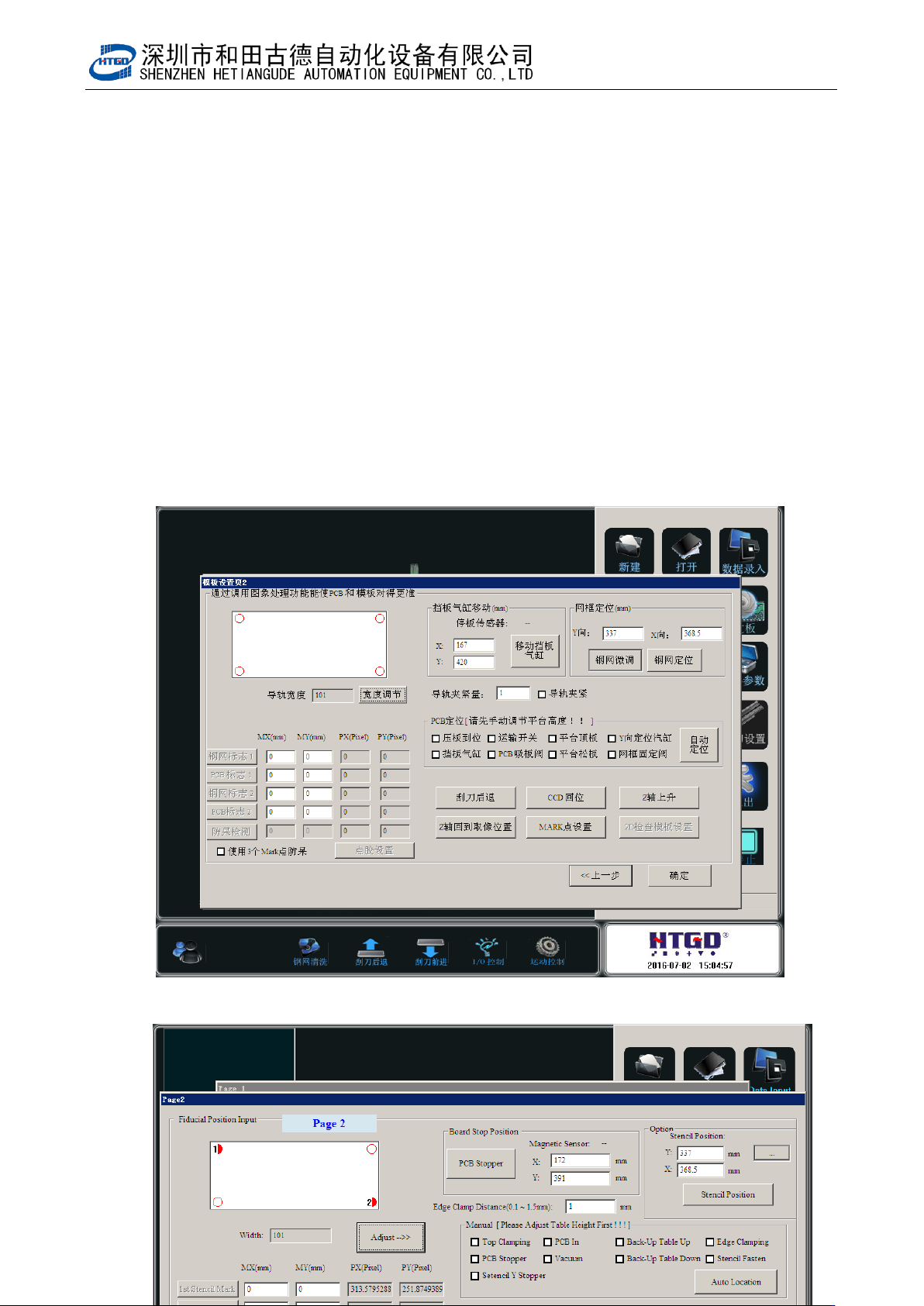
- 33 - Pix 3-9(Mark point matching interface) 注: Notice: A . [ 钢网标志 1 ] :点击匹配钢网标志 1 ; (stencil mark 1): Click it to match stencil mark 1. B . [ PCB 标志 1 ] :点击匹配 PCB 标志 1 ; (PCB mark 1): Click it to match PCB mark 1 C . […
- 32 -
Pix 3-8
图 3-9(Mark 点匹配界面)

- 33 -
Pix 3-9(Mark point matching interface)
注:Notice:
A.[钢网标志 1]:点击匹配钢网标志 1;
(stencil mark 1): Click it to match stencil mark 1.
B.[PCB 标志 1]:点击匹配 PCB 标志 1;
(PCB mark 1): Click it to match PCB mark 1
C.[钢网标志 2]:点击匹配钢网标志 2;
(stencil mark 2): Click it to match stencil mark 2.
D.[PCB 标志 2]:点击匹配 PCB 标志 2;
(PCB mark 2): Click it to match PCB mark 2
E.[宽度调节]:对进行运输导轨宽度调节;
(width adjustment): To adjust the width of transmission rail.
F.[移动挡板气缸]:将 CCD 移动到设置的坐标上去;
(remove damper cylinder): Remove CCD to the setup position
G.[网框固定阀]:自动定位钢网的时候,点击该按钮机器会松开钢网支撑架,用手将钢网
架移到指定位置,并夹紧;
(frame fixed valve):Clicking this button when do the stencil’s automatic positioning,
the equipment will loose the support frame and remove the stencil supporting frame
to the designated spot and fix it by hand.
H.[钢网定位]:自动定位钢网的时候,钢网自动气缸会随刮刀横梁移动到指定的位置,并
伸出气缸杆,将钢网插到气缸杆位置后点击[确定],系统重新将钢网锁紧;
(stencil positioning): When do the stencil’ automatic positioning, the stencil automatic

- 34 -
cylinder will move to the designated spot along with scraper beam and will release
cylinder guide. Plug the stencil into cylinder guide and click “确定 ”(ok)button, the
system will re-fasten the stencil.
I. [钢网微调]:当钢网定位位置不准确时,可点击此按钮并用鼠标调整挡钢网气缸位置。
(stencil fine adjustment ): When the positioning of the stencil is not correct, click this
button and adjust the position of stencil cylinder with mouse.
J.[刮刀后退]:让刮刀后退到后起点位置,手工对钢网的时候使用;
(scraper back ): Let scraper comes back to the starting position at the back. Do it
when operate manually on the stencil.
K.[Z 轴上升]:Z 轴上升到印刷位置。手工对钢网的时候使用,看焊盘和网孔是否对正;
(Z axis lifts up): Z axis lifts up to the printing position. Do it when operate manually on
the stencil. Check whether the bonding pad align at the hole.
L.[CCD 回位]:点击后 CCD 会回到原点,手工对钢网的时候使用。
(CCD return): Click it and CCD will return to the original spot. D Do it when operate
manually on the stencil.
M.[MARK 点设置]:点击后 PCB 标志点成可编辑状态。
(MARK setting): Click it and PCB mark will become editable.
N.[Z 轴到取像位置]:点击后 Z 轴会升到取像位置,手工对钢网的时候使用;
(Z axis comes to the position of capturing image): Click it and Z axis will lift to the
position of capturing image. Do it when operate manually on the stencil.
O.[自动定位]:点击后机器会自动定位 PCB。这个按钮经常使用,通常设置好 PCB Mark
点到边的距离后点击该按钮,机器会自动执行停板气缸到位、PCB 压板机构开启、PCB
传送、PCB 到位停止、Z 上升到取像位置、侧压夹紧、PCB 压板机构关闭、停板气缸
复位、CCD 回到原点。至此 PCB 定位完毕,后面只需进行 PCB,钢网 Mark 点匹配
即可。
(automatic positioning):Click it and the equipment will automatically positioning the
PCB. This button will be used frequently. Click this button after setting the distance
between the PCB Mark and the side. The equipment will automatically execute the
return and reset of board limit cylinder, the open and close of the PCB pressure
plate mechanism, PCB transmission, the stop at given spot of the PCB. And the Z
axis will lift up to the position of capturing image and lateral pressure will clamp.
Then PCB positioning has been done. Next should need be done is to match the