00193802-01.pdf - 第49页
User Manual SIPLAC E CF 2 Operational safety Software version SR.101.xx 06/2003 US Edition 2.5 Safety equipment 49 (13) Main power switch (14) Protective con tactor comb inatio n K1 at the power su pply uni t (15) Protec…
2 Operational safety User Manual SIPLACE CF
2.5 Safety equipment Software version SR.101.xx 06/2003 US Edition
48
2.5.3 Emergency stop buttons, protective cover switches ...
2
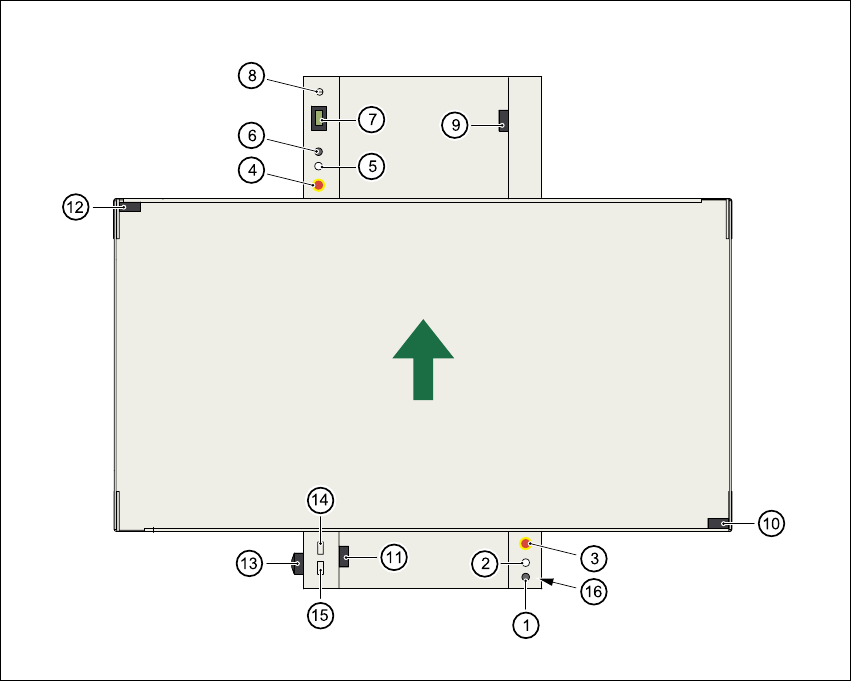
Fig. 2.5 - 4 Location of the buttons and protective contactor combinations K1, K2
2
(1) Stop button
(2) Start button
(3) Emergency stop button
(4) Emergency stop button
(5) Start button
(6) Stop button
(7) Component counter
(8) Key switch open:position 0 for normal mode
Key switch closed: position I for service purposes
(9) Protective cover switch (output conveyor, 00303617-xx)
(10) Protective cover switch (right, 00321417-xx)
(11) Protective cover switch (input conveyor, 00303614-xx)
(12) Protective cover switch (left, 00321416-xx)

User Manual SIPLACE CF 2 Operational safety
Software version SR.101.xx 06/2003 US Edition 2.5 Safety equipment
49
(13) Main power switch
(14) Protective contactor combination K1 at the power supply unit
(15) Protective contactor combination K2 at the power supply unit
(16) Compressed air unit
2.5.3.1 Functional description
Emergency stop button
When the emergency stop button is pressed (item 3 or item 4. in Fig. 2.5 - 4), the motor voltage
to the gantry axes is switched off. The gantry axes are no longer powered, and thus are not dan-
gerous.
PLEASE NOTE
Placement is interrupted and can then either be continued or canceled once the system is work-
ing correctly again. 2
Protective cover switch
If one of the protective covers is opened (see items 9, 10, 11, or 12 in Fig. 2.5 - 4), the gantry
axes will stop immediately. They are no longer powered, and thus are not dangerous.
Key-operated switch:
If the key switch (item 8 in Fig. 2.5 - 4) is closed (position I), the star can still be paced at low
speed while the protective covers are open. The gantry axes are no longer powered, and thus
are not dangerous.
PLEASE NOTE
The key switch remains open for normal mode, i.e. in the 0 position. 2
WARNING
The protective covers must only be opened, with the key switch closed (position I), by appropri-
ately qualified and trained personnel. 2
2 Operational safety User Manual SIPLACE CF
2.5 Safety equipment Software version SR.101.xx 06/2003 US Edition
50
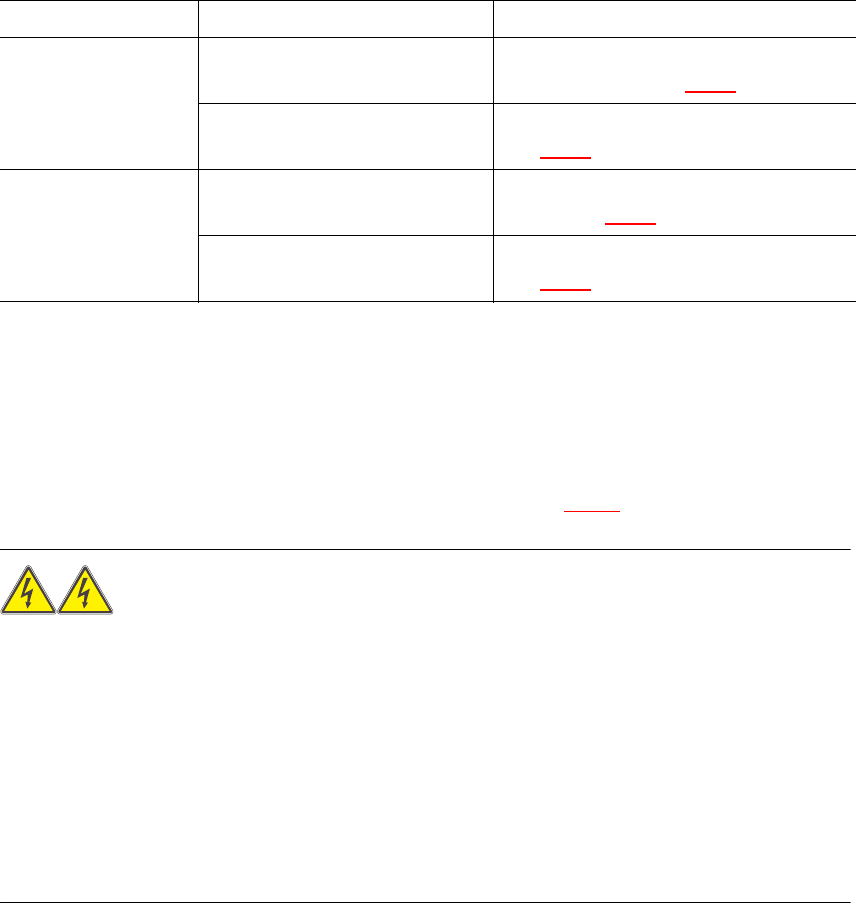
2.5.3.2 Status messages and the action required
The following displays may appear in placement mode. If they appear, carry out the action spec-
ified in the third column.
2
2.5.4 Safety circuits
The SIPLACE automatic placement system has two separate safety circuits which are monitored
by protective contactor combinations K1 and K2. Both protective contactor combinations are
incorporated into the power supply (see items 14 and 15 in Fig. 2.5 - 4
).
WARNING
Automatic placement systems from the SIPLACE family are powered with 3 x 400 VAC (3 x 208
VAC for the U.S.A. version) ± 5 %, 50/60 Hz main power voltage.
This means that some parts of the system carry potentially lethal voltages - even when switched
off at the main power switch. Death, serious injury or considerable damage may result if these au-
tomatic placement systems are handled incorrectly.
Always follow the applicable accident prevention and DIN regulations (particularly EN 60204,
part 1) and the applicable regulations in your own country.
The guard over the power supply must ONLY be opened by appropriately qualified and trained
personnel. 2
Protective contactor combinations K1 and K2 monitor the following circuits:
K1: Emergency stop circuit, safety circuits for the component trolleys or waffle-pack changer,
protective cover switches and the enable software signal
K2: Emergency stop circuit, K1 protective contactor combination, software enable signal and key
switch
Status Display on screen Action required
Emergency stop but-
ton pressed
Emergency stop pressed ...
Machine stopped. Release button
Release the pressed emergency stop but-
ton (item 3 or 4 in Fig. 2.5 - 4
)
Press start button Press the white Start button (item 2 or 5 in
Fig. 2.5 - 4
)
Protective cover open Close the cover Close the protective cover (item 9, 10, 11
or 12 in Fig. 2.5 - 4
)
Press start button Press the white Start button (item 2 or 5 in
Fig. 2.5 - 4
)
Tab. 2.5 - 1 Screen display when the emergency stop button is pressed or the protective cover is open