00195094-0202-MM-D3_EN.pdf - 第67页
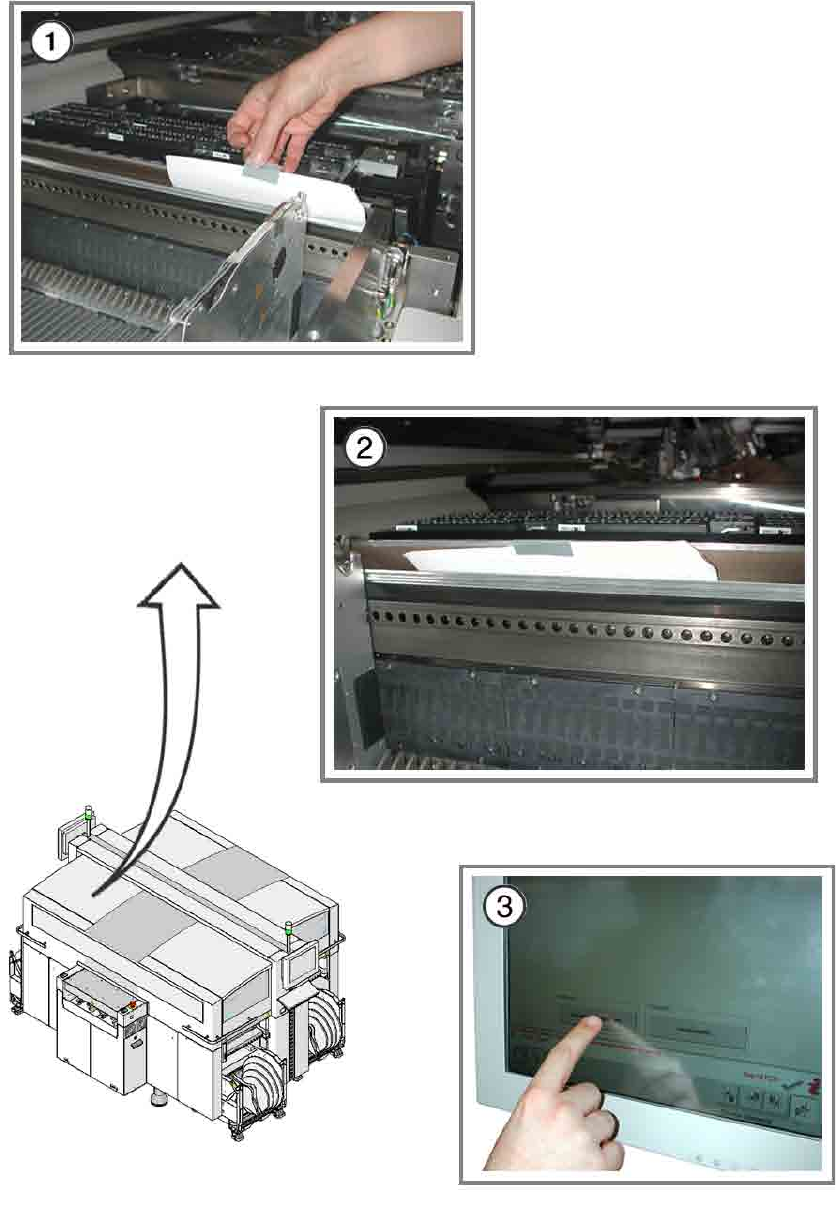
SIPLACE D3 10 Annual maintenance work 08/2008 US Edition 67 Function test of used t ape cutter 10 a Introduce a DIN A3 sheet of pape r or two DIN A4 sheet s stuck together into the used t ape channel. 10 One DIN A4 sheet…
10 Annual maintenance work SIPLACE D3
08/2008 US Edition
66
10

SIPLACE D3 10 Annual maintenance work
08/2008 US Edition
67
Function test of used tape cutter 10
a Introduce a DIN A3 sheet of paper or two DIN A4 sheet
s stuck together into the used tape
channel.
10
One DIN A4 sheet on its own is too short to reach the tape cutter. 10
10
10
s Use adhesive tape to stick the sheet(s) to the used tape channel.
10
Make sure that no paper protrudes into the traveling range of the placement head. 10
10
10
d Log on to the station as a service engineer and start SITEST.
d In the taskbar, click on the Component tables button.
d In the view that appears, click on "Activate tape cutter".
10
: Remove the sheet of paper from the used tape channel.
Contact your Regional Service Center if it is not cut through cleanly.
10
10
10 Annual maintenance work SIPLACE D3
08/2008 US Edition
68
10