80S-2080F480F4-680F5 User’s Manual.pdf - 第394页
SIPLACE 80S- 20/F4/F4-6/F5 User’s Manual 6 What should you do ... ? Edition 03/98 from Software Vers ion SR.404.xx 6.1 W hen you switch on the SIPLACE line 6 - 3 This chapter covers a number of subjects whi ch are bas ed…
6 What should you do ... ? SIPLACE 80S-20/F4/F4-6/F5 User’s Manual
Edition 03/98 from Software Version SR.404.xx
6 - 2
SIPLACE 80S-20/F4/F4-6/F5 User’s Manual 6 What should you do ... ?
Edition 03/98 from Software Version SR.404.xx 6.1 When you switch on the SIPLACE line
6 - 3
This chapter covers a number of subjects which are based on experience gained from using automatic place-
ment machines.
We hope to help you to minimize machine down-times by preventing faults before they occur. We also thought
it would be useful to create what we know as operator and line engineer profiles and then use this allocation of
responsibility to achieve the maximum possible efficiency from your automatic placement machines.
6.1 When you switch on the SIPLACE line
6.1.1 Starting the line computer
Switch the monitor on.
Switch on the uninterruptible power supply (UPS). A dialog window will appear after approximately 2 min-
utes.
Enter
plr
in the ’AUTXXXXX login’ box (X = space holder for the identifier).
Press RETURN.
Enter the password and press RETURN again.
The ’Desktop’ menu (starting window) will appear on screen after approximately 3 minutes.
If no password is required, press RETURN twice.
6.1.2 Starting the stations
ATTENTION
Do not switch on the stations and peripherals until the 'Desktop' menu appears on the monitor of the line com-
puter. Otherwise you may experience communication problems.
Before you switch on the automatic placement machines ...
Check that the placement system is connected to the power and compressed air supply.
Do the manometers show the required working pressure?
Carry out a visual inspection of the automatic placement machines. Check, in particular, that there are no
obstructions in the traveling range of the gantries.
Check that the z-axes of all the heads are in the top end position.
Close the protective covers.
Check that there is no diskette in the floppy drive of the station computer.
Switch on the automatic placement machines at the main switch. If the line computer is connected and
communication has been established correctly, the main menu for the ’Operator’ user class will appear
after approximately 2 minutes.
6 What should you do ... ? SIPLACE 80S-20/F4/F4-6/F5 User’s Manual
6.1 When you switch on the SIPLACE line Edition 03/98 from Software Version SR.404.xx
6 - 4
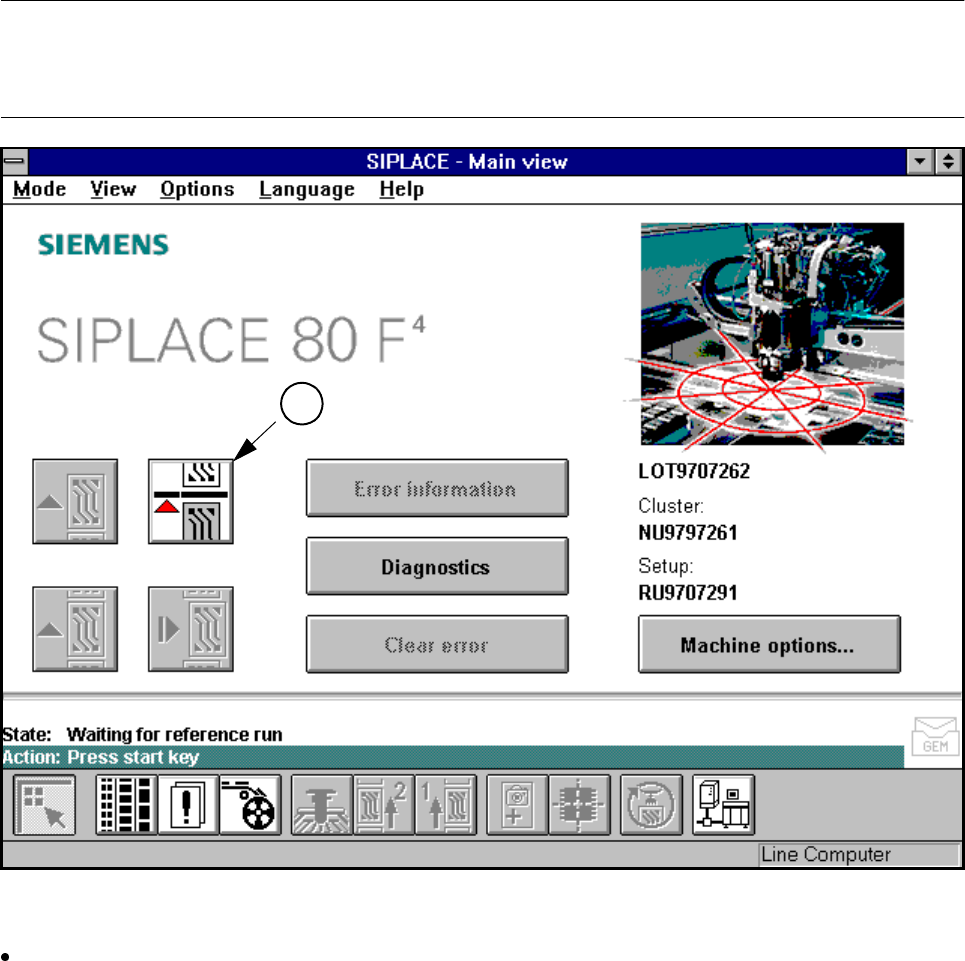
PLEASE NOTE:
During the transfer of data from the line computer to the station computer, make sure that the red “Stop pro-
cessing“ button lights up (see point A in Fig. 6.1.1)
Fig. 6.1.1 Main view menu - prompt to start the automatic placement machine
After the prompt appears on screen, press one of the round green start buttons on the input or output side.
The "State“ row on the screen shows the action that has just been carried out.
The "Action“ row immediately beneath it (with a green background) contains the actions that you should
carry out.
Once the approach to the reference point has ended, the automatic placement system is ready for service.
6.1.3 Flow chart: switching on the SIPLACE line
The following flow chart shows the actions of the line computer, automatic placement system and operator
while the SIPLACE line is being switched on and starting up.
A