80S-2080F480F4-680F5 User’s Manual.pdf - 第401页
6 What should you do ... ? SIPLACE 80S-20/F4/F4-6/F5 User’s Manual 6.5 When you, as an operator, carry out a walk-ro und inspection Edition 03/98 from S oftware Version S R.404.xx 6 - 10 6.5 When you, as an operator, car…

SIPLACE 80S-20/F4/F4-6/F5 User’s Manual 6 What should you do ... ?
Edition 03/98 from Software Version SR.404.xx 6.4 When you change shift
6 - 9
6.4 When you change shift
Splice the tapes in good time so that the feeder modules will not run out of tape as soon as the new shift
starts. This can sometimes lead to pick-up errors and prolonged down-times.
Pass on information from one shift to the next if, for example, something has been changed in the place-
ment program or if frequent errors have occurred in certain feeder modules. Also take a look at the ’Feeder
module preliminary setup area' checklist in section 6.6, pages 6-12.
Carry out a set-up check.
Check that the feeder modules are equipped with the correct components and that they are at the correct
locations.
TIP
When you hand over the line, make sure that it as you would want to find it yourself, i.e. that
- The reject containers are empty.
- The waste containers are empty.
- The conveyor areas have been cleaned with a vacuum cleaner.
- Defective feeder modules in the feeder area have been replaced.
6 What should you do ... ? SIPLACE 80S-20/F4/F4-6/F5 User’s Manual
6.5 When you, as an operator, carry out a walk-round inspection Edition 03/98 from Software Version SR.404.xx
6 - 10
6.5 When you, as an operator, carry out a walk-round
inspection
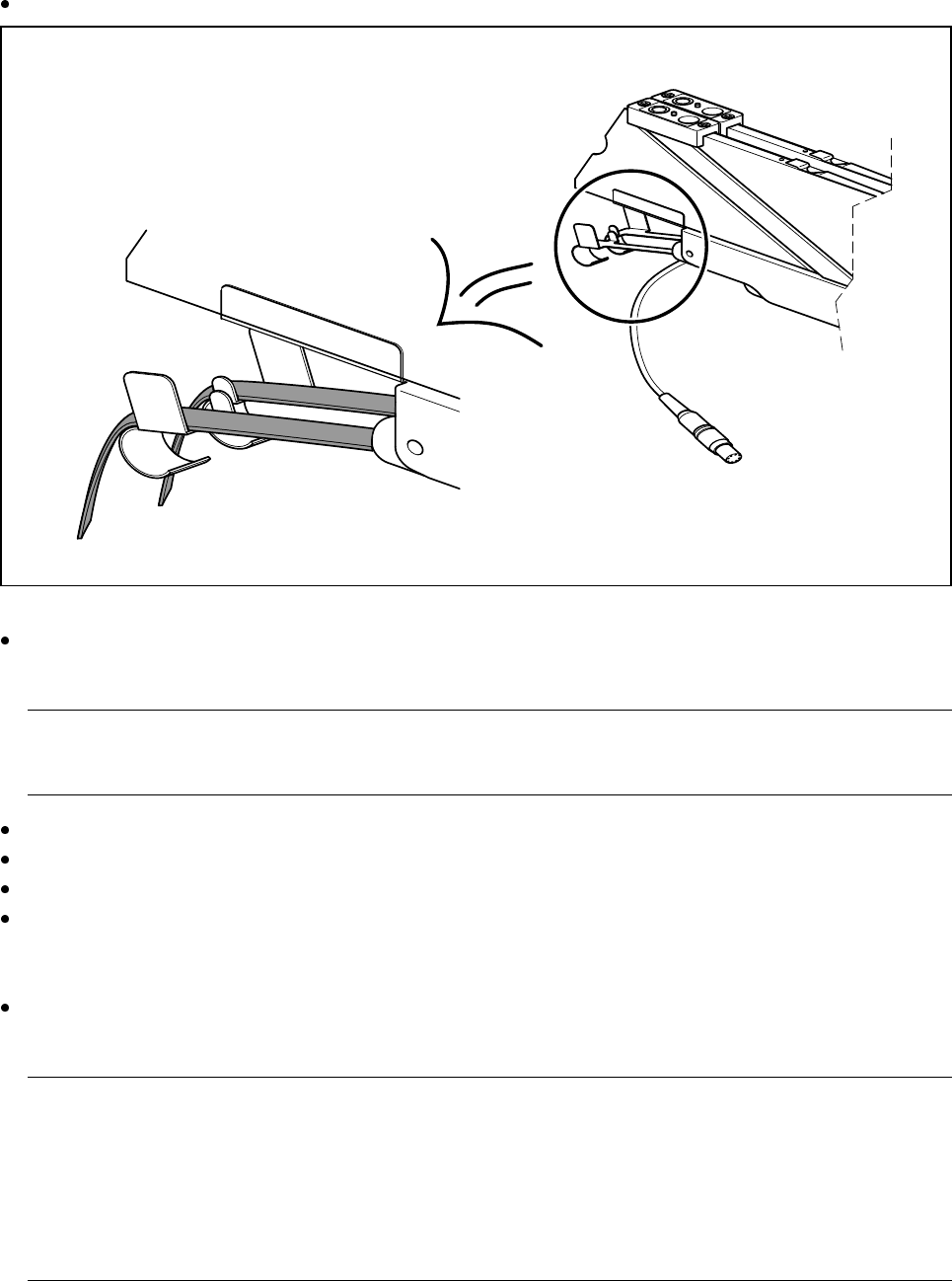
Check that the tape is lying correctly in the springs of the 8 mm S.
Fig. 6.5.1 Placing the tape in the springs of the 8 mm S
Check whether the tape cover foil container for the 8 mm S is full. If it is, pull out the foil and cut it off with
scissors.
PLEASE NOTE:
If you tear the foil, this can lead to tape removal problems.
Check whether the window on the feeder module is the right size for the component.
Are the tape guides used on the feeder modules intended for different tape widths?
Is the additional plastic guide in use for tapes of different widths?
Check the position of the stopper on the PCB transport.
Always position the stopper centrally, outside the PCB. Make sure that the stopper is also positioned out-
side any recesses in the PCB.
Check the magnetic supports on the lifting table. They must be arranged so that they do not collide with
components on the bottom of the PCBs.
PLEASE NOTE:
Splice the tapes in good time so that the feeder modules will not run out of tape, since this will increase
the frequency of stoppages.
However, do not splice the tapes too early since, if you wind the end of the old tape onto the new reel after
splicing, the reel holding the new tape will be overfilled and the tapes will slip off the reel and become tan-
gled up. This will again result in pick-up errors and more stoppages.
In preparation
SIPLACE 80S-20/F4/F4-6/F5 User’s Manual 6 What should you do ... ?
Edition 03/98 from Software Version SR.404.xx 6.5 When you, as an operator, carry out a walk-round inspection
6 - 11
With wafflepack changers, check that the trays with the wafflepacks lie against the guides and are firmly
held in place by the magnets. Do not forget to check the polarity of the components in the tray.
Prepare the used tape reels for the feeder modules.
For heavy tape reels, insert shafts into the tape container.
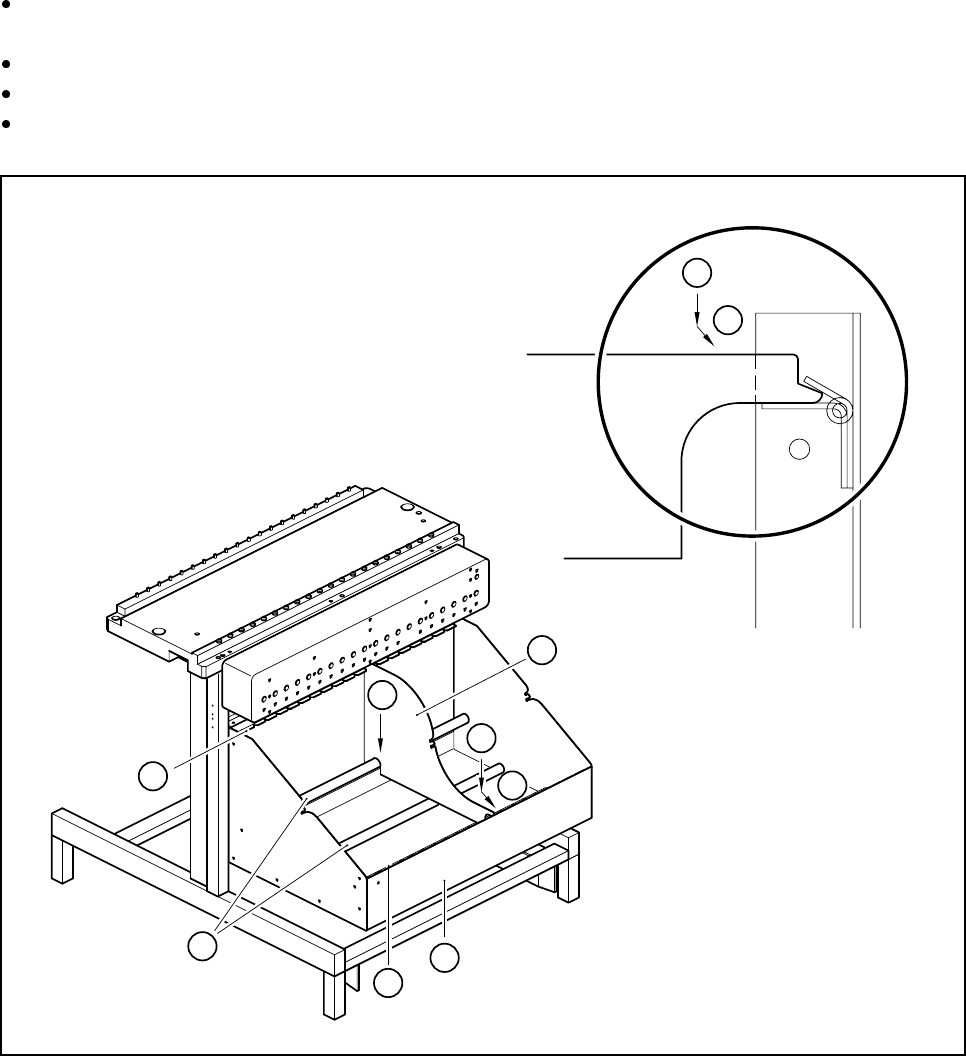
Insert the dividing plates as shown in Fig. 6.5.2 and remember that the smallest division of the tape con-
tainer is a 2x division. This will avoid placement errors.
Fig. 6.5.2 Inserting dividing plates into the containers
Key to Fig. 6.5.2
1 Tape container
2 Dividing plate
3 Guide rail for the dividing plates on the front of the container
4 Guide rail for the dividing plates on the back of the container
5 Supporting rod for the dividing plates
Steps for Fig. 6.5.2
A Insert the dividing plate with the nose under the guide rail on the front of the container.
B Push the dividing plate in direction (B).
C Engage the dividing plate on the supporting rod (5)
4
5
3
1
2
C
A
B
A
B