80S-2080F480F4-680F5 User’s Manual.pdf - 第404页
SIPLACE 80S- 20/F4/F4-6/F5 User’s Manual 6 What should you do ... ? Edition 03/98 from Software Vers ion SR.404.xx 6.7 When you change the set-up 6 - 13 6.7 When you change the set-up Before c hanging the set-u p, print …
6 What should you do ... ? SIPLACE 80S-20/F4/F4-6/F5 User’s Manual
6.6 When you carry out a preliminary set-up Edition 03/98 from Software Version SR.404.xx
6 - 12
6.6 When you carry out a preliminary set-up
Use this checklist when you carry out the preliminary set-up on the machine.
Clean the feeder modules with a vacuum cleaner or by "shaking them out".
Remove the cover foil from the S feeder modules.
Clean the supporting surfaces of the feeder modules.
Clean the component tables
Use a vacuum cleaner or a short-bristled brush to remove loose components on the component table.
RISK OF INJURY
Avoid removing components from the magnetic rail of the component table with your fingers because you may
hurt yourself with tiny splinters of metal. Use a brush instead.
Abrade the magnetic rail of the component table with the oilstone on a regular basis - or if you detect irreg-
ularities (see Section 9.3.3 ’Component Tables’, page 9 - 20).
Clean the contact surfaces on the bottom of the component table.
Clean the tape container with a vacuum cleaner.
Check that the feeder modules are divided up correctly.
Check the feeder module location.
Are all the plugs of the feeder module plugged in at the correct places?
Shorten the used tape at the front of the feeder module to around 3 cm.
Are the tape container plates inserted correctly (see Fig. 6.5.2, page 6 - 11)?
Check the size of the component reel and equip large reels with shafts.
Splice short tape ends together.
Personnel in the preliminary set-up area should have access to the same equipment as the machine opera-
tors. A list of equipment is given in Section 6.13 on page 6 - 21.
PLEASE NOTE:
If the equipment is defective, the machine operator should inform (in writing or orally) the personnel in the pre-
liminary set-up area.
SIPLACE 80S-20/F4/F4-6/F5 User’s Manual 6 What should you do ... ?
Edition 03/98 from Software Version SR.404.xx 6.7 When you change the set-up
6 - 13
6.7 When you change the set-up
Before changing the set-up, print out the set-up with a description of the job on the printer of the line com-
puter, as described in the ’UNIX line computer’ User’s Manual.
6.7.1 What you should note when changing the feeder module
Handle the feeder modules carefully when you insert them into or remove them from the component table.
Do not allow the supporting surfaces of the feeder modules to bang against the edges of the component
table.
Clean the supporting surfaces of the feeder modules.
– Remove any loose components.
– Remove any residues of the rubber lining or dirt from the contact surface of the feeder modules.
Clean the component tables.
– Use a vacuum cleaner or a short-bristled brush to do this.
RISK OF INJURY
Avoid removing components from the magnetic rail of the component table with your fingers because you may
hurt yourself with tiny splinters of metal. Use a brush instead.
6.7.2 What you should note when changing the component table
Set up the feeder modules in the external set-up area as shown in the set-up drawing. Follow the prelimi-
nary set-up instructions in section 6.6.
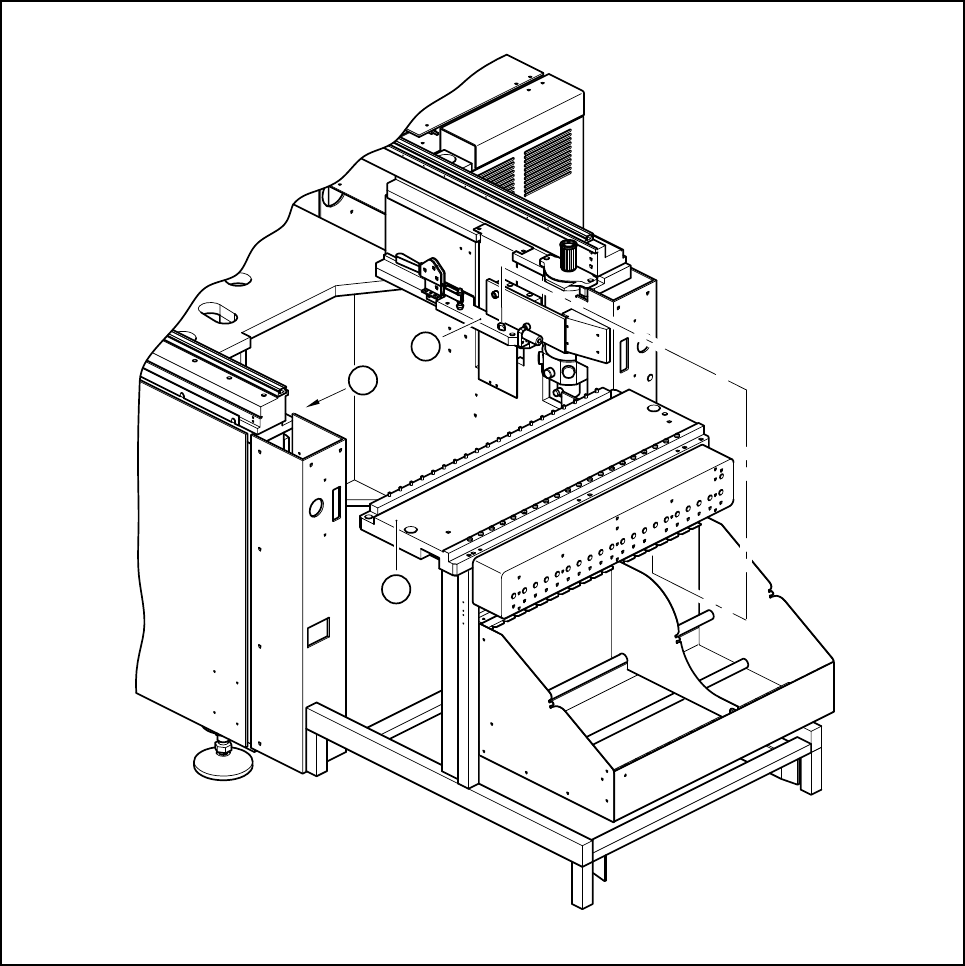
Make sure that contact surface of the sliding rail on the automatic placement machine (see Fig. 6.7.1) is
clean when you insert the component table.
PLEASE NOTE:
Insert the component table into the automatic placement machine carefully. Do not use too much force. If
the component table collides with the nozzle changer, it may be displaced and have to be recalibrated.
6 What should you do ... ? SIPLACE 80S-20/F4/F4-6/F5 User’s Manual
6.7 When you change the set-up Edition 03/98 from Software Version SR.404.xx
6 - 14
Fig. 6.7.1 Cleaning the contact surface of the sliding rail for the component table
Key to Fig. 6.7.1
1 Component table
2 Contact surfaces of the sliding rails for the component table
2
1
2