80S-2080F480F4-680F5 User’s Manual.pdf - 第423页
7 Error Information & Diagnostics SIPLACE 80S-20/F4/F4-6 User’s Manual 7.1 Error Information Edit ion 03/98 f rom Software Version SR.403.xx 7 - 8
SIPLACE 80S-20/F4/F4-6 User’s Manual 7 Error Information & Diagnostics
Edition 03/98 from Software Version SR.403.xx 7.1 Error Information
7 - 7
7.1.1.1 Leaving and Editing
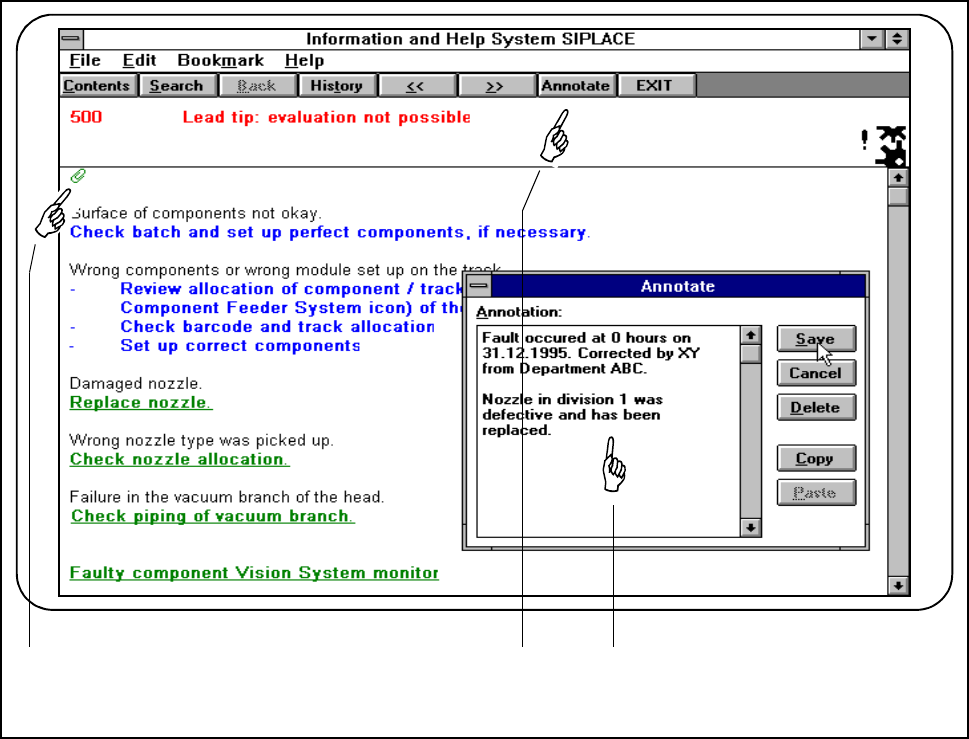
Within any view you can leave or edit comments. In this way you can make a record of work you have carried
out, instructions and so on. If a comment has been added to a view this will be indicated by a paper clip.
● Click on the Annotate button. An input window will be displayed. In this window you can enter and edit
your comments.
Fig. 7.1.5 Adding comments
- Key to Fig. 7.1.5
1 Indicates whether a comment on this information has been added (paper-clip symbol)
2 Annotate button
3 Input window
● The paperclip indicates that a comment has been added. Click on the symbol and the corresponding com-
ment will be displayed.
1 2 3
7 Error Information & Diagnostics SIPLACE 80S-20/F4/F4-6 User’s Manual
7.1 Error Information Edition 03/98 from Software Version SR.403.xx
7 - 8
SIPLACE 80S-20/F4/F4-6 User’s Manual 7 Error Information & Diagnostics
Edition 03/98 from Software Version SR.403.xx 7.2 Diagnostics
7 - 9
7.2 Diagnostics
7.2.1 General Comments
If errors occur while the board is being processed, a diagnostics program can be started for this error. You can
start this diagnostics facility either from the main view or from Display error.
This diagnostics facility will guide you as far as identifying a possible cause for the error and suggesting a
remedy. This is done by means of a series of questions. Information on the questions asked can be accessed
by pressing an information button.