80S-2080F480F4-680F5 User’s Manual.pdf - 第478页
SIPLACE 80S-20/F4/F4-6/F5 User’s Manual 9 Maintenance Edition 03/98 from S oftware Version S R.404.xx 9.3 Machine Base 9 - 29 Fig. 9.3.5 Maintenance of the compre ssed air unit SIPLACE 80S -20, 80F 4 , 80F 4 -6, 80F 5 - …

9 Maintenance SIPLACE 80S-20/F4/F4-6/F5 User’s Manual
9.3 Machine Base Edition 03/98 from Software Version SR.404.xx
9 - 28
8 Rotary cutter carriage in its parking position
9 Compressed air cylinder
10 Cutting edge
A Detail A
A1 Visual inspection: Is the annular face of the rotary cutter blunt?
A-A Section A-A, enlarged view
A-A1 Visual inspection: check the cutting edge.
Risk of injury on the cutting edge!
Refitting the wafflepack changer
NOTE
Every other time the cutter unit is maintained you should also maintain the wafflepack changer.
Re-install the wafflepack changer (see the Component supply section of this user’s manual)
Pay attention to the rotational position of the magazines and the correct assignments of the magazines to
the tray (see Section 9.8, Wafflepack Changer). The position of the wafflepack changer is automatically
recorded following loading of a placement program which includes components being picked up from the
wafflepack changer.
9.3.5 Compressed Air Unit
NOTE
The intervals at which this maintenance work is carried out will depend directly on the quality of the com-
pressed air used. If you fail to meet the quality requirements of the compressed air specification, you should
carry out maintenance more frequently. To prevent contamination in the vacuum circuits of the placement
heads (which is very complicated to remove) you should make sure you change the filter cartridges before
error messages occur.
9.3.5.1 Checking the 5.1 bar Operating Pressure
NOTE
Excessive or inadequate operating pressure will primarily result in vacuum faults, leading to a fatal error mes-
sage and interruption of placement.
For the following work the main switch of the machine is switched on.
SIPLACE 80S-20/F4/F4-6/F5 User’s Manual 9 Maintenance
Edition 03/98 from Software Version SR.404.xx 9.3 Machine Base
9 - 29
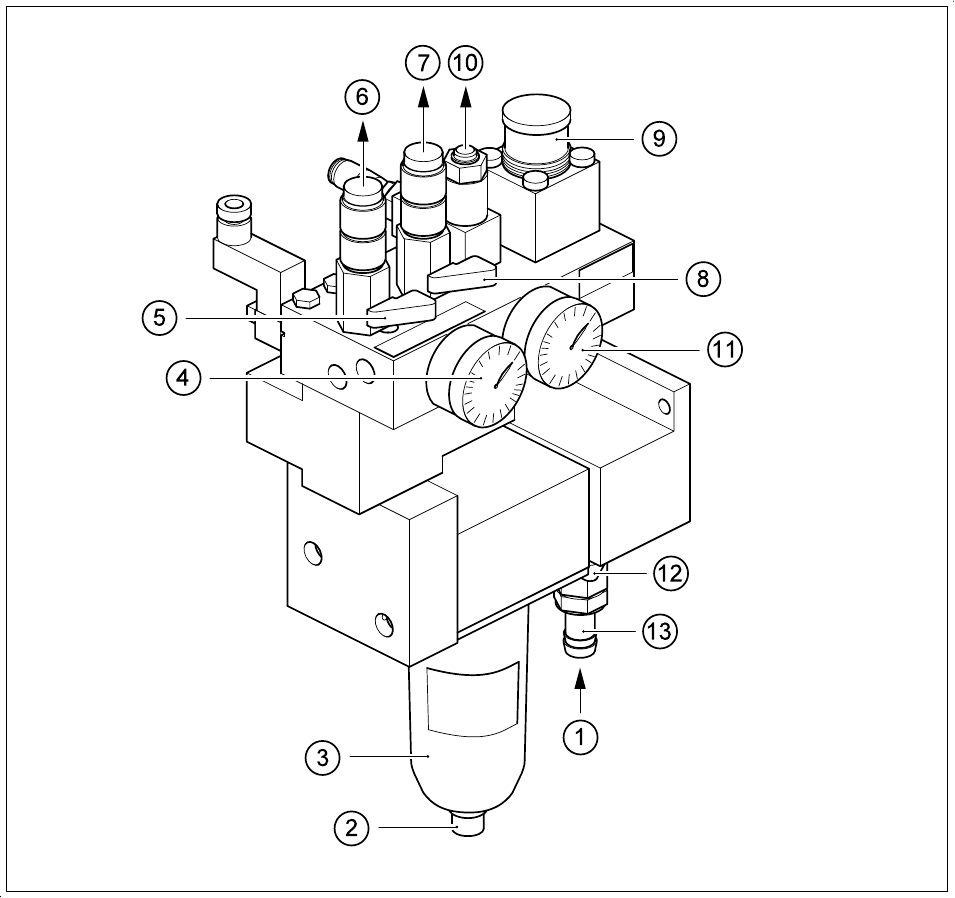
Fig. 9.3.5 Maintenance of the compressed air unit SIPLACE 80S-20, 80F
4
, 80F
4
-6, 80F
5
- Key to Fig. 9.3.5
1 Infeed of the compressed air supply
2 Drain plug for condensate
3 Filter cup, water trap
4 Manometer for operating pressure, 5.0 - 5.3 bar permissible range, permanently set to 5.1 bar
5 Stop valve for compressed air supply, placement head 1, in CLOSED position
6 Compressed air supply for vacuum generation, placement head 1
7 Compressed air supply for vacuum generation, placement head 2
8 Stop valve for compressed air supply, placement head 2, in CLOSED position
9 Compressed air regulator for the stopper
10 Connection for the components table pneumatics system
11 Manometer for compressed air supply to the stopper, 2.3 bar
12 Stop valve of the compressed air supply, in CLOSED position
13 ½“ hose connector with hose clamp

9 Maintenance SIPLACE 80S-20/F4/F4-6/F5 User’s Manual
9.3 Machine Base Edition 03/98 from Software Version SR.404.xx
9 - 30
Hose connector with hose clamp
Check the pressure displayed on lefthand manometer (see Fig. 9.3.5): during operation the manometer
should display a pressure of 5.1 bar.
If this is not the case, this may be due to the following reasons:
– The pressure in the supply network is too low. It must be 6 bar
– The filter in the compressed air unit is contaminated
– There is a leak in the compressed air supply or
– The drain plug has not been tightened up or is leaky.
NOTE
For the compressed air supply use a ½" hose without reducer. The operating pressure of 5.6 bar is preset in
the compressed air unit and cannot be changed.
If it is not possible to achieve the operating pressure of 5.0 bar despite none of the above-mentioned reasons
applying, this means the compressed air unit is defective. You should inform Siemens’ SMD service depart-
ment.
9.3.5.2 2.3 bar Pressure for Stopper
Check the pressure displayed on the right-hand, upper manometer (see Fig. 9.3.5, page 9 - 29): a pres-
sure of 2.3 bar must be displayed.
If this is not the case, remove the cover plate (see Fig. 9.1.1, page 9 - 3) from the machine base (hexagon
socket spanner, size 3) and correct the setting at the adjustment knob up and to the right.
9.3.5.3 Draining the Condensate
PLEASE NOTE
Make sure that there are no components on the placement heads before you carry out this work.
WARNING
NEVER drain off the condensate under pressure.
Remove the cover plate from the compressed air unit.
Close the shut-off valve the compressed air unit (see point 12 in Fig. 9.3.5, pages 9 - 29).
Wait a few moments until the lines have depressurized. The two manometers (see points 4 and 11 in Fig.
9.3.5, pages 9 - 29) must read 0.