80S-2080F480F4-680F5 User’s Manual.pdf - 第582页
SIPLACE 80 S20/F4/F4-6/F5 User’s Manual 10 Component Handling Edition 03/98 from Software Version SR.404.xx 10.7 Support for Fl atpack Magazine (Manual Tray Rest) 10 - 29 10.7 Support for Flatpack Magazine (Manual Tray R…
10 Component Handling SIPLACE 80 S20/F4/F4-6/F5 User’s Manual
10.6 Wafflepack Changer Edition 03/98 from Software Version SR.404.xx
10 - 28

SIPLACE 80 S20/F4/F4-6/F5 User’s Manual 10 Component Handling
Edition 03/98 from Software Version SR.404.xx 10.7 Support for Flatpack Magazine (Manual Tray Rest)
10 - 29
10.7 Support for Flatpack Magazine (Manual Tray
Rest)
PLEASE NOTE
The manual tray holder must only be placed on the right side of the SIPLACE 80F
4
or 80F
4
-6/F
5
. The tray
holder can only be positioned so that the right edge covers no more than track 73.
10.7.1 General Information
With the support for flatpack magazines components can be picked up from individual flatpack magazines.
The flatpack magazines are changed by hand.
The support for flatpack magazines is positioned on the component table like a feeder.
There are two different versions of the support which differ in their width.
Support for large flatpack magazine (260 mm) from item No. 00116430-01
Support for small flatpack magazine (136 mm) from item No. 00116432-01
10.7.2 Installation
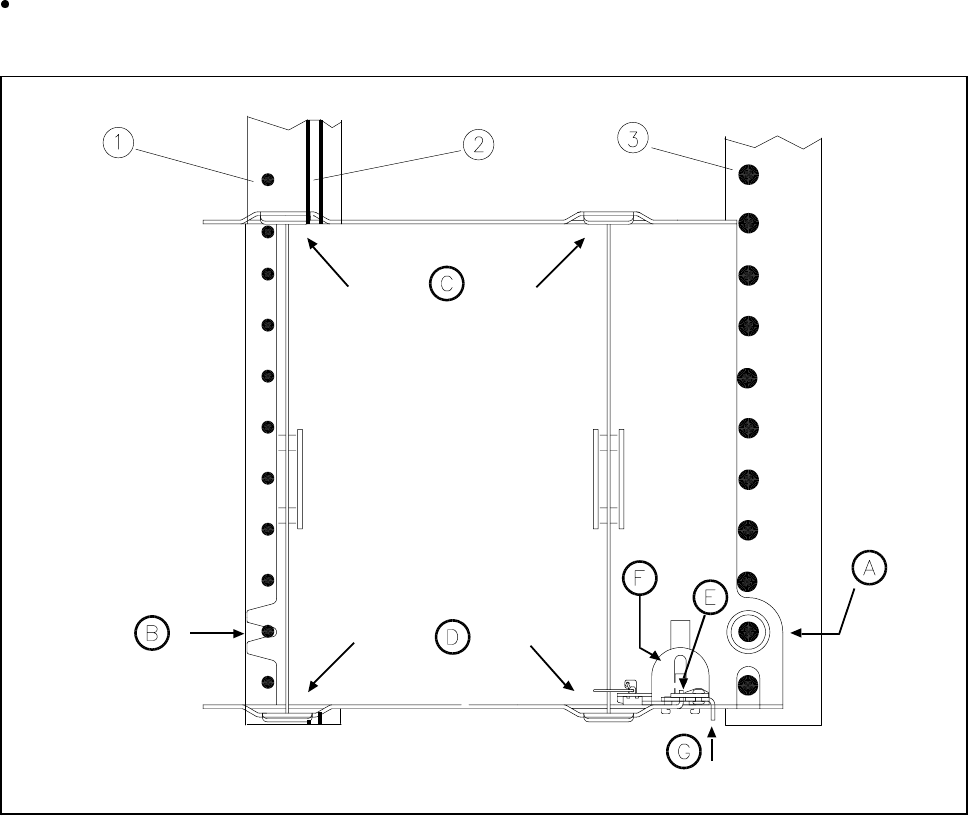
Insert the front side of the manual tray rest into the associated centering pin (B in Fig. 10.7.1).
Position the rear of the manual tray rest into the spherical cap on the component table (A in Fig. 10.7.1).
Make sure the manual tray rest is resting securely on the component table.
Position one side of the flatpack tray in the mounting (C in Fig. 10.7.1) and then press the other side into
the mounting (D in Fig. 10.7.1).
Slide the flatpack magazine up against the stop (E in Fig. 10.7.1).
Secure the flatpack magazine carrier by pressing the clamp downwards (F in Fig. 10.7.1).
To remove the flatpack magazine carrier press the clamp once more.
NOTE
With the "mounting for small flatpack magazine" (136 mm) a flatpack magazine (JEDEC or CENELEC flat-
pack magazines) can be fitted directly to the mounting, in other words, without a flatpack magazine carrier
being used.The clamp will however need changing.
10 Component Handling SIPLACE 80 S20/F4/F4-6/F5 User’s Manual
10.7 Support for Flatpack Magazine (Manual Tray Rest) Edition 03/98 from Software Version SR.404.xx
10 - 30
10.7.3 Changing the Retainer
Hold the retainer firmly (G in Fig. 10.7.1). Press the clamp (F in Fig. 10.7.1) downwards and remove the
retainer by pressing it out sideways.
Fig. 10.7.1 Installation/Removal
- Key to Fig. 10.7.1
1 Centering pins 2 Magnetic rail
3 Spherical caps
10.7.4 Data Input
Define the flatpack magazines as described in the SIPLACE UNIX line computer UNIX user’s
manual.