80S-2080F480F4-680F5 User’s Manual.pdf - 第613页
11 Station Extensions/Options SIPLACE 80S-20/F4/F4-6/F5 User’s M anual 11.3 PCB Barcode Edition 03/98 from Software Version SR.404.xx 11 - 16 11.3.4.1 Adjusting the Reading Beam Place th e board o nto the inp ut board. T…

SIPLACE 80S-20/F4/F4-6/F5 User’s Manual 11 Station Extensions/Options
Edition 03/98 from Software Version SR.404.xx 11.3 PCB Barcode
11 - 15
NOTE
If you know what barcode you want to process during start-up, the barcode will be set to your barcode type.
Otherwise the CODE 2/5 interleaved barcode type will be preinstalled. If you want to change your barcode
type, the steps you will need to take for parametrization are described below.
Parametrization takes place using the program SR_INST_LPBC.001.001.
The only actions you should carry out in the menus are the ones described below. All other parameters are
standard values and need not be changed.
Insert the diskette with the SITEST test program into drive A: of the MC computer
Switch the control unit ON
Boot the system with the key combination Strg (Ctrl) + Alt + Entf (Del)
Insert diskette SR_INST_LPBC.001.001 into drive A: of the MC computer
Boot the system with the key combination Ctrl+Alt+Del
The home screen with the main view menu will be displayed.
Press function key F4. A menu for selecting the interface will be displayed.
Select the interface COM 2.
Press the function key F10. This will return you to the main view menu and the interface will be configured
for COM 2.
In the main view menu select < E >
In the Code sub-menu select < 1 >
NOTE
If the sub-menu does not open, there is no communication with the PCB bar code reader unit.
Possible causes: +24 V voltage supply missing, interface interrupted, laser defective.
In the Code type sub-menu select < 1>
Select the code type you want to work with < Customer-specific>
NOTE
When the code type or number of digits is changed both new values will need to be keyed in anew.
Key in the number of digits in the bar code <Customer-specific>
Confirm with < Enter >
NOTE
Specify a single number for the number of digits in the bar code. If you specify a range of numbers, this
may lead to errors.
Quit the menu with < Esc >
Quit the menu with < Esc >
Quit the menu with < Esc >
Secure the parameters with ’Store permanent’ < 3 >
11 Station Extensions/Options SIPLACE 80S-20/F4/F4-6/F5 User’s Manual
11.3 PCB Barcode Edition 03/98 from Software Version SR.404.xx
11 - 16
11.3.4.1 Adjusting the Reading Beam
Place the board onto the input board.
The SR_CONF_LPBC.100.001 diskette must still be loaded and the control system be switched on.
Adjust the reading head so that the laser beam can scan the entire bar code when the board is moved by.
At this point note the reading orientation of the bar code.
Switch the read beam ON using the + key on the keyboard.
Move the board over the barcode reader. The bar code which has been read will be displayed on the
screen.
Switch the read beam OFF using the – key on the keyboard.
NOTE
For further details on operating and programming, please refer to the UNIX line computer user's manual.
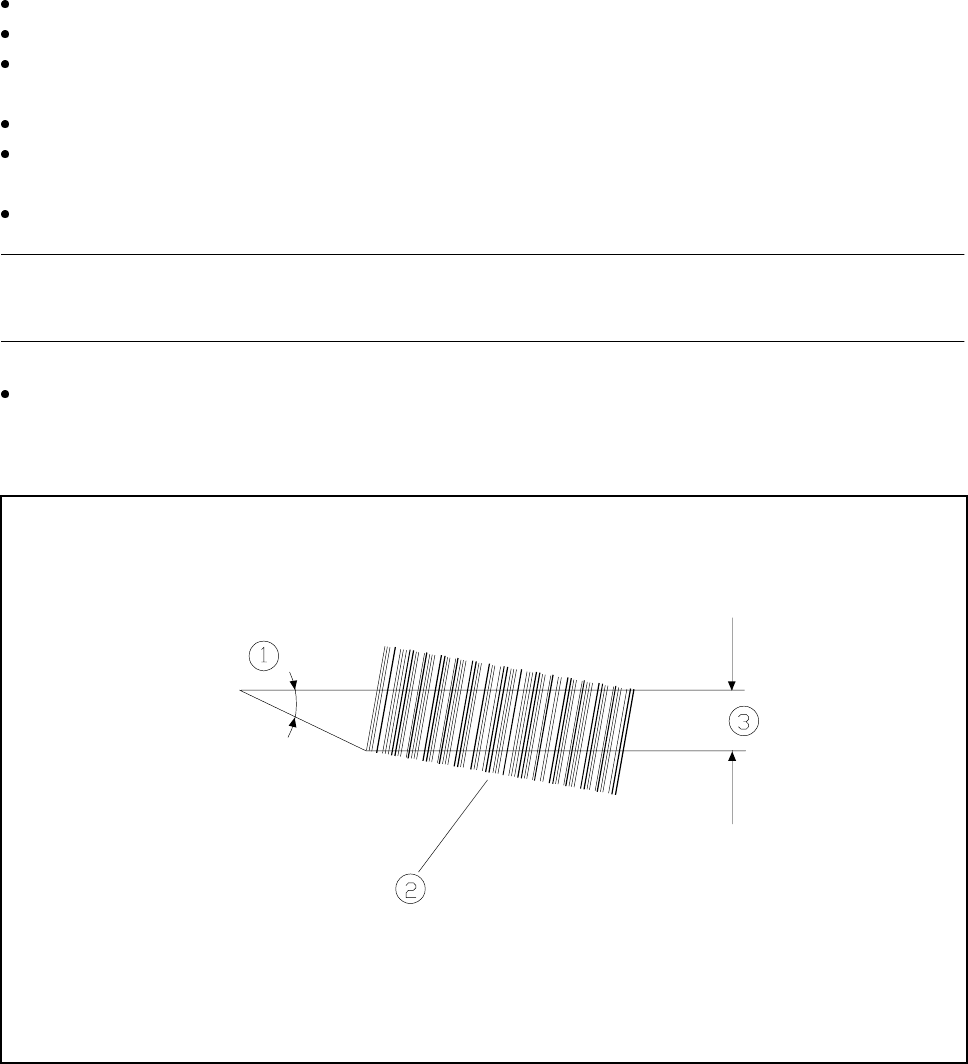
Please note,
the smaller the reading angle the larger the effective reading length, and the larger this effective line length
is, the more certain reading of the bar code will be.
Fig. 11.3.2 Barcode reading
- Key to Fig. 11.3.2
1 Reading angle 2 Barcode
3 Effective line length
SIPLACE 80S-20/F4/F4-6/F5 User’s Manual 11 Station Extensions/Options
Edition 03/98 from Software Version SR.404.xx 11.3 PCB Barcode
11 - 17
11.3.5 Limitations
11.3.5.1 Barcode reading from above
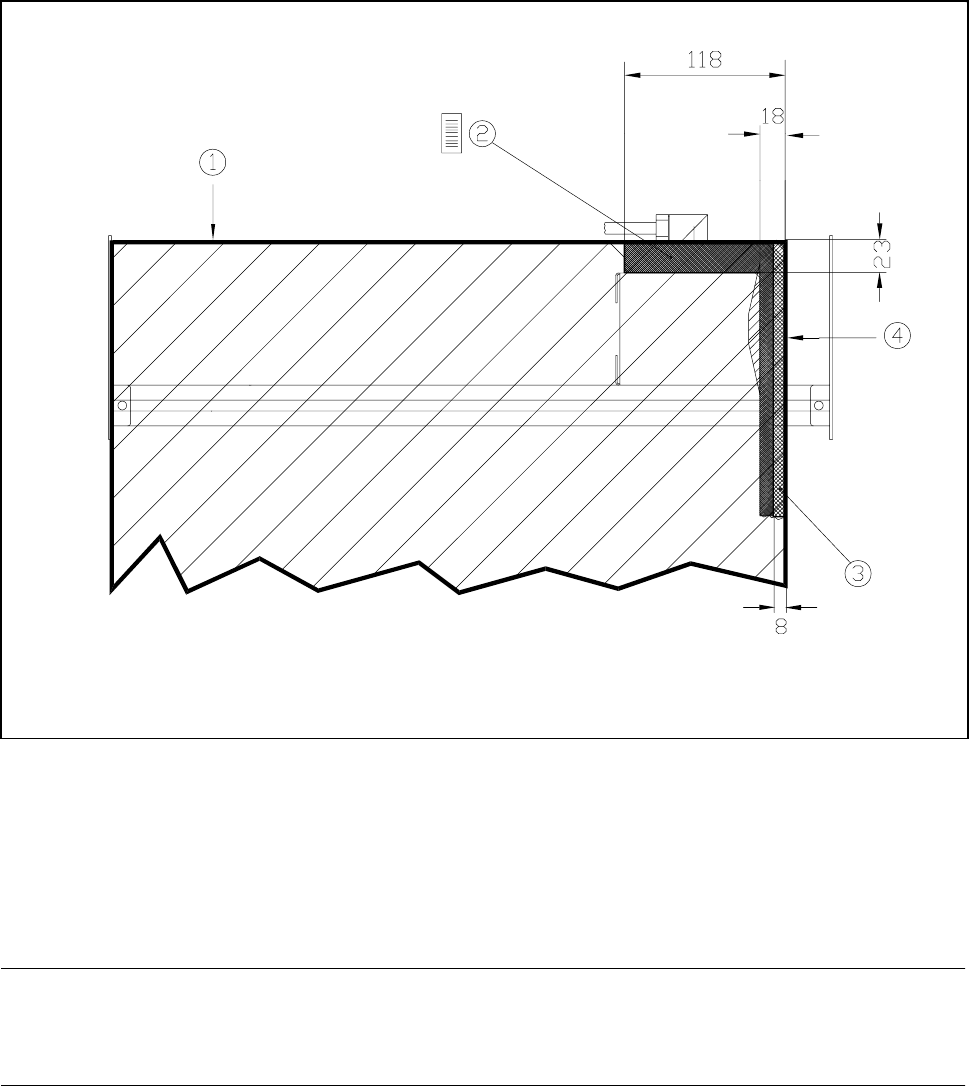
Restrictions will apply to barcode reading from above in the case of boards longer than 460 mm (see Fig.
11.3.3).
Fig. 11.3.3 Restrictions to barcode reading from above
- Key to see Fig. 11.3.3
1 Trailing edge of the board at a length of 460 mm
2 In this area a vertical positioning of the barcode is not permissible.
3 In this area it is not possible to read the barcode over the entire board length.
4 Outer edge of boards
NOTE
No barcodes should be located in the vicinity of the board clamping device as the barcode could then be
scraped and rendered illegible.