SussPA300UserGuide.pdf - 第37页
36 SUSS / PA300 / User Manual / M10-121841-00 / February 2002 Manual Movement The manual platen movement control knob is located at the left front corner of the prober and provides a precise contact/separation stroke and…
SUSS / PA300 / User Manual / M10-121841-00 / February 2002
35
REAL POS switches the display to the stage position in µm from the home position. F1
displays the X distance, F2 the Y value and F3, the Z position
QUIET switches on the quiet mode. Once the control position has been reached,
electricity is taken away from all motors to reduce electrical noise interference to the
device under test.
TURRET Changes microscope objective. Display changes to DEC INC and chooses
the next smaller / larger objective.
7.4 PA300 Mechanic Assembly
The PA300 Semiautomatic Prober has a fully motorized chuck stage consisting of x, y,
z and theta, and typically a motorized microscope movement of x and y axes. Additionally
the platen, microscope focus and nosepiece and up to four motorized probeheads
may be installed. A pin drive is integrated in the Z axis.
7.4.1 Microscope Movement
The microscope movement mounts the microscope to the prober and provides a means
of viewing beyond the field of view when the chuck cannot be moved because probes
are in contact. The microscope movement consists of x and y axis translation and a
microscope lift; the microscope typically has a manual focus or z axis and nosepiece
controls, which can also be motorized.
There are several microscope movements available:
• Motorized,
• Manual coaxial knob type,
• Adjustable.
Motorized
All microscope x and y axes control, as well as a motorized focus and nosepiece, is
performed from the PC-based User Interface or Joystick Controller.
Manual Coaxial
To change the position of the microscope use the knobs located on the right side of the
microscope movement. The Drag Lever sets the amount of resistance for precise feel.
Adjustable
The Adjustable Mount is a fixed microscope mount with an adjustable fixed position.
This allows the microscope to be coarsely positioned or centered over the probe tips.
7.4.2 Platen and Controls
The platen supports the probeheads and probecard. The typical configuration is for
vacuum base probeheads and a manual movement mount. Other configurations can
include magnetic, bolt-down and clamping probehead bases, as well as fixed mount.
The lid should only be opened for loading and unloading of wafers and substrates but
should be closed during operation.
36
SUSS / PA300 / User Manual / M10-121841-00 / February 2002
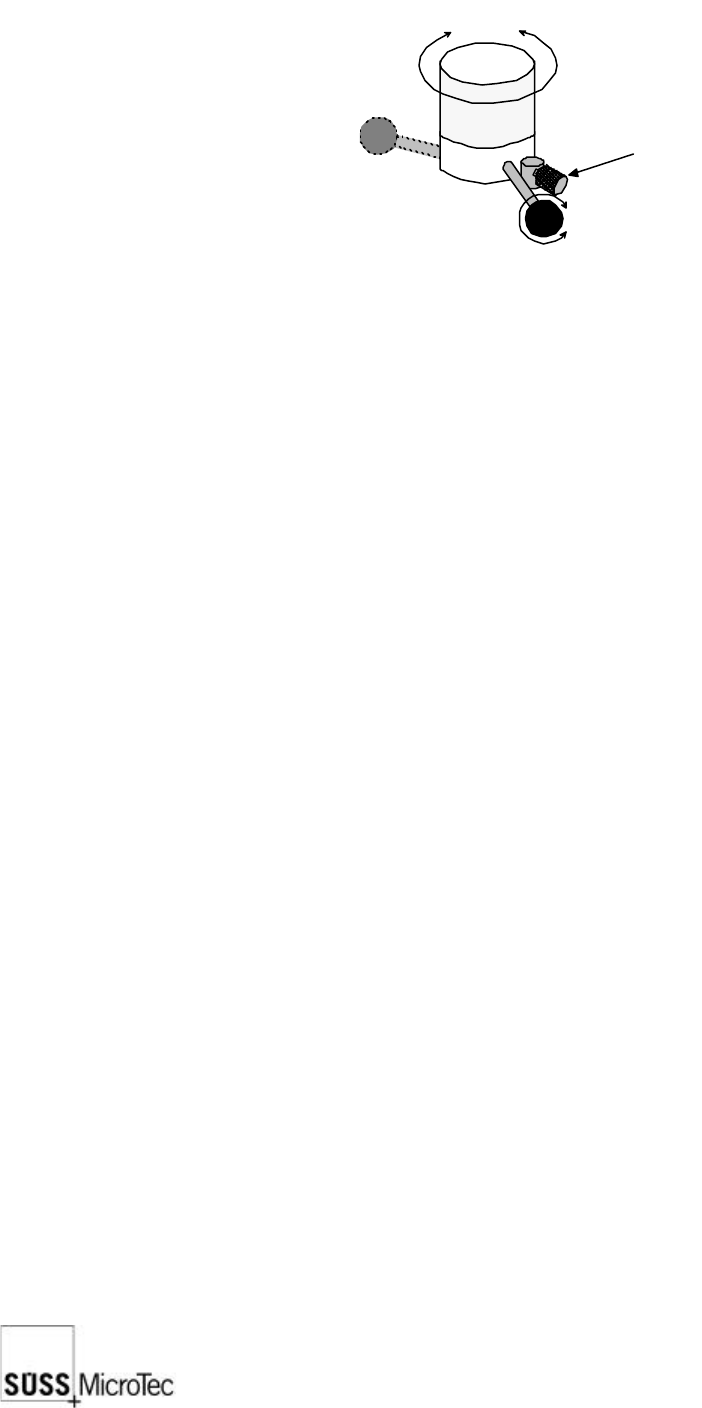
Manual Movement
The manual platen movement control knob is located at the left front corner of the
prober and provides a precise contact/separation stroke and a coarse set-up range.
contact
position
separate
position
raise lower
secured
adjust
lock
Separation/Contact Lever: the lever of the platen control knob provides 0.4
mm of travel to facilitate precise simultaneous
separation or contact of probe tips. A clockwise
rotation raises the platen for separation.
Platen Height Adjustment Knob: the large knurled knob provides up to 35 mm of
platen height adjustment to accommodate test
fixtures of various heights. This knob is locked in
place by the separation/contact lever. To adjust,
turn the lever a quarter of a turn anticlockwise;
the adjustment knob is now free to turn. A
clockwise movement raises the platen. Secure
by turning the lever clockwise.
Platen Lock: the small knurled knob locks the platen in the
current position. To lock, turn the lock knob inward.
Platen Travel Indicator: the dial indicator located on the rear left side of
the platen provides a means to determine the
amount of platen travel. A clockwise movement
indicates that the platen is rising.
Probehead Mounting Options
Vacuum: Vacuum relies on the system vacuum, also used to secure the
wafer to the chuck, to secure the probeheads. Vacuum is
distributed using six-port manifolds located on both sides of the
prober on the microscope bridge. Shutoffs for each probehead
are provided and when not in use should be closed to preserve
maximum system vacuum.
Bolt-down: Bolt-down is used in high frequency applications due to the
stability required for semi-rigid cables. Also probe-heavy
probeheads could unbalance, damaging the tips, if vacuum is
lost with vacuum secured probeheads.
SUSS / PA300 / User Manual / M10-121841-00 / February 2002
37
Platen Cable Clamps
Cable clamps are provided to secure electrical connections and/or vacuum hoses.
Chuck Stage
All stage movements are DC servo motor driven with encoder positioning feedback.
Stage control is from the ProberBench User Interface or Joystick Controller. No manual
controls are required.
Vacuum Hold-down Adjustment
The vacuum chuck has provisions to adjust the vacuum hold-down for various size
wafers. To change the wafer size, unscrew and remove the current seal-pin. Insert
and screw in the appropriate length seal-pin. The unused seal-pins are usually stored
on the front left hand side of the system.
Chuck Grounding and Biasing
The chuck is isolated from ground and a lead is provided from the chuck to a banana
jack at the right rear corner of the prober mechanic. At this point the jack can be
connected to ground with the ground jack provided, or connected to a bias voltage
source.
Pin Drive
The pin drive is integrated into the Z-Axis and because the pins are fixed, one controls
them with the movement of the Z-Axis, an automatic interlock prevents damage
occurring to the wafer. If the wafer is lying on the chuck and held by vacuum, the
movement of the Z-Axis is restricted so that the pins stay in the chuck. After switching
off the vacuum, the chuck can be driven as far as the wafer unloading height and the
pins stand finally about 5-6mm away.