182050 User manual.pdf - 第11页
semi automatic 0$&+,1 (352*5 $00,1 * ,1752'8& 7,21 Software Version 07SP02 User Manual 1.1 CHAPTER 1 MACHINE PROGRAMMING INTRODUCTION This chapter details the procedur e for a product setup, i n stages and …

'(.:25/':,'(
DEK ASIA PACIFIC
Central China
DEK Printing Machines Ltd
Shanghai Rep
Zhong Hai Building
11th Floor
Unit C/D
No 398 Huai Hai Zhong Road
Shanghai Province
Shanghai
200020
China
Tel: +86 21 53 830 200
Fax: +86 21 53 063 018
Email: deksha@public4.sta.net.cn
DEK ASIA PACIFIC
North China
DEK Tianjin Service Station
Room 8820
Shanglu Building No 165
San Ma Road
Nankai District
Tianjin
300100
China
Tel: +86 22 2702 1089
Fax: +86 22 2722 9421
Email: mlsun@dek.com
DEK ASIA PACIFIC
South China
DEK Shenzhen Service Station
Room 1612
Great China Tower
1008 Jiangshe Road
Guangdong Province
Shenzhen
518001
China
Tel: +86 755 239 2124
Fax: +86 755 239 2130
Email: rlee@dek.com
semi automatic
0$&+,1(352*5$00,1*
,1752'8&7,21
Software Version 07SP02 User Manual 1.1
CHAPTER 1 MACHINE PROGRAMMING
INTRODUCTION
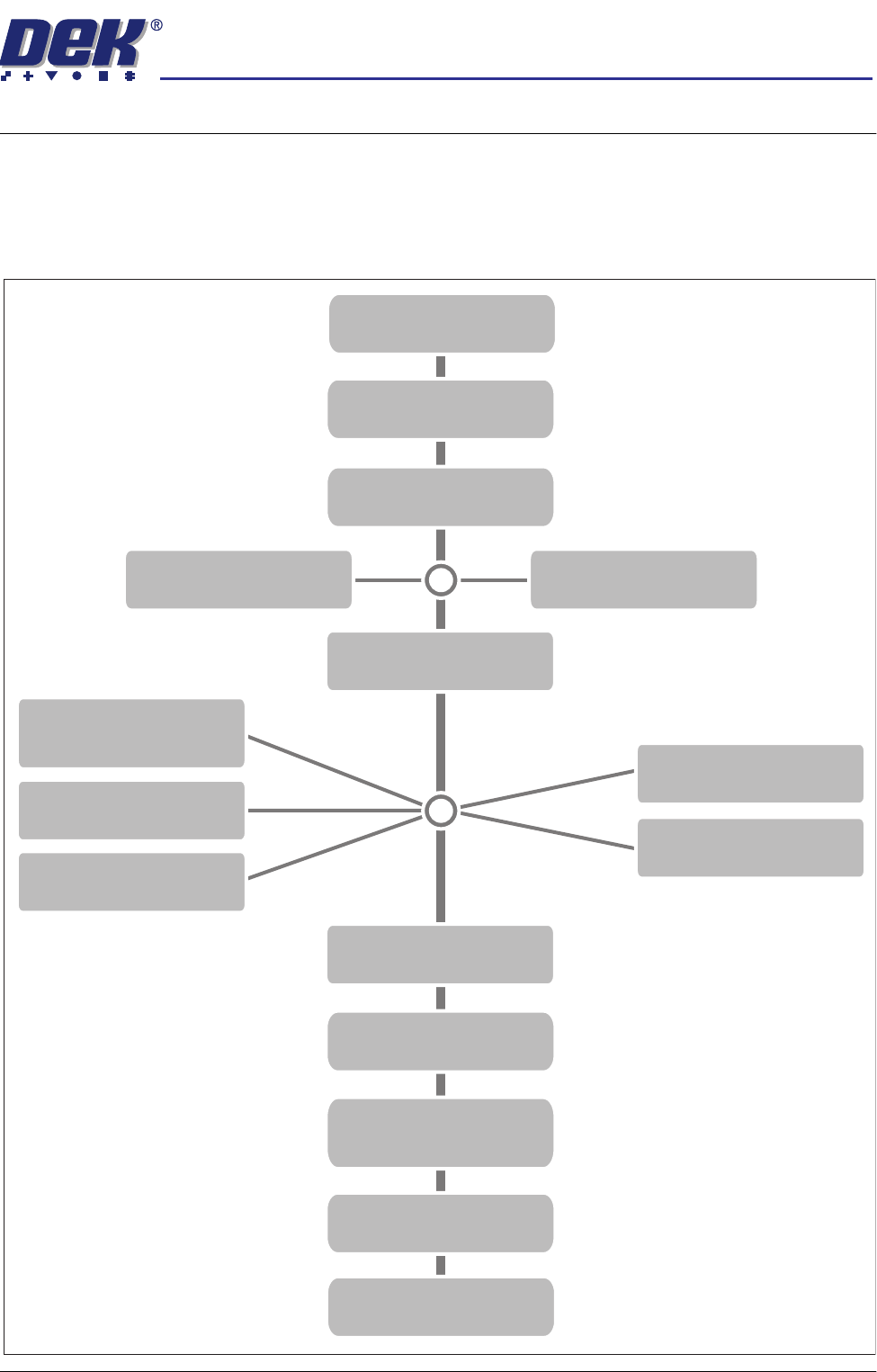
This chapter details the procedure for a product setup, in stages and are as
follows:
STAGE 1
POWER UP
STAGE 2
LOAD A PRODUCT FILE
STAGE 3
EDIT A PRODUCT FILE
STAGE 9
PRINT
Load Paste
IN STEP MODE
STAGE 10
2DI SETUP
STAGE 11
PRINT IN RUN MODE
STAGE 8
VISION SYSTEM SETUP
STAGE 6E
FORMFLEX TOOLING
STAGE 6C
DEDICATED TOOLING
STAGE 6B
VACUUM TOOLING
STAGE 6D
MULTIFLEX TOOLING
STAGE 6A
MAGNETIC PILLARS
TOOLING
STAGE 4A
FIT SQUEEGEES
STAGE 5
SCREEN UNLOAD
STAGE 7
SCREEN LOAD
STAGE 4B
PROFLOW SETUP
semi automatic
0$&+,1(352*5$00,1*
67$*(32:(583
1.2 User Manual Software Version 07SP02
STAGE 1 - POWER UP
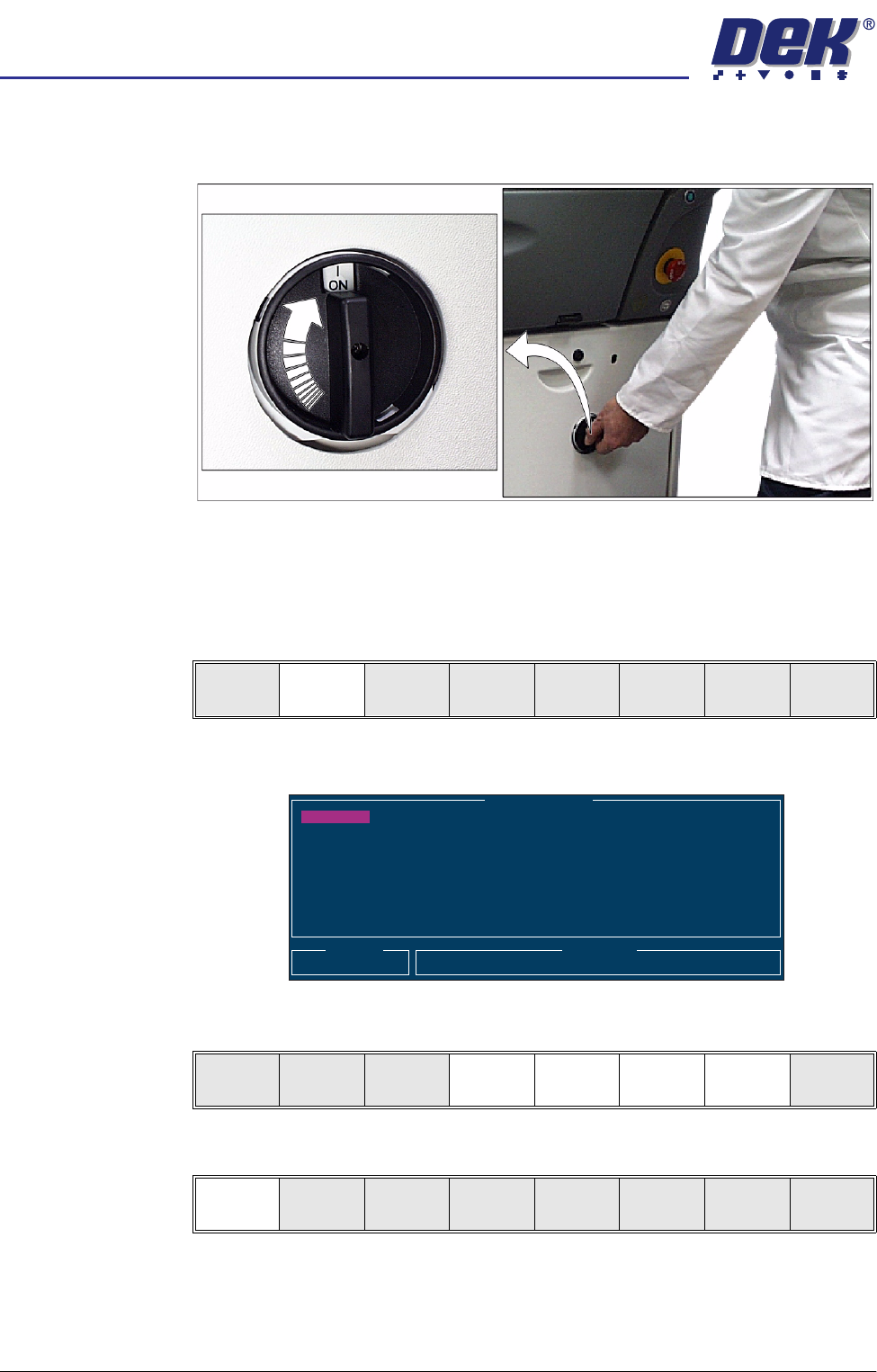
1. Turn the mains isolator switch to ON.
2. When the message ‘Press SYSTEM Switch To Initialize Printer or Select
Diagnostics or Load Data’ is displayed in the message prompt bar, either:
a. Select Load Data (F2) if the loaded product is unknown or needs to be
changed.
b. Go to Step 5 if the loaded product file is known to be the correct one.
The following Load data File window is displayed:
3. Use Left, Right, Up or Down function keys (F4-F7) to highlight the required
file.
4. Press Load (F1).
Load
Data
Diagnost
Load Data File
Product ID
Search
Training
265TEST1
265TEST1
ANDY H
CALIBRA
DEFAULT
DEK04
DEK06
Load
Rebuild
List
Left Right Up Down Exit
Load
Rebuild
List
Left Right Up Down Exit