182050 User manual.pdf - 第174页
semi automatic +286(.((3,1 * )($785(/,& (16,1* 6.20 User Manual Software Ve rsion 07SP02
semi automatic
+286(.((3,1*
)($785(/,&(16,1*
Software Version 07SP02 User Manual 6.19
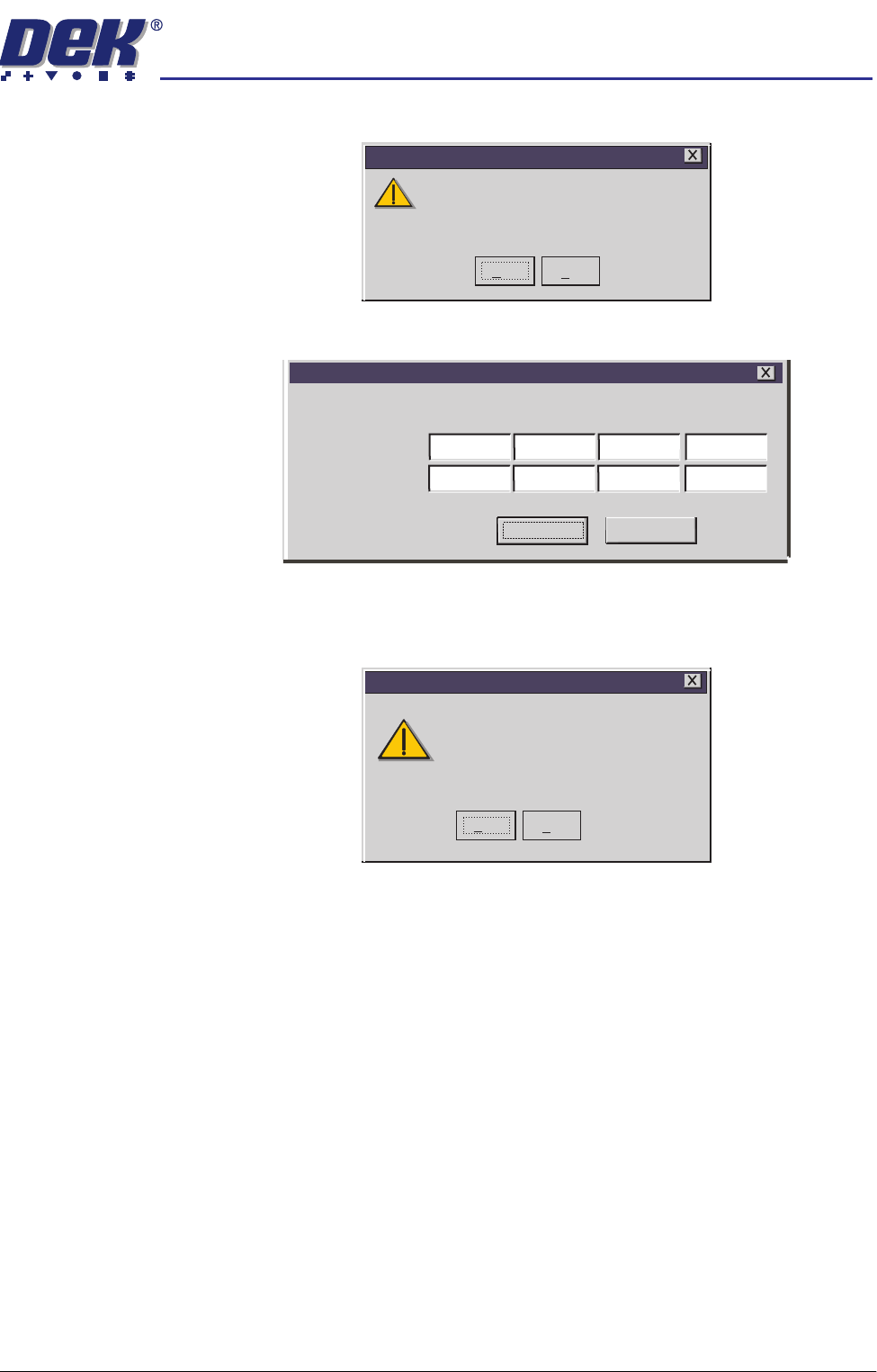
7. Select Yes on the following window:
The following window is displayed:
8. Carefully enter the 8 groups of 8 alphanumeric characters of the installation
instructions in the order specified and select Proceed. Once the licence has
been accepted the following window is displayed:
9. If further licencing instructions are to be entered, select Yes and repeat Step
8. If not, select No and Exit the program.
If you have more than a single instruction to enter,
it is essential that you enter them in the order specified
If you are in any doubt about this, please contact
Customer Support before you proceed.
Feature Licensing
Yes
No
Enter Licence Installation Instruction
Installation Instruction
Proceed
Cancel
ASDEDIV3
32WQLOIJ
MVBRH371
MNBVCXZ1
LKJH743G
GFDS76AP
POIUYTRE
LOREV341
Installation instruction accepted.
Are there any more?
Feature Licensing
Yes
No

semi automatic
+286(.((3,1*
)($785(/,&(16,1*
6.20 User Manual Software Version 07SP02
semi automatic
',163(&7,21
02'8/(29(59,(:
Software Version 07SP02 User Manual 7.1
CHAPTER 7 2D INSPECTION
MODULE OVERVIEW
Introduction 2D Inspection (2Di) utilizes the machine vision system for accurate detection of
paste on the board after printing. When this option is enabled the board can be
inspected for the amount of pad covered by solder paste, as a % of the aperture
size.
When certain function keys are selected the existing machine status page is
replaced by a Graphical User Interface (GUI). The GUI allows the user to setup
and navigate 2Di sites quickly and easily.
Purpose By monitoring the printing process, 2Di ensures the continual quality of board
printing. 2Di, if licensed, verifies the correct paste coverage.
If there is insufficient paste on the board, paste load and reprinting the board
operations can be undertaken.
2Di optimizes the cycle time by eliminating unnecessary paste dispensing
operations. To achieve this, the system inspects various areas of the board to
detect the amount of paste on pad.
Operation Board inspection is licensed and can be enabled in the Set Prefs menu. The
level of inspection is None (No Inspection) or Basic (Paste on Pad).
Pre-images Board inspection is achieved by image comparison. Therefore prior to printing,
the camera visits all programmed sites to capture images of the bare sites.
This captured image, called a Pre-image, is taken for every site setup. The two
available parameter settings for capturing Pre-images are:
• One - Pre-image captured on the first board in a batch only.
• Every - Pre-image captured on every board of a batch.
There is no provision to select sites to be pre-imaged individually. All sites are
pre-imaged once (one) or every cycle (every).
NOTE
A new batch may be started when the machine is switched ON/OFF or a product
file being re-loaded.