YSM20R_YSM20WR_Mainte_E.pdf - 第132页
3-71 3 Periodic maintenance items 6 Detach camer a holder . 1. Remove 4 mounting bolts of camera holder with hex wrench (2.5). 2. Detach the camera holder . n NOTE The knock pin is installed to the camera holder for posi…
3-70
3
Periodic maintenance items
5
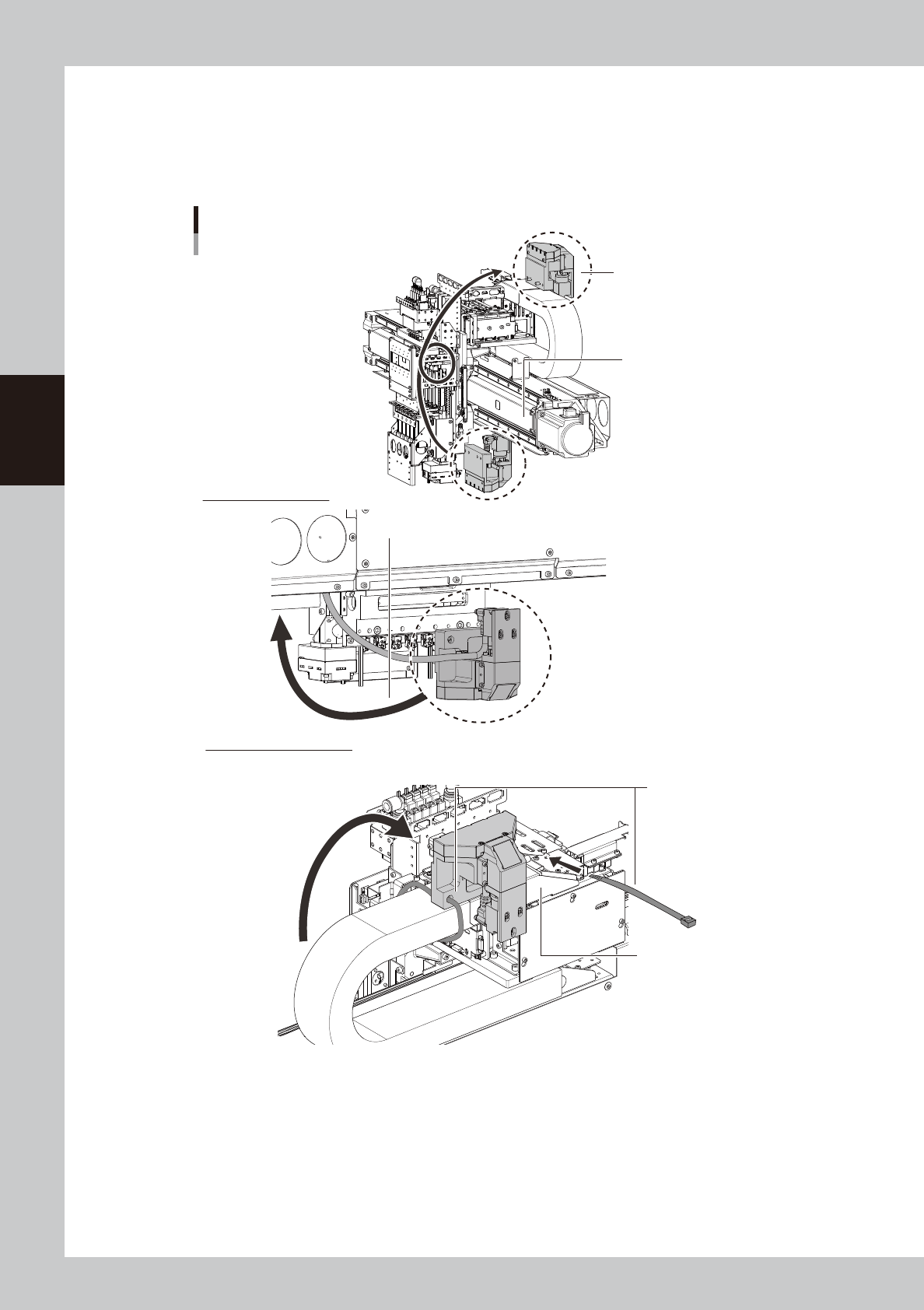
Mount side-view camera temporarily.
Mount side-view camera temporarily on the X-axis cable duct cover for easier maintenance work.
1. Pass the side-view camera assembly under the X-axis frame. Turn over the side-view camera and
mount it on the X-axis cable duct cover.
2. Mount the side-view camera assembly with cable ties (250 mm or longer) temporarily.
Mounting side-view camera temporarily
Mount with cable ties
temporarily.
Lower side of FM head
Pass under X-axis frame.
X-axis cable duct cover
X-axis frame
Side-view camera assembly
Upper side of X axis frame
53388-KMK-00
3-71
3
Periodic maintenance items
6
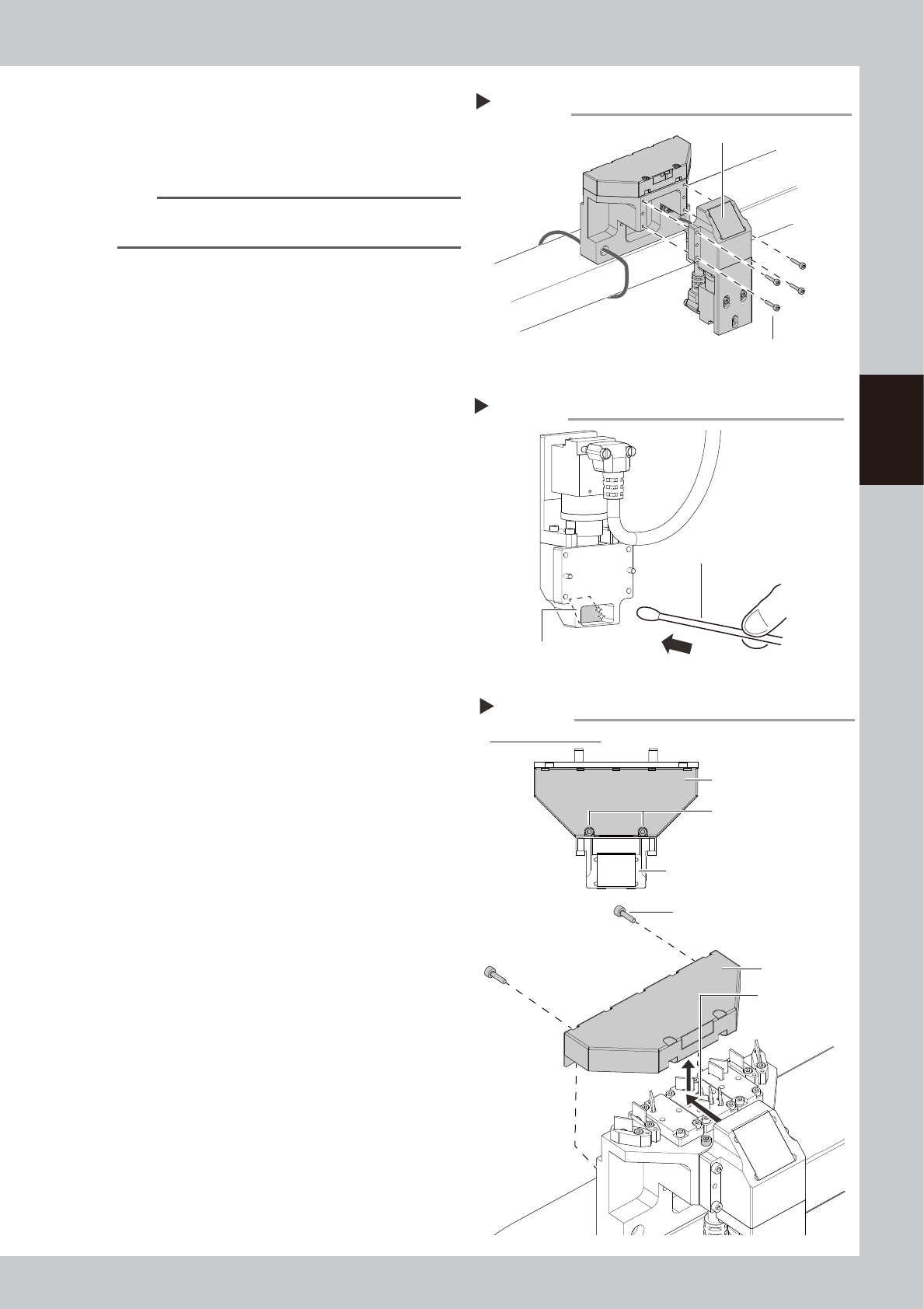
Detach camera holder.
1. Remove 4 mounting bolts of camera
holder with hex wrench (2.5).
2. Detach the camera holder.
n
NOTE
The knock pin is installed to the camera holder for
positioning.
7
Clean reflector plate in camera
holder.
1. Apply absolute ethanol to a cotton swab
slightly and clean the reflector plate in
camera holder.
2. Wipe the reflector plate with a dry cotton
swab without absolute ethanol.
3. Check that no solvent remains on the
reflector plate.
8
Return the camera holder to
original position.
9
Detach cover of side-view camera.
1. Loosen 2 mounting bolts of camera cover
for camera holder with hex wrench (2.5).
The bolts do not need to be removed.
2. Remove the rest of 2 mounting bolts of
cover.
3. Slide the camera cover backward and
raise to detach it.
Detaching camera holder
Step 6
Camera holder
Mounting bolt
53389-KMK-00
Cleaning reflector plate
Step 7
Reflector plate
Cotton swab with absolute ethanol
53390-KMK-00
Detaching camera cover
Step 9
Loosen 2 mounting bolts.
Figure viewed from top
Camera holder
Mounting bolt
Camera cover
Slide camera
cover.
Camera cover
53391-KMK-00
3-72
3
Periodic maintenance items
0
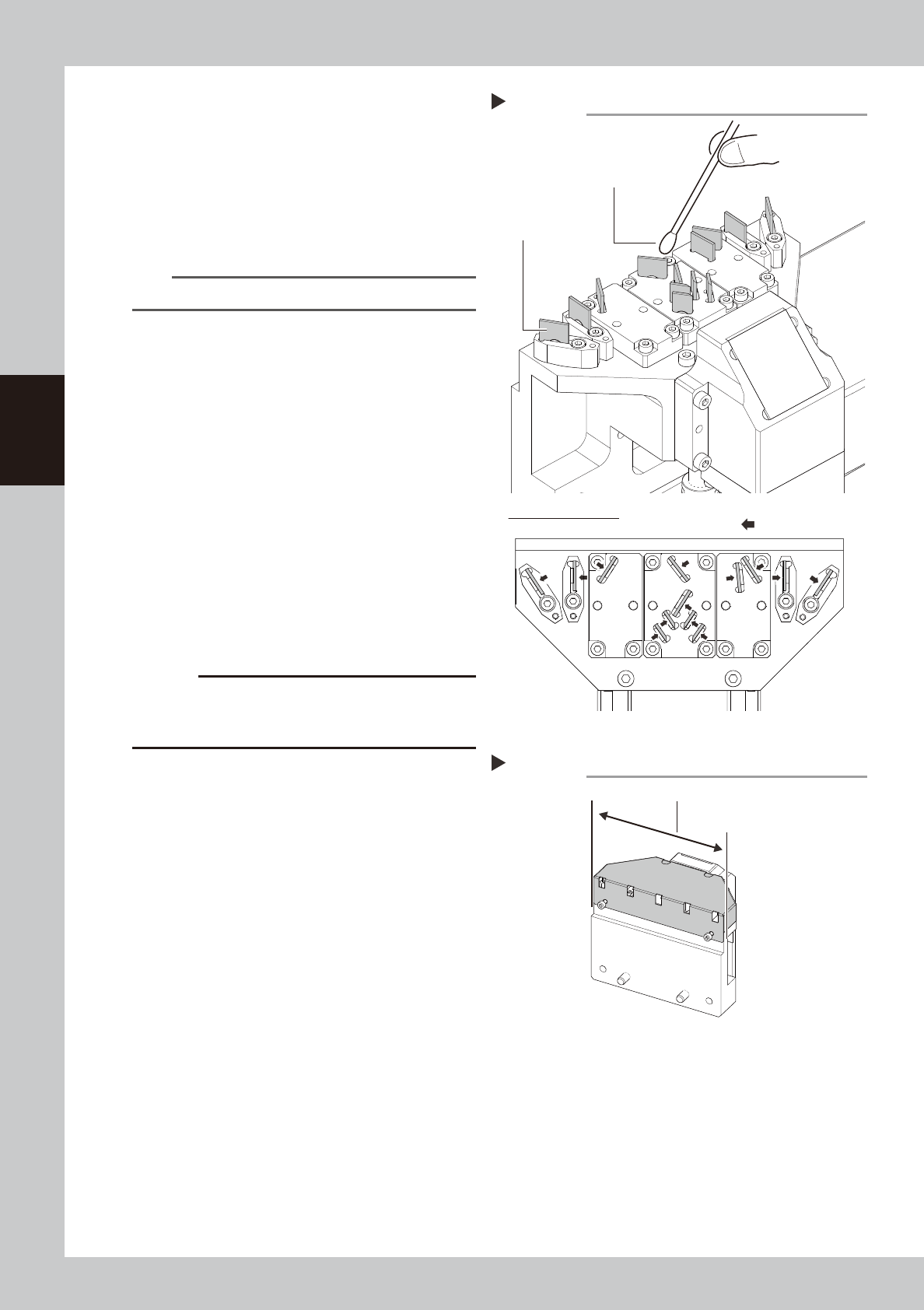
Clean inner reflector plates.
1. Apply absolute ethanol to a cotton swab
slightly. Clean mirror finished surfaces of
13 reflector plates.
2. Wipe reflector plates with a dry cotton
swab without absolute ethanol.
3. Check that no solvent remains on the
reflector plates.
n
NOTE
Clean and wipe reflector plates gently.
q
Attach side-view camera cover.
Attach the side-view camera cover in
reverse order of Step 9. After attaching the
cover, check that it is attached uniformly to
the side-view camera assembly.
w
Return side-view camera assembly
to the original position.
1. Cut cable ties mounting the side-view
camera temporarily with cutting pliers.
2. Return the side-view camera assembly to
the original position and attach it with 2
mounting bolts.
3. Fix the side-view camera cable with
cable ties (100 mm or longer) to positions
where 4 cable ties were cut in Step 3.
4. Remove the square cloth.
c
CAUTION
Make sure not to damage the cable when cutting
cable ties. Do not fasten cable ties excessively when
fixing the cable.
Cleaning inner reflector plates
Step 10
Reflector plate
Cotton swab with absolute ethanol
Figure viewed from top
: Cleaning side
53392-KMK-00
Attaching camera cover
Step 11
Attach cover uniformly.
53393-KMK-00