YSM20R_YSM20WR_Mainte_E.pdf - 第133页
3-72 3 Periodic maintenance items 0 Clean inner reflector plates. 1. Apply absolute ethanol to a cotton swab slightly. Clean mirror finished sur faces of 13 reflector plates. 2. Wipe reflector plates with a dry cotton sw…
3-71
3
Periodic maintenance items
6
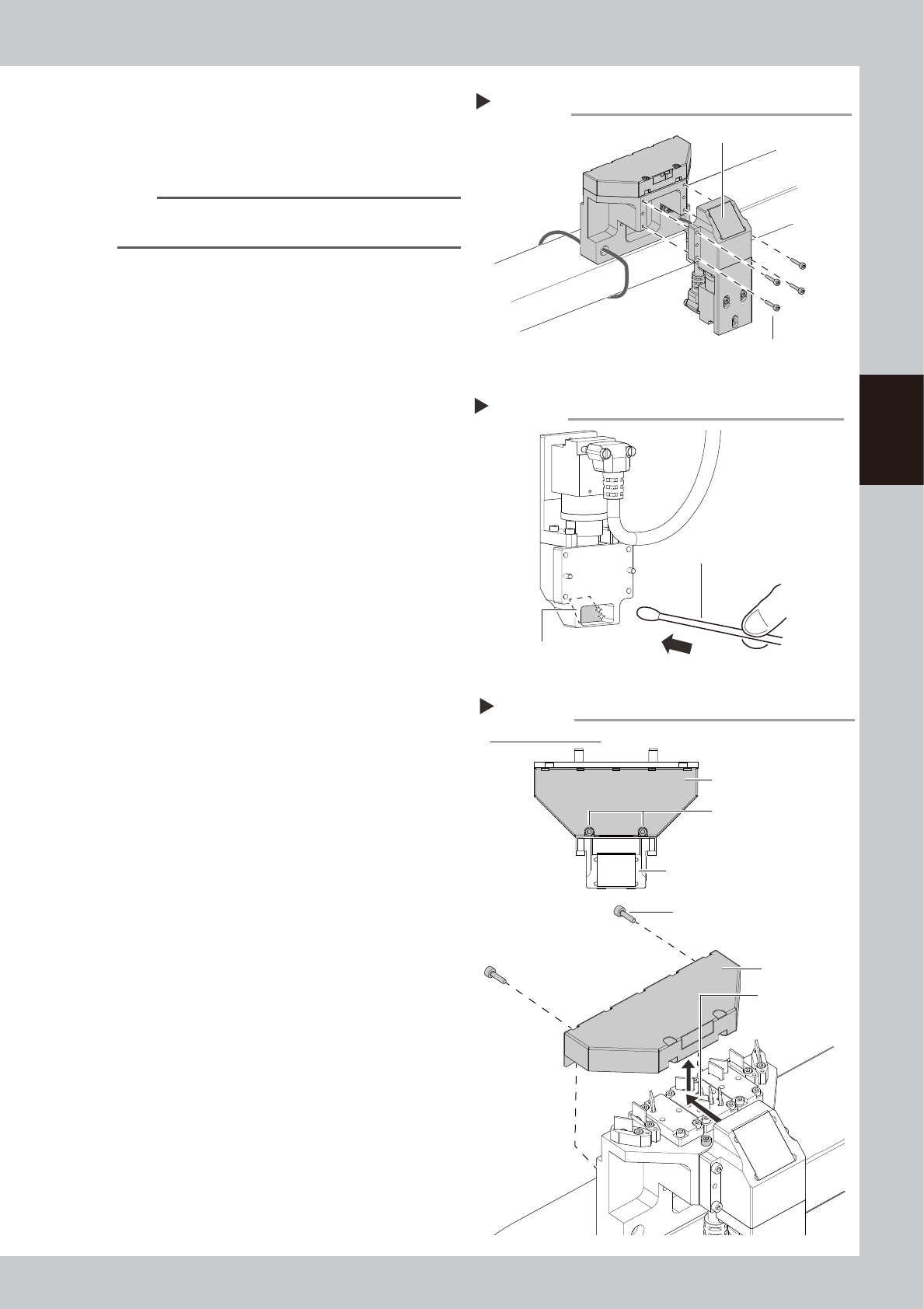
Detach camera holder.
1. Remove 4 mounting bolts of camera
holder with hex wrench (2.5).
2. Detach the camera holder.
n
NOTE
The knock pin is installed to the camera holder for
positioning.
7
Clean reflector plate in camera
holder.
1. Apply absolute ethanol to a cotton swab
slightly and clean the reflector plate in
camera holder.
2. Wipe the reflector plate with a dry cotton
swab without absolute ethanol.
3. Check that no solvent remains on the
reflector plate.
8
Return the camera holder to
original position.
9
Detach cover of side-view camera.
1. Loosen 2 mounting bolts of camera cover
for camera holder with hex wrench (2.5).
The bolts do not need to be removed.
2. Remove the rest of 2 mounting bolts of
cover.
3. Slide the camera cover backward and
raise to detach it.
Detaching camera holder
Step 6
Camera holder
Mounting bolt
53389-KMK-00
Cleaning reflector plate
Step 7
Reflector plate
Cotton swab with absolute ethanol
53390-KMK-00
Detaching camera cover
Step 9
Loosen 2 mounting bolts.
Figure viewed from top
Camera holder
Mounting bolt
Camera cover
Slide camera
cover.
Camera cover
53391-KMK-00
3-72
3
Periodic maintenance items
0
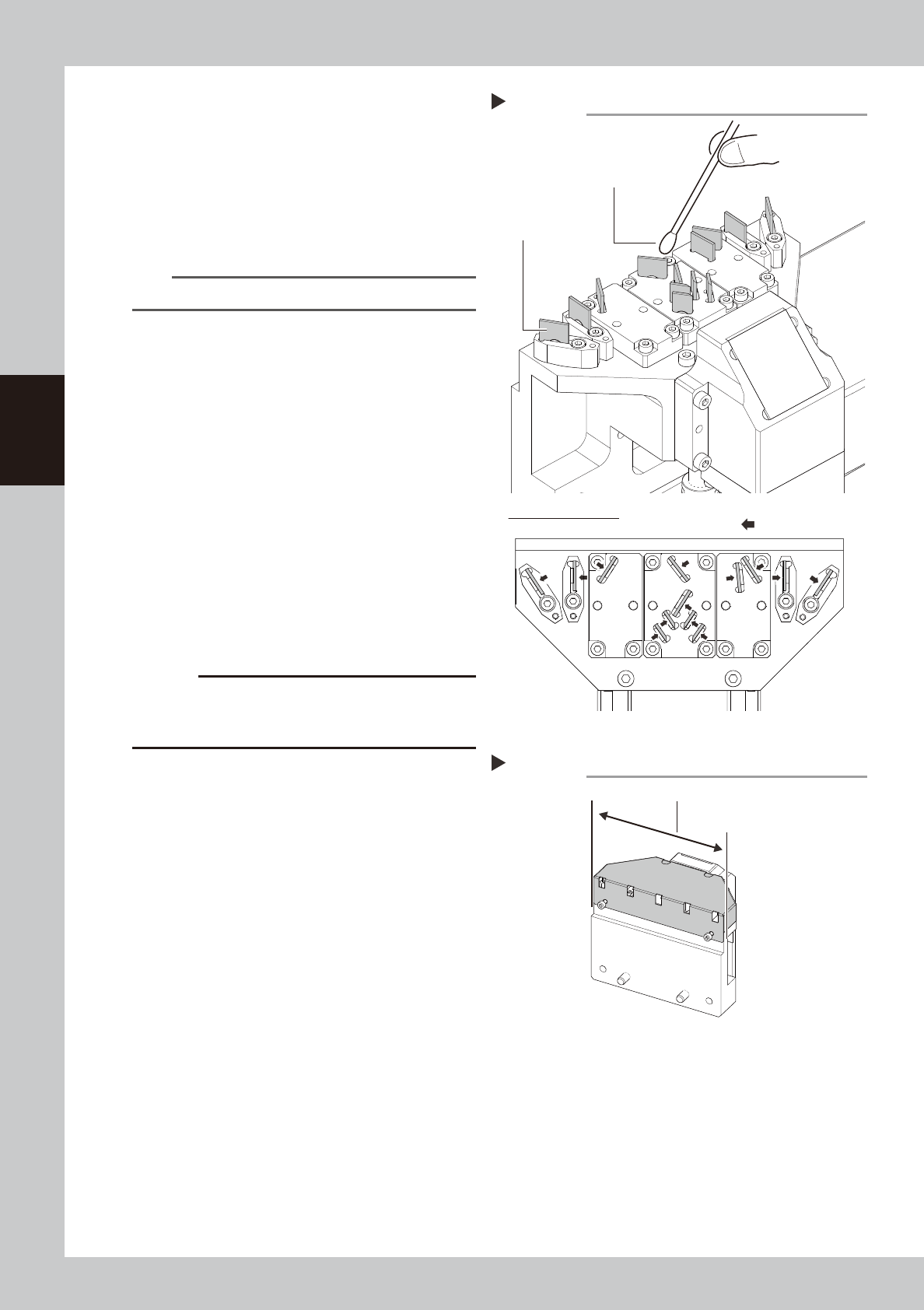
Clean inner reflector plates.
1. Apply absolute ethanol to a cotton swab
slightly. Clean mirror finished surfaces of
13 reflector plates.
2. Wipe reflector plates with a dry cotton
swab without absolute ethanol.
3. Check that no solvent remains on the
reflector plates.
n
NOTE
Clean and wipe reflector plates gently.
q
Attach side-view camera cover.
Attach the side-view camera cover in
reverse order of Step 9. After attaching the
cover, check that it is attached uniformly to
the side-view camera assembly.
w
Return side-view camera assembly
to the original position.
1. Cut cable ties mounting the side-view
camera temporarily with cutting pliers.
2. Return the side-view camera assembly to
the original position and attach it with 2
mounting bolts.
3. Fix the side-view camera cable with
cable ties (100 mm or longer) to positions
where 4 cable ties were cut in Step 3.
4. Remove the square cloth.
c
CAUTION
Make sure not to damage the cable when cutting
cable ties. Do not fasten cable ties excessively when
fixing the cable.
Cleaning inner reflector plates
Step 10
Reflector plate
Cotton swab with absolute ethanol
Figure viewed from top
: Cleaning side
53392-KMK-00
Attaching camera cover
Step 11
Attach cover uniformly.
53393-KMK-00
3-73
3
Periodic maintenance items
6. 2-year maintenance
This section describes 2-year maintenance items.
6.1 Replacing the ejector bit
As the ejector bit is used for a long time, its function may lower. Therefore, it is recommended to replace the
ejector bit with a new one once every about 2 years so as to maintain its performance even though this service
life may vary depending on the operating conditions. The following describes the replacement procedures for
the ejector bit.
c
CAUTION
The bit cannot be reused. When replacing the ejector
bit, be sure to use a new one.
1
Make the preparations.
1. Take off all accessories susceptible to the
magnetic fields, such as a wristwatch
and/or magnetic ID card.
e
2. Press the emergency stop button and
then open the machine safety cover.
3. Place a square cloth under the head unit
for the bit replacement.
2
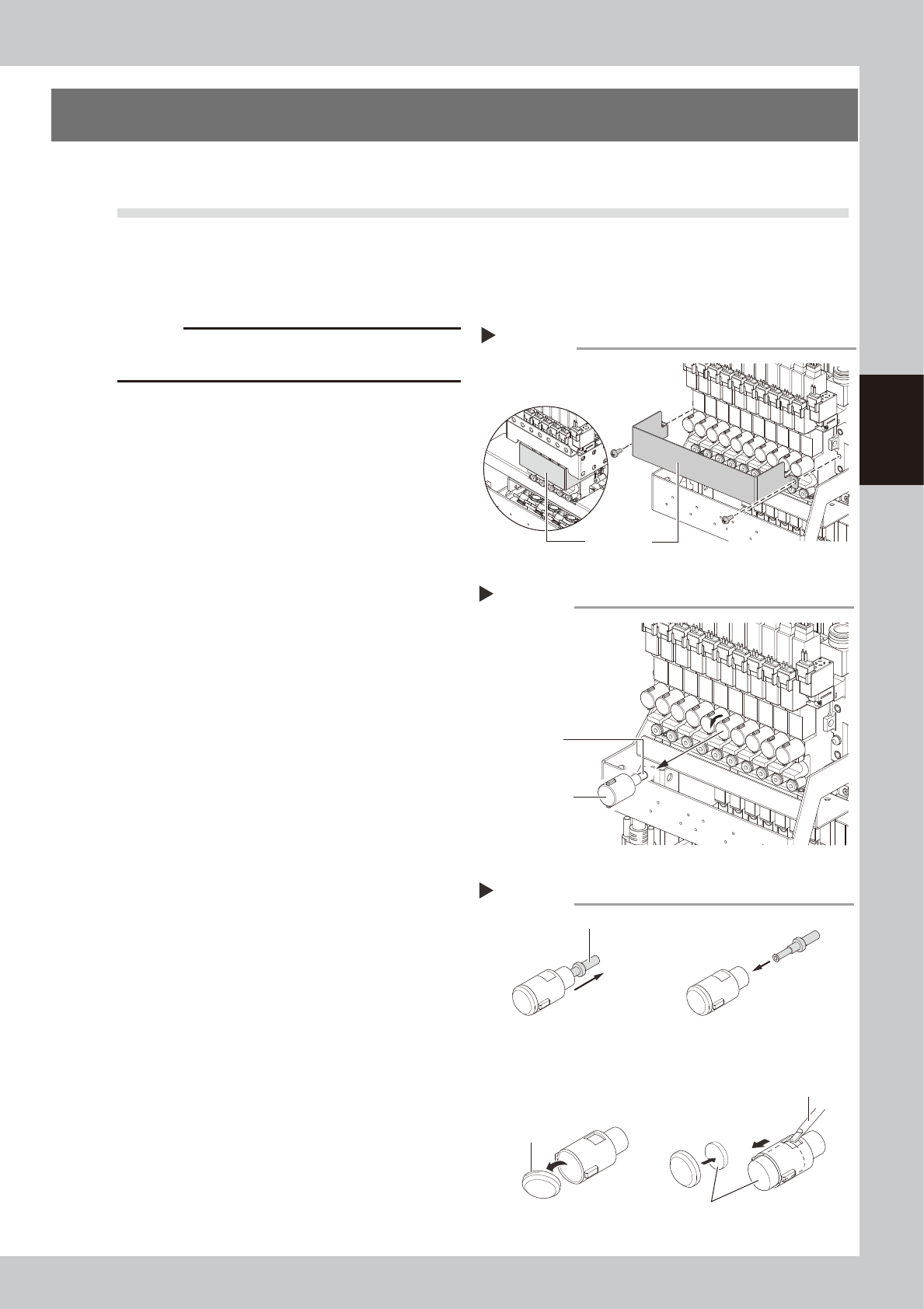
Detach the baffle plate.
Use a Phillips screwdriver to Detach the
baffle plate.
3
Detach the bit cap.
Turn the bit cap counterclockwise manually
to remove it.
4
Replace the bit.
Pull out the bit to be replaced from the bit
cap and insert a new bit.
If the muffler is contaminated, replace it
with a new one.
5
Reattach the bit cap to the head.
1. Insert the bit cap into its original position
and turn it clockwise to mount it.
2. Use a Phillips screwdriver to attach the
baffle plate at its original position.
3. Remove the square cloth.
Detaching the baffle plate
Step 2
Baffle plate
FM head
HM head
53394-KMK-00
Detaching the bit
Step 3
Bit cap
Bit
53395-KMK-00
Replacing the bit
Step 4
Bit
If the muffler is contaminated:
Precision screwdriver
Claw
Detach the bit cap tip.
Detach the muffler.
Muffler
53396-KMK-00