00197498-03_UM_SiplaceCA-Serie_EN.pdf - 第102页
2 Operational Safety User Manual SIPLACE CA- Series 2.10 Disabling the Compressed Air Supply and Discharging the Pre ssure From software version SC.708.0 Edition 12/2014 EN -DR AFT 102 2.10 Disabling the Compressed Air S…
User Manual SIPLACE CA-Series 2 Operational Safety
From software version SC.708.0 Edition 12/2014 EN -DRAFT 2.9 Residual Voltages and Discharge Times
101
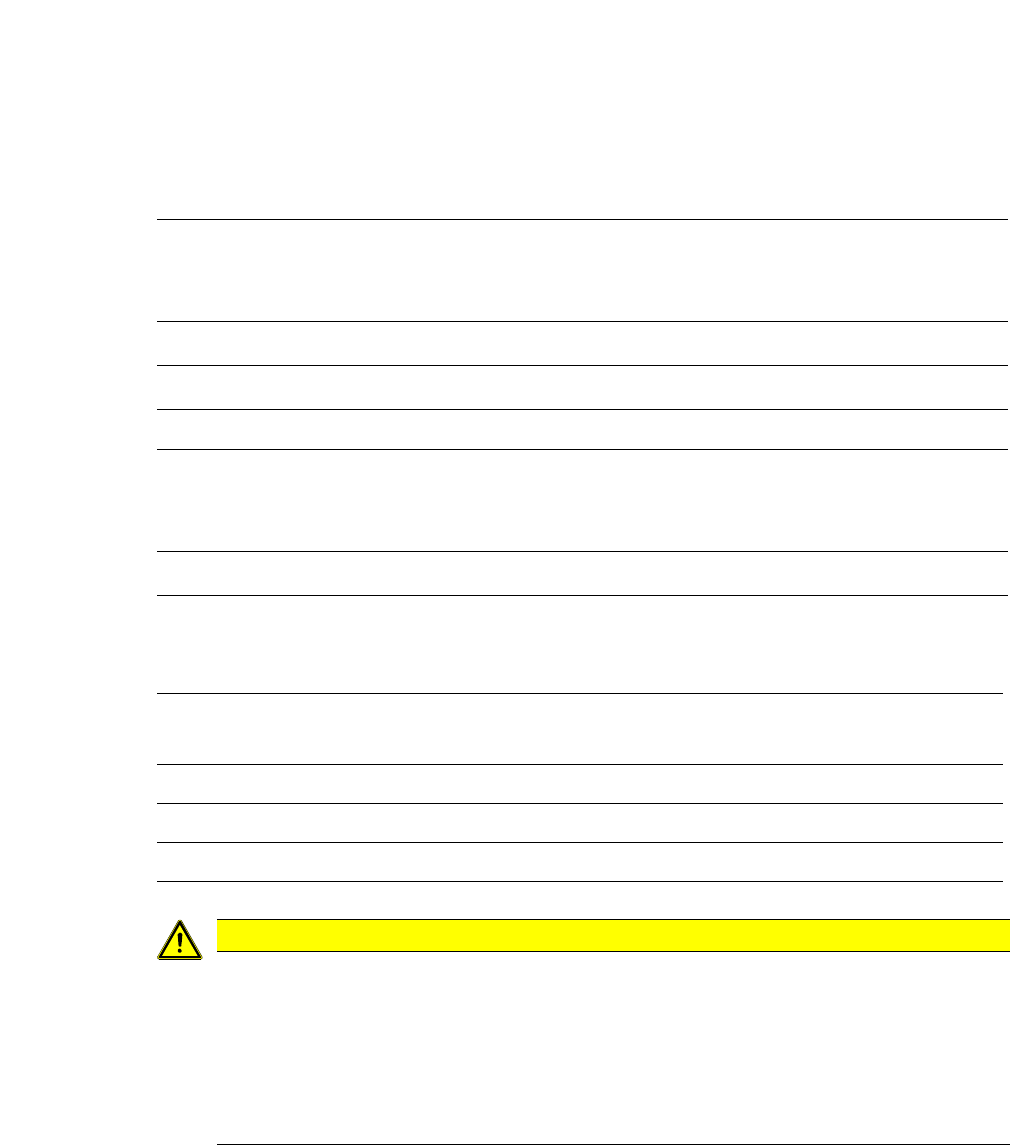
2.9.1.1 Residual Voltages and Discharge Times after Pressing the EMERGENCY STOP But-
ton
2
2
2.9.1.2 Residual Voltages and Discharge Times After Switching off the Main Switch
2
2
Pins X11 and X13_1
measured against X12 (GND)
Voltage in
normal mode
Residual voltage
after EMERGENCY
STOP
Discharge
times
X11 + 250 VDC < 10 VDC 7 s
X13_1 + 145 VDC < 10 VDC 50 s
Pin X13_4
measured against pin X3_7 (-
)
Voltage in
normal mode
Residual voltage
after EMERGENCY
STOP
Discharge
times
X13_4 + 40 VDC + 40 VDC -
Pins X11, X13_1 and X13_4
measured against X12 (GND)
Residual voltage when main
switch is switched off Discharge times
X11 < 10 VDC < 7 s
X13_1 < 10 VDC < 50 s
X13_4 < 10 VDC < 2 s
CAUTION
Data loss!
To avoid losing data, assess the following criteria before switching off your machine (apart
from in emergencies):
– Has the machine finished transmitting machine, setup and panel data?
– Has the machine finished processing the PCB?
– Has the machine completed the run-up phase?
2 Operational Safety User Manual SIPLACE CA-Series
2.10 Disabling the Compressed Air Supply and Discharging the Pressure From software version SC.708.0 Edition 12/2014 EN -DRAFT
102
2.10 Disabling the Compressed Air Supply and Dis-
charging the Pressure
The operating pressure of the machine and SWS is fixed to 0.50 ± 0.025 MPa (5.0 ± 0.25 bar).
The position of the compressed air unit is shown at item 1 in fig. 2.10 - 1
. The supply of com-
pressed air to the machine can be interrupted with the shutoff valve (item 2 in fig. 2.10 - 1
).
The SWS is supplied with compressed air via the machine.
Use the machine key to release the cover lock.
Lift the cover (see fig. 2.10 - 1).
Turn the lever of the shutoff valve (item 1 of fig. 2.10 - 1) from the vertical to the horizontal
position.
Monitor the operating pressure manometer (item 5 in fig. 2.10 - 1). When the machine is
switched on, the pressure discharges to 0 MPa (0 bar) within 1 minute.
2
CAUTION
Interruption to compressed air supply!
When the machine is switched on, do not use the stop valve to interrupt the com-
pressed air supply for more than 30 minutes.
If you need to shut off the pneumatic system for longer in order to carry out preventive
maintenance or servicing work, you must switch the machine off at the main switch
and disconnect it from the power supply.
User Manual SIPLACE CA-Series 2 Operational Safety
From software version SC.708.0 Edition 12/2014 EN -DRAFT 2.10 Disabling the Compressed Air Supply and Discharging the Pressure
103
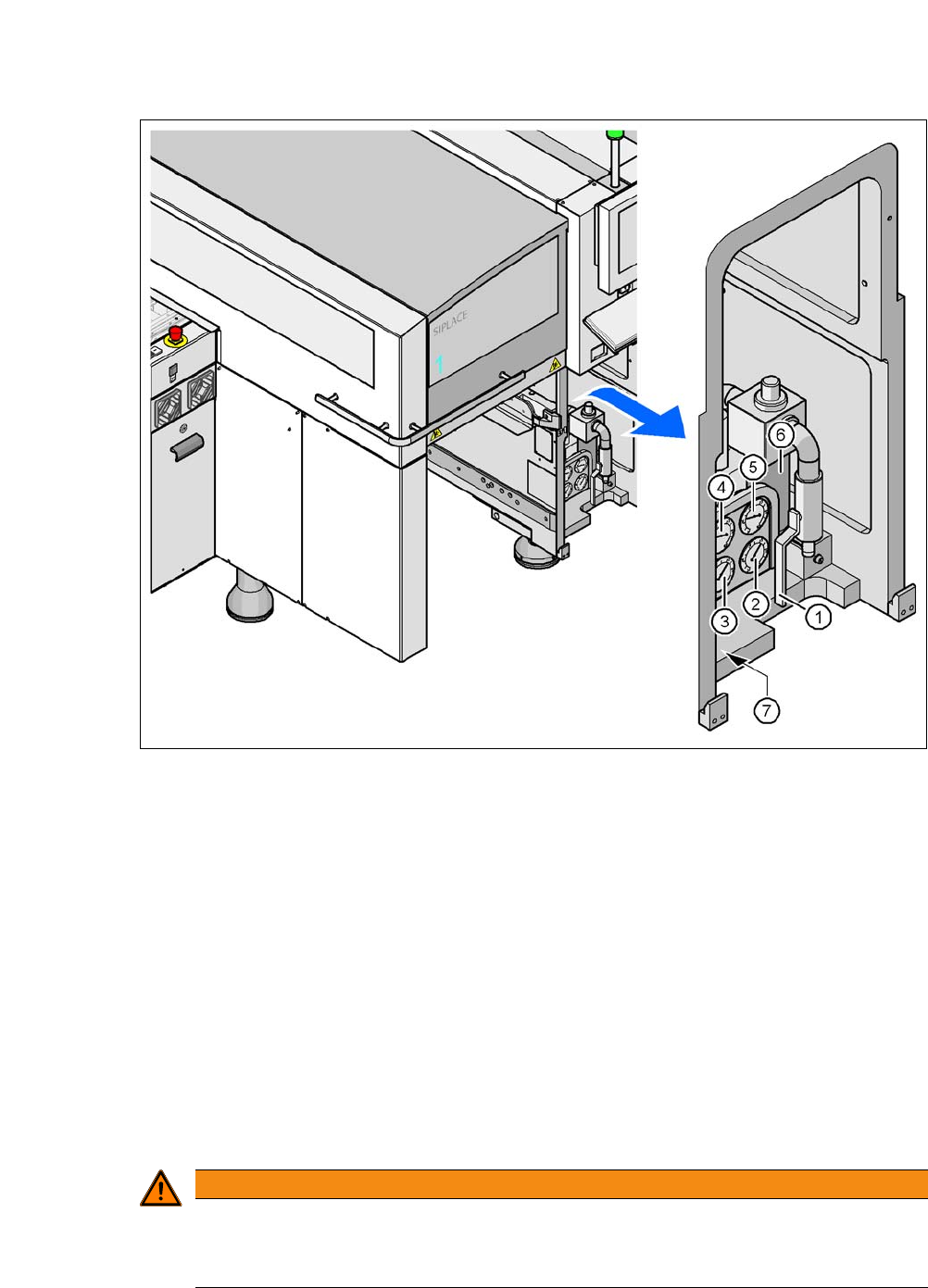
Fig. 2.10 - 1 Compressed air unit on the machine
(1) Shutoff valve
(2) Manometer for the machine component supply pressure
Target pressure: 0.48 ± 0.025 MPa, 4.8 ± 0.25 bar (display range 0 - 0.6 MPa, 0 - 6 bar)
(3) Manometer for gantry distributor supply pressure
Target pressure: 0.46 ± 0.01 MPa, 4.6 ± 0.1 bar (display range 0 - 0.6 MPa, 0 - 6 bar)
(4) Manometer for the bulk case feeder modules supply pressure
Target pressure: 0.25 ± 0.05 MPa, 2.5 ± 0.5 bar (display range: 0 - 0.6 MPa, 0 - 6 bar)
(5) Manometer for inlet pressure
Target pressure: 0.5 - 1.0 MPa, 5 - 10 bar (display range: 0 - 1.0 MPa, 0 - 10 bar)
(6) Compressed air filter
(7) Hexagon socket-head screw for fixing the pneumatic unit
2
WARNING
Risk of injuries!
Risk of injuries from pressurized compressed air lines.
NEVER detach compressed air lines while they are still pressurized.