00197498-03_UM_SiplaceCA-Serie_EN.pdf - 第295页
User Manual SIPLACE CA-Series 5 Setting up and Commissioning From software version SC.708.0 Edition 12/20 14 EN -DRAFT 5.5 Setting Up the Placement Machine 295 Insert the mandrel (item 5 in fig. 5.5 - 9 ) for the trans…
5 Setting up and Commissioning User Manual SIPLACE CA-Series
5.5 Setting Up the Placement Machine From software version SC.708.0 Edition 12/2014 EN -DRAFT
294
5
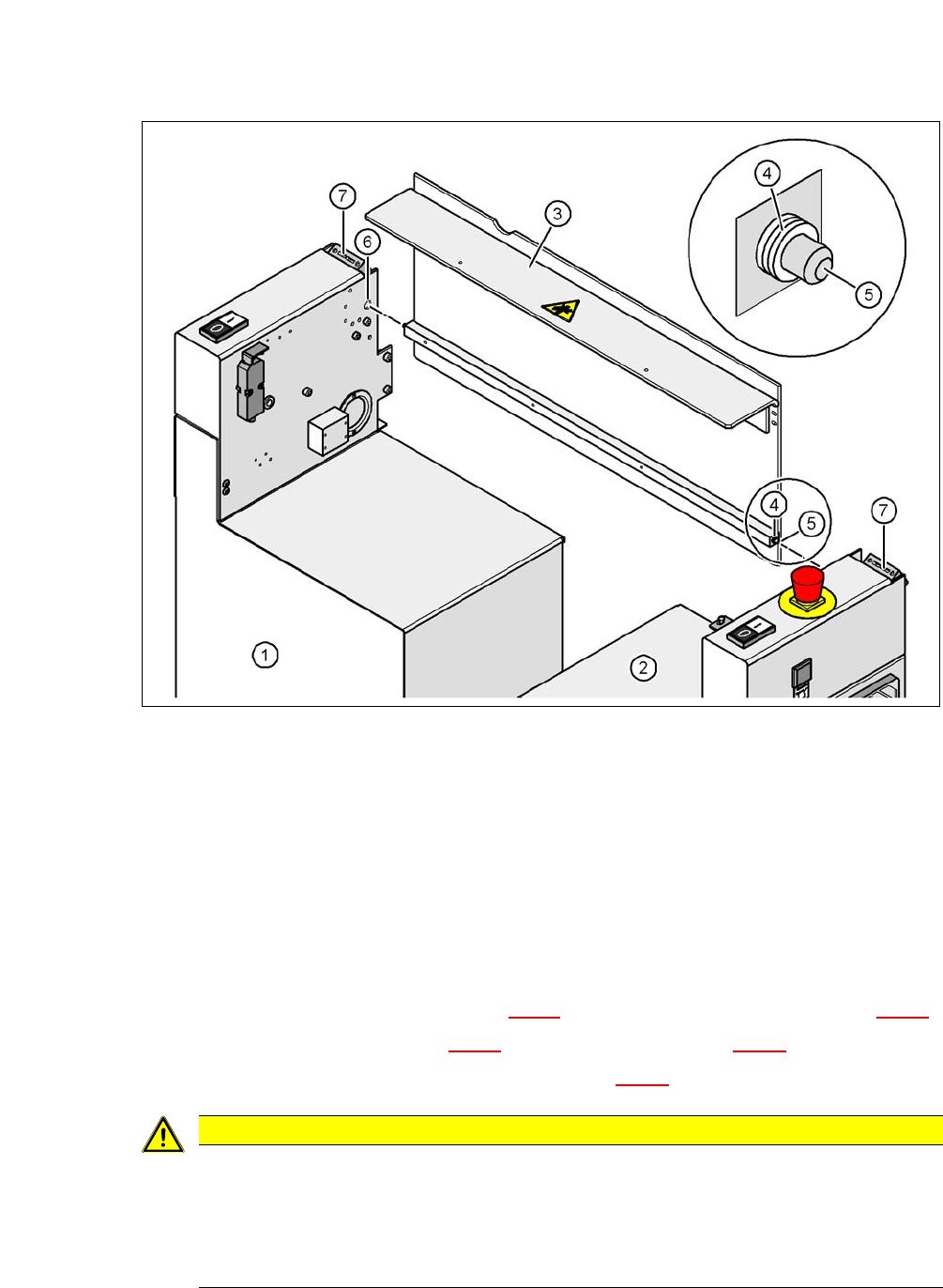
Fig. 5.5 - 9 Fitting the conveyor cover and the second half of the extension kit
(1) Half of the extension kit already fitted
(2) Second half of the extension kit to be fitted
(3) Transport cover
(4) Insert 3 white plastic washers on both sides
(5) Mandrel of the conveyor cover
(6) Hole
(7) Protective cover switch
Insert 3 white plastic discs (item 4 in fig. 5.5 - 9) onto the two mandrels (items 5 in fig. 5.5 - 9).
Insert the mandrel (item 5 in fig. 5.5 - 9) into the hole (item 6 in fig. 5.5 - 9).
Lift the second half of the extension kit (item 2 in fig. 5.5 - 9) up to the machine frame.
5
CAUTION
Risk of collisions!
Half of the extension kit could collide with the hexagonal shaft of the PCB conveyor. The
hexagonal shaft could be bent.
Make sure that this half of the extension kit does not collide with the hexagonal shaft
of the PCB conveyor and thus bend the shaft.

User Manual SIPLACE CA-Series 5 Setting up and Commissioning
From software version SC.708.0 Edition 12/2014 EN -DRAFT 5.5 Setting Up the Placement Machine
295
Insert the mandrel (item 5 in fig. 5.5 - 9) for the transportation cover into the hole (item 6 in
fig. 5.5 - 9
) for the second half of the extension kit.
Position the second half of the extension kit so that the assembly bracket lies on the assembly
bar (item 7 in fig. 5.5 - 8
).
Fasten this second half of the placement machine with 2 fillister head screws M6x16 and the
corresponding washer (item 3 in fig. 5.5 - 8
).
5.5.7.3 Fastening the Hexagonal Shaft Guidance
When using a single conveyor, fasten one guidance for the hexagonal shaft (item 8 in fig. 5.5
- 7) to the extension kit with two fillister head screws M6x16 and washers
When using a dual conveyor, fasten two guidances for the hexagonal shaft (item 8 in fig. 5.5
- 7) to the extension kit with two fillister head screws M6x16 and washers
5.5.7.4 Establishing Cable Connections - Extension Kit on the PCB Output Side
5
5
5
5
5.5.7.5 Fitting the Ground Cable for the Doors
Fasten the two ground cables for the doors (item 4 in fig. 5.5 - 8) to the machine frame as
follows:
Left side of extension kit
(viewed in direction of transport)
Connector/cable To connector/cable
EMERGENCY STOP button
Start/Stop button
X63/03020687 X63/03002526
Protective cover switch, location 3 X53/03020409 X53/03002528
Button for the COT insert,
location 3
X232/03021056 X232/03021053
Right side of extension kit
(viewed in direction of transport)
Connector/cable To connector/cable
Start/Stop button
Switch, PCB conveyor cover
X62/03020410 X62/03002525
Protective cover switch, location 2 X52/03006476 X52/03002527
Button for the COT insert,
location 2
X222/03021056 X222/03021052
5 Setting up and Commissioning User Manual SIPLACE CA-Series
5.5 Setting Up the Placement Machine From software version SC.708.0 Edition 12/2014 EN -DRAFT
296
5
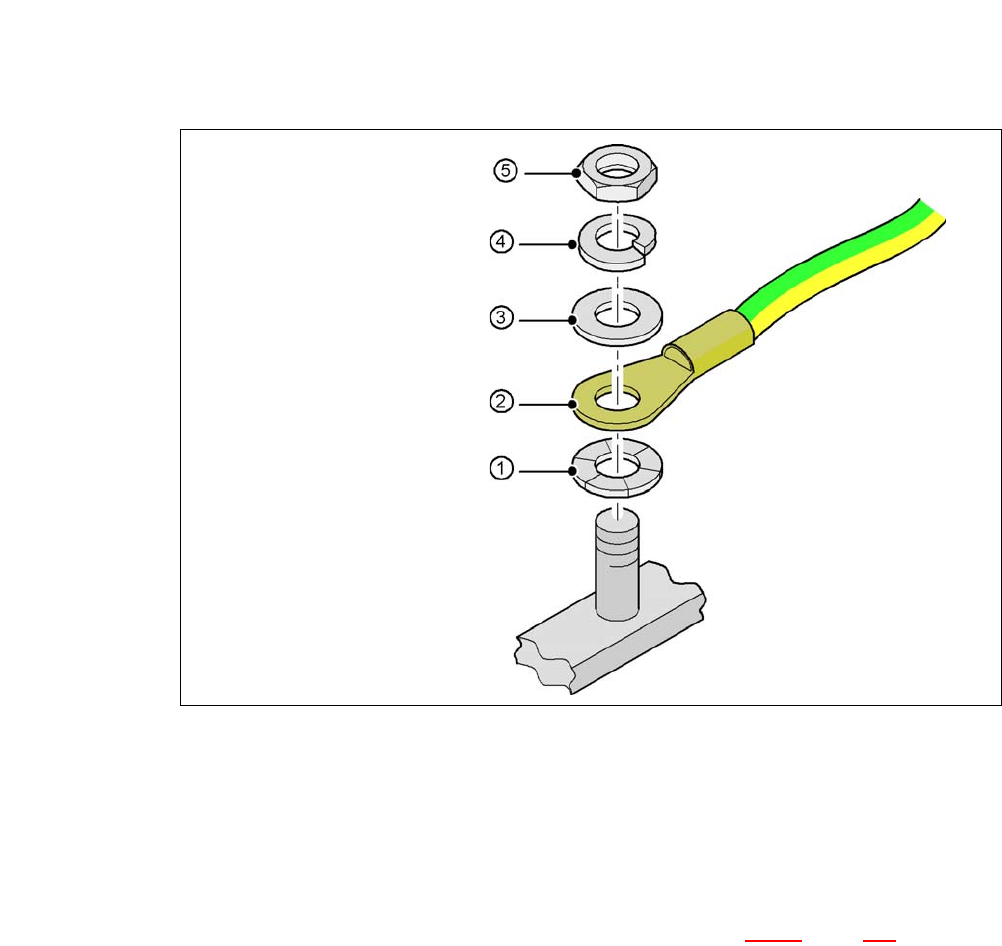
Fig. 5.5 - 10 Fitting the grounding cable
5
5
5
5
5
5.5.7.6 Checking and Setting the Protective Cover Switch
Check the function of the protective cover switch (item 7 in fig. 5.5 - 9, page 294).
Adjust the protective cover switch if necessary (see service manual).
Hex nut M
Spring washer M, DIN 7980
Washer M, DIN 125
Cable lug, annular
Contact washer