00197498-03_UM_SiplaceCA-Serie_EN.pdf - 第431页
User Manual SIPLACE CA-Series 7 Component and Die Handling From software version SC.708.0 Edition 12/20 14 EN -DRAFT 7.2 SIPLACE X-Series Component Trolley 431 7 Fig. 7.2 - 7 SIPLACE X-Series changeover table, front view…
7 Component and Die Handling User Manual SIPLACE CA-Series
7.2 SIPLACE X-Series Component Trolley From software version SC.708.0 Edition 12/2014 EN -DRAFT
430
7.2.5 SIPLACE X-Series Changeover Table
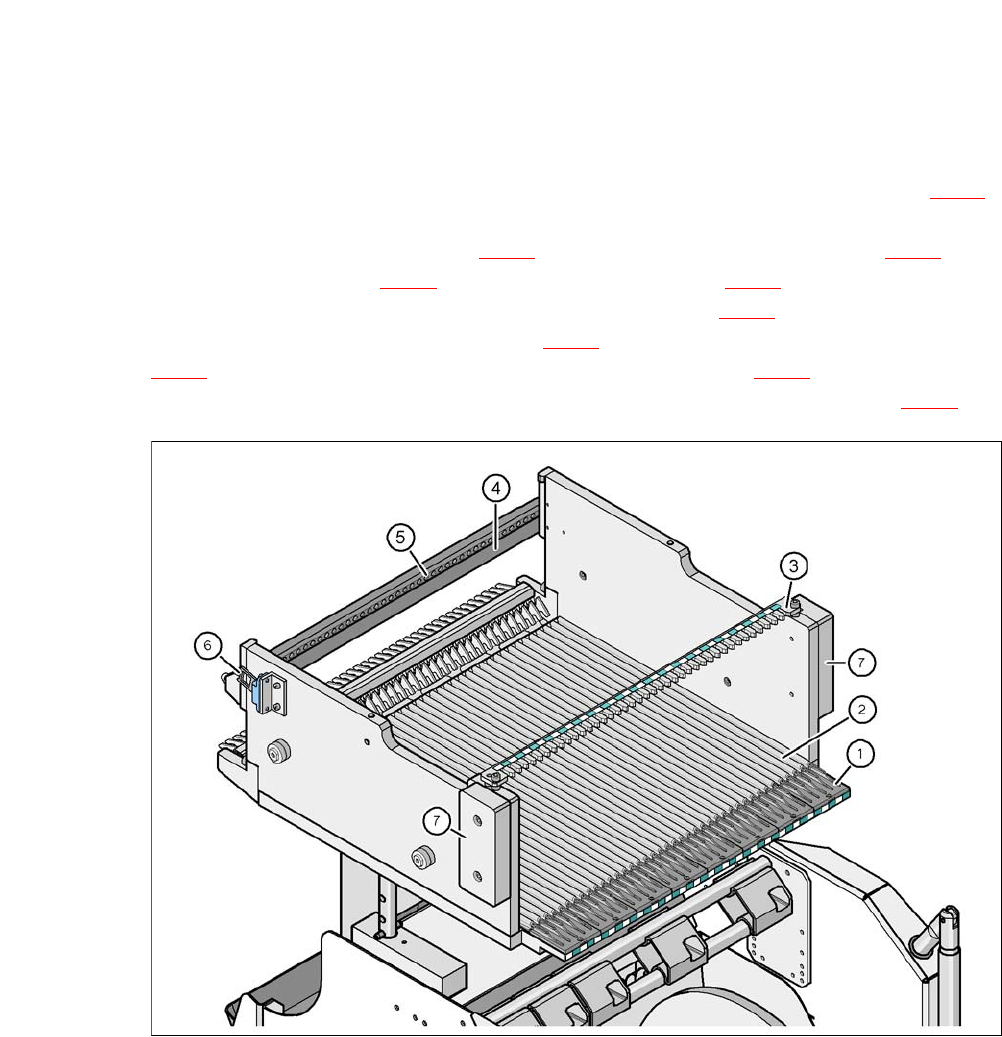
The front slider guides of the feeder modules are placed on the insertion aid (item 1 in fig. 7.2 - 6).
When pushed in, the slider guides of the
feeder module (item 12 and 13 in fig. 7.1 - 2
) slide on the guide profile (item 2 in fig. 7.2 - 6) up to
the stop rail (item 4 in fig. 7.2 - 6
). A centering hole (item 5 in fig. 7.2 - 6) on the stop rail accom-
modates the X feeder module centering pin "front" (item 4 in fig. 7.1 - 1
). At the same time, the
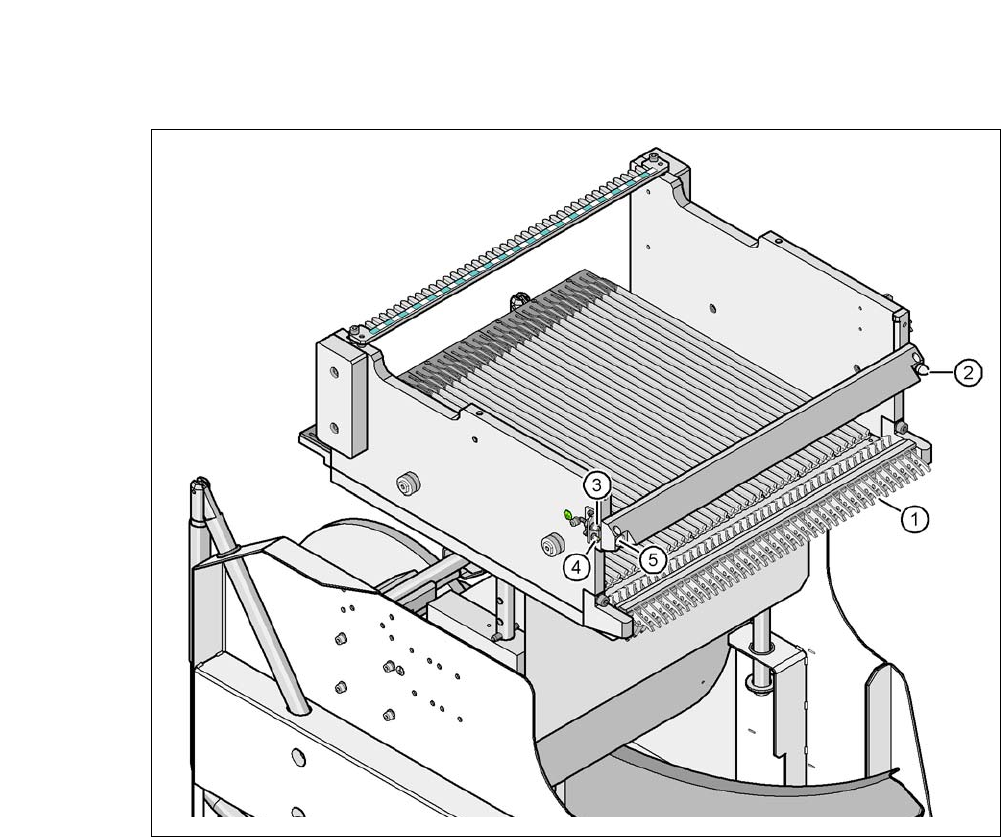
changeover table locking latch (item 1 in fig. 7.2 - 7
) engages with the locking roller (item 1 in fig.
7.1 - 1
) of the feeder module. The centering pin "rear" (item 12 in fig. 7.1 - 1) on the upper side of
the feeder module is accommodated by the recess in the centering bar (item 3 in fig. 7.2 - 6
).
7
Fig. 7.2 - 6 Changeover table, SIPLACE X-Series, rear view
(1) Insertion aid
(2) Guide profile (Ω profile)
(3) Centering bar for holding the "back" centering pin for X feeder modules
(4) Stop bar
(5) Centering holes
(6) Contact for switching the safety switch of the EMERGENCY STOP circuit
(7) Hand guard
User Manual SIPLACE CA-Series 7 Component and Die Handling
From software version SC.708.0 Edition 12/2014 EN -DRAFT 7.2 SIPLACE X-Series Component Trolley
431
7
Fig. 7.2 - 7 SIPLACE X-Series changeover table, front view
(1) Locking latches
(2) Centering pin on the changeover table
(3) Compressed air coupling
(4) Earthing (ground) pin
(5) Centering hole on the changeover table
7 Component and Die Handling User Manual SIPLACE CA-Series
7.2 SIPLACE X-Series Component Trolley From software version SC.708.0 Edition 12/2014 EN -DRAFT
432
7.2.6 Mount for Additional Tape Reel (X-Series)
7
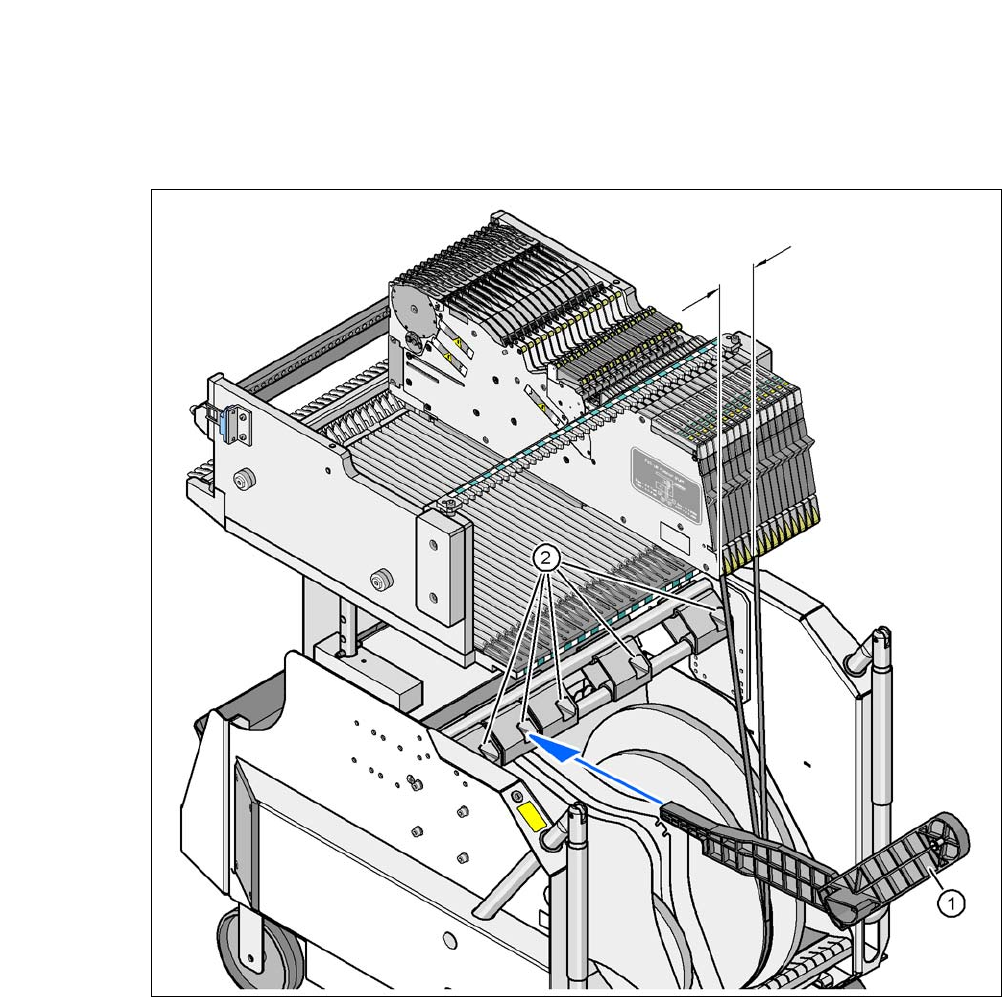
Fig. 7.2 - 8 Mount for Additional Tape Reel (X-Series)
(1) Mount for additional tape reel [00141217-xx]
(2) Mounting device for the support
X-Series feeder modules can process component tapes without problems if the lateral offset be-
tween the feeder module and the tape reel does not exceed 60 mm. If a predefined setup means
that the maximum permitted offset cannot be maintained, we recommend that you use the mount
for an additional tape reel (item 1). Simply insert the mount into the holder (item 2) and push it until
the offset is less than the maximum permitted value of 60 mm. The component trolley has 5 hold-
ers in total. Each tape reel mount can hold 2 tape reels, which means that up to ten 15" (381 mm)
reels can be positioned above the tape container.
Max. 60 mm