80S-20贴片机.pdf - 第279页
SIPLACE 80S-20/F4 Service Manual 8 IC Head Edition 01/97 8.4 Servicing Work on the Dr Axis 8 - 17 &DO FXODWHWK H=HUR3RLQW &RUUHFWLR QIRUW KH'$ [LV PLEASE NOT E The startin g value o n the axis …

8 IC Head SIPLACE 80S-20/F4 Service Manual
8.4 Servicing Work on the Dr Axis Edition 01/97
8 - 16
6HUYLFLQJ:RUNRQWKH'U$[LV
7RROV(TXLSPHQWDQG&RQVXPDEOHV
6SDUH3DUWV
5HSODFH0RWRUZLWK7DFKRIRUWKH'U$[LV
See item 4 in Fig. 8.3.1 page 8 - 12
7RGLVDVVHPEOHWKHPRWRU
– Detach all electrical cables to and from the motor.
– Loosen the two M3 hexagon socket head screws fixing the motor in place.
– Remove the motor from the top.
7RUHDVVHPEOHWKHPRWRU
– Clean the rubber lining of the friction wheel (item 3) and the ring (Ø 12 mm) on the motor shaft with isopro-
pyl alcohol.
– Replace the motor and fix in place.
Ensure that there is good contact between the motor drive shaft and the friction wheel.
– Check that the axis is moving correctly with reference to the Adjusting Instructions.
)URPLWHPQXPEHU
Hexagon socket head screw key, set
SITEST program
Adjusting Instructions
Nozzle, type 416 00322545-01
Isopropyl alcohol
)URPLWHPQXPEHU
Motor/tacho (dr axis) 00306383-02
SIPLACE 80S-20/F4 Service Manual 8 IC Head
Edition 01/97 8.4 Servicing Work on the Dr Axis
8 - 17
&DOFXODWHWKH=HUR3RLQW&RUUHFWLRQIRUWKH'$[LV
PLEASE NOTE
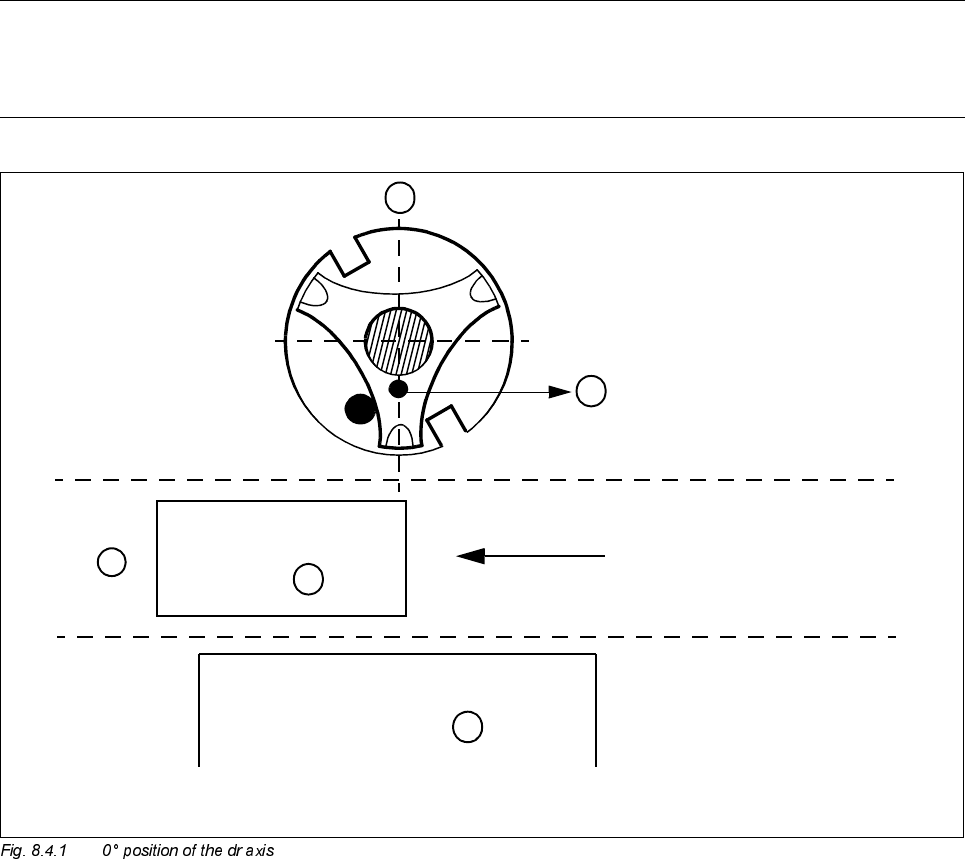
The starting value on the axis display should be approximately 0 if the pin of the nozzle support is pointing
towards component table no. 3.
Key to Fig. 8.4.1
To accurately calculate the zero point correction value, you require the IC head camera and a type 416 noz-
zle.
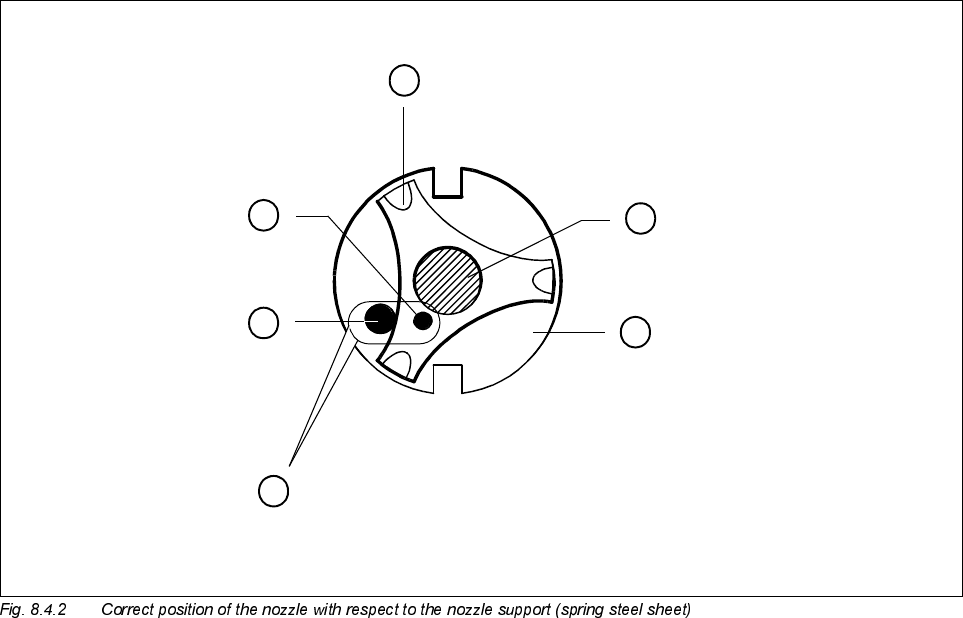
● Place the nozzle in the correct position, as shown in Fig. 8.4.2.
● To ensure that the nozzle is clearly visible to the IC camera, mark the tip of the nozzle with washable white
paint.
A0° position of the dr axis
B The pin of the star should point towards component table 3
C PCB transport direction
D Component table 3
PCB
A
B
C
D
Table 3
8 IC Head SIPLACE 80S-20/F4 Service Manual
8.4 Servicing Work on the Dr Axis Edition 01/97
8 - 18
Key to Fig. 8.4.2
● Using the ’Vision system/teaching position’ menu, move the IC head over the IC head camera.
● Press F7 on the IC head camera to switch over.
● Disable the dr axis and align the nozzle over the red crosshairs.
1 Spring plate on the star (spring steel sheet) 2 Sleeve
3 Nozzle 4 Pin in the nozzle
5Pin
A The two pins must be opposite one another, with the pin of the nozzle lying against the spring plate.
A
2
4
3
5
1