80S-20贴片机.pdf - 第350页
11 Control Unit SIPLACE 80S-20/F4 Service Manual 11.2 Set-Up Configuration of M44 Com puter (Machine Controller) E dition 03/97 11 - 8 Post me ssag e: Maximiz e Quick bo ot: Disab le Halt on: ALL errors Secur ity: Disab …
SIPLACE 80S-20/F4 Service Manual 11 Control Unit
Edition 03/97 11.2 Set-Up Configuration of M44 Computer (Machine Controller)
11 - 7
11.2 Set-Up Configuration of M44 Computer (Machine
Controller)
● Switch off the machine.
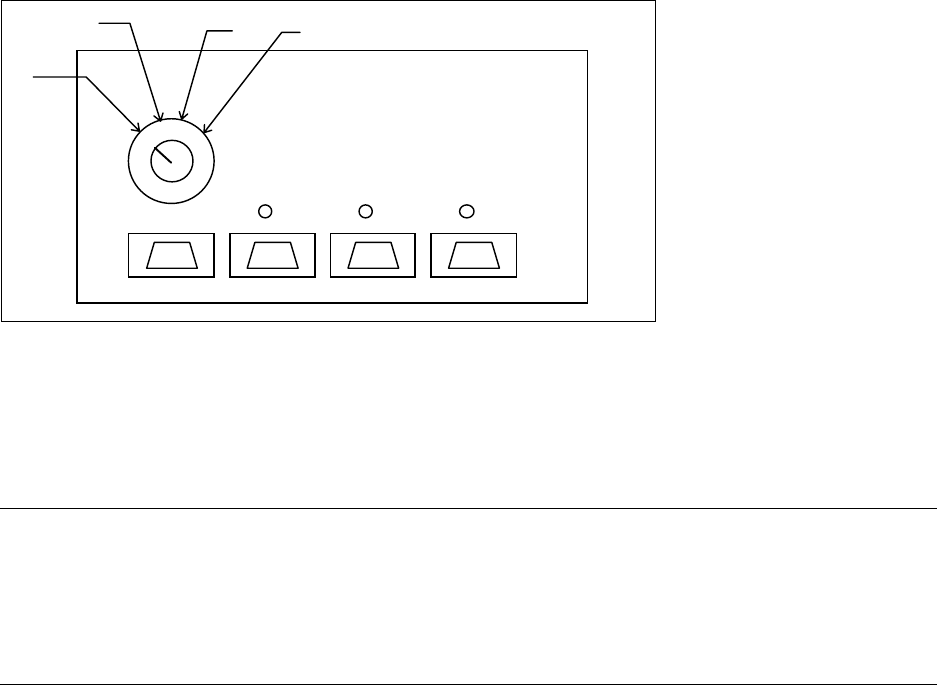
● Switch the monitor to the M44 computer on the multiplexer. (Switch setting: 4 for M44, see Fig. 11.2.1).
Fig. 11.2.1 Multiplexer above control unit
● Unplug the keyboard from the station computer and plug it into the machine controller (the socket is next to
the station computer).
● Switch on the machine and press the keys
Ctrl - Alt - Ins (Strg - Alt - Einfg) when you are requested to do
so.
NOTE
To change the data you will need to use the numerical keypad. This is included in a normal keyboard. The
keys are marked with violet numbers and characters in their top left corner (for example, keys 7-0, U-P, J-
ö, and so on).
Press the Fn key to activate the numerical keypad function of the individual keys.
● Switch the monitor to automatic mode on the multiplexer (switch setting: 1 see Fig. 11.2.1).
11.2.1 Configuration Data
11.2.1.1 Screen 1
Date: tt. mmm jjjj
Time: hh:mm:ss
Drive A: 1.44, 3 ½ in.
Drive B: None
Video: EGA / VGA
1
2
3
4
11 Control Unit SIPLACE 80S-20/F4 Service Manual
11.2 Set-Up Configuration of M44 Computer (Machine Controller) Edition 03/97
11 - 8
Post message: Maximize
Quick boot: Disable
Halt on: ALL errors
Security: Disable
Virus Warury: Disable
Booting sequence: A, C
Default speed: High
Disk 0 49 (automatic hard disk detection)
Disk 1 None
11.2.1.2 Screen 2
> Bios < Enabled D000: Disabled E000: Disabled
> Video < Enabled D400: Disabled E400: Disabled
Disabled D800: Disabled E800: Disabled
Disabled DC00: Disabled EC00: Disabled
External cache: Enabled Default speed: High
Internal cache: Enabled Slow setting: Fast
COM A: 3F8h
COM B: 2F8h Console rediv: Enable / ANSI
LPT: 378h
Floppy drive: Enabled
IDE: Enabled
11.2.1.3 Screen 3
I/O selection RAM window SMP memory window SMP COM1/2: Disabled
Start address 0000H Start address 0000 00H SMP COM3/4: Disabled
End address 0000H End address 0000 FFH SMP LPT 2: Disabled
SIPLACE 80S-20/F4 Service Manual 11 Control Unit
Edition 03/97 11.3 Wrap Connections
11 - 9
11.3 Wrap Connections
The following jumpers must be present :
Connection Significance
WL 1.8 - WL 2.8 Primary adapter, color
WS 3.12 - WS 4.12 FD_DRQ on DRQ2 (floppy drive)
WS 2.13 - WS 2.14 On-board FD controller
WP 1.2 - WP 2.2 Interrupt, hard disk
WP 1.8 - WP 2.8 Interrupt, line printer
WP 1.9 - WP 2.9 Interrupt, floppy drive
WP 1.11 - WP 2.11 Interrupt COM1
WP 1.12 - WP 2.12 Interrupt COM2
WP 1.13 - WP 2.13 Interrupt, keyboard
WD 5.1 - WD 5.2 INIT* connected to M44, M44 drives INIT*
WD 4.1 - WD 4.2 BCLK on AMS bus
WD 4.3 - WD 4.4 CCLK on AMS bus
Connection Name
WS 4.8 - WS 1.12 Axes
WS 4.7 - WS 1.11
WS 4.6 - WS 1.10 I/O boards
WS 4.4 - WS 2.6 HS 3L
WS 4.3 - WL 1.5
WS 4.2 - WS 1.4
WS 4.1 - WS 1.3
WS 2.8 - WP 2.7 CAN bus
WS 3.6 - WP 2.6 COM 3
WS 3.5 - WP 2.5 COM 4
WS 3.4 - WP 2.4 COM 5
WS 3.3 - WP 2.3 COM 6
WS 1.1 - WP 2.1 LAN
WP 1.10 - WP 2.10
WL 1.3 - WL 2.3
WS 3.11 - WS 4.11