HS50_advance_level 1_20200522_221201 (1).pdf - 第190页
06/2002 E dition Studen t Guide H S-50 Advance d I 6 Operati ng the S IT ES T Softwa r e 6 6.3. 2 M ai n V iew- Icon s SIP LACE H S-50 / HS -55 6 Error s Call- up of t he display of t he gener al errors . Call- up of t h…
Student Guide HS-50 Advanced I 06/2002 Edition
6 Operating the SITEST Software
5
6.3 Components of the User Interface
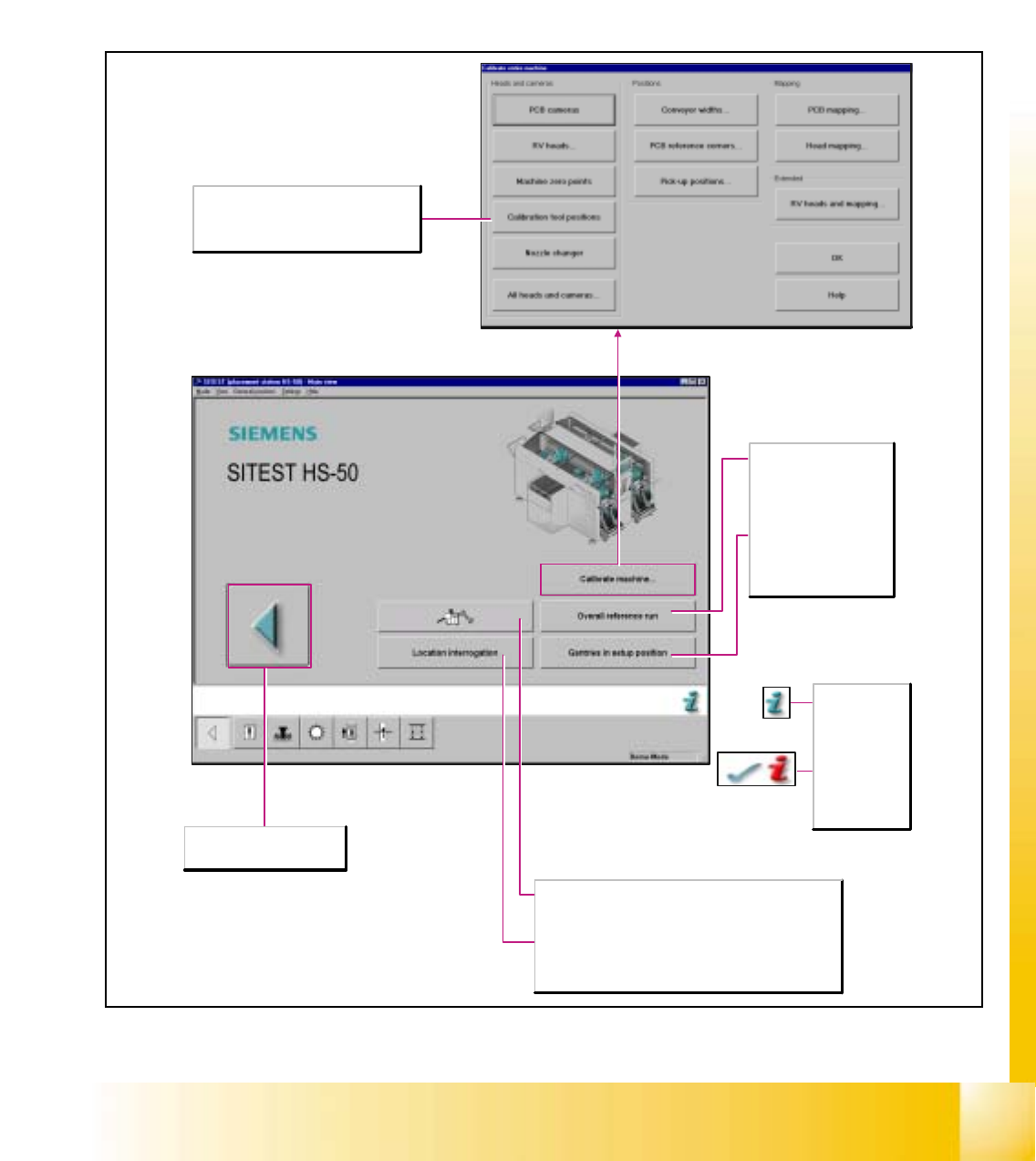
After starting the SITEST test program, the main view of the user interface will be displayed. The
operator can control the basic functions of the program from this view. He can return to the main
view from all the other displays.
6.3.1 Main View- Dialog Boxes and Buttons
Aborts the processing and the
SITEST test program is exited.
The online help
for the current
screen opens.
After the
successful
completion of
troubleshooting
activities, the
current error is
deleted.
Overall reference run
Starts the reference run
for all head and gantry
axes of the machine and
initializes the conveyor.
Gantries in setup position
The gantries are moved to
a position that permits the
component feeder tables
to be exchanged.
Location interrogation
Existing locations are interrogated for component feeder tables
and MTCs. (MTC only for SIPLACE S-25HM/S-25HM2)
Diagnostics
Starts the diagnostic system with the objective to detect - in an
interactive dialog with the operator - the cause of the current
error and to eliminate it.
Calibrate machine...
Opens the Calibrate entire machine dialog box
containing a display of all functions required
for the calibration of the entire machine.
06/2002 Edition Student Guide HS-50 Advanced I
6 Operating the SITEST Software
6
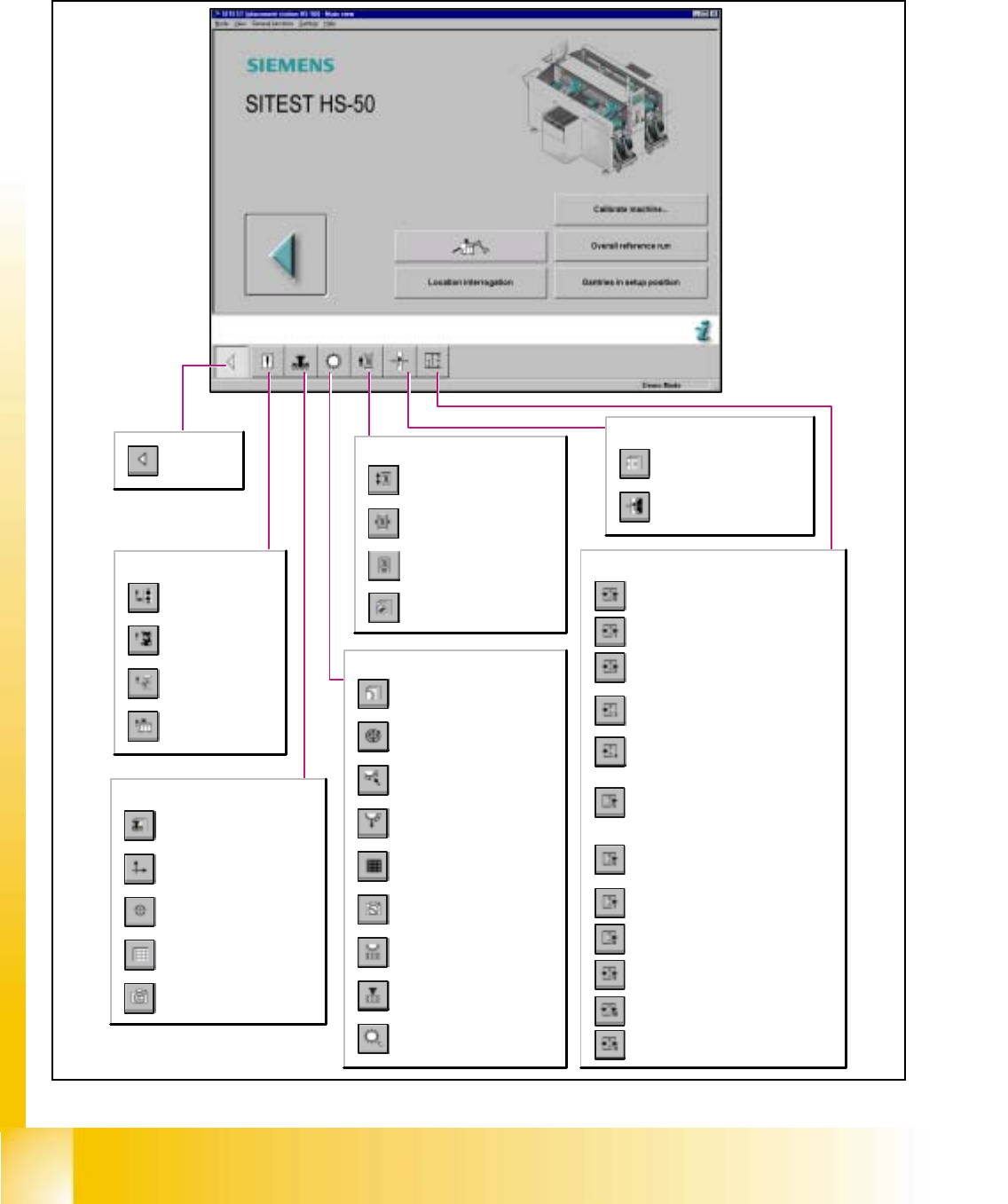
6.3.2 Main View- Icons SIPLACE HS-50 / HS-55
6
Errors
Call-up of the display
of the general errors.
Call-up of the transport
error display.
Call-up of the machine
error display.
Call-up of the track
error display.
Return to the
main view.
Gantry
Call-up of the gantry functions.
Call-up of the display of the
gantry axis functions.
Call-up of the display of the
gantry's calibration functions.
Call-up of the display of the
gantry's PCB mapping
functions.
Call-up of the display of the
gantry's PCB camera
functions.
Revolver heads
Call-up of the display of the
functions of the revolver head.
Call-up of the display of the axis
functions of the revolver head.
Call-up of the display of the
functions of the revolver head in
the holding and reject circuit.
Call-up of the display of the
functions of the revolver head in
the placement and pick-up circuit.
Call-up of the display of the
mapping functions of the revolver
head.
Call-up of the display of the RV
camera functions.
Opening the screen for the head
functions of the revolver head
nozzle changer
Opening the screen for the
magazin functions of the revolver
head nozzle changer
Call-up the view for the functions
of the revolver head component
sensor.
PCB-Conveyor
Call-up the Conveyor Functions
view.
Call-up the screen for setting
the conveyor speed.
Not for SIPLACE S-25HM!
Call-up of the display of the
conveyor width settings.
Call-up the screen displaying
the PCB transport functions.
Tables
Call-up of the display of the
component table functions.
Call-up of the display for the
calibration of the component
table pick-up position.
Inputs/Outputs
Conveyor width adjustment
Options, conveyor 2
Options, conveyor 1
Interface, conveyor 2
Interface, conveyor 1
HS-50: Belt motor, sonar Bero and width
adjustment, conveyor 2
HS-55: Belt motor and PCB sensor,
conveyor 2
HS-50: Belt motor, sonar Bero and width
adjustment, conveyor 1
HS-55: Belt motor and PCB sensor,
conveyor 1
HS-50: Lifting table and stopper, conveyor 2
HS-55: Lifting table and laser light barrier,
conveyor 2
HS-50: Lifting table and stopper, conveyor 1
HS-55: Lifting table and laser light barrier,
conveyor 1
I/O module 3
Not for SIPLACE S-25HM/S-25HM2!
I/O module 2
I/O module 1
Student Guide HS-50 Advanced I 06/2002 Edition
6 Operating the SITEST Software
7
6.3.3 Display Errors
6
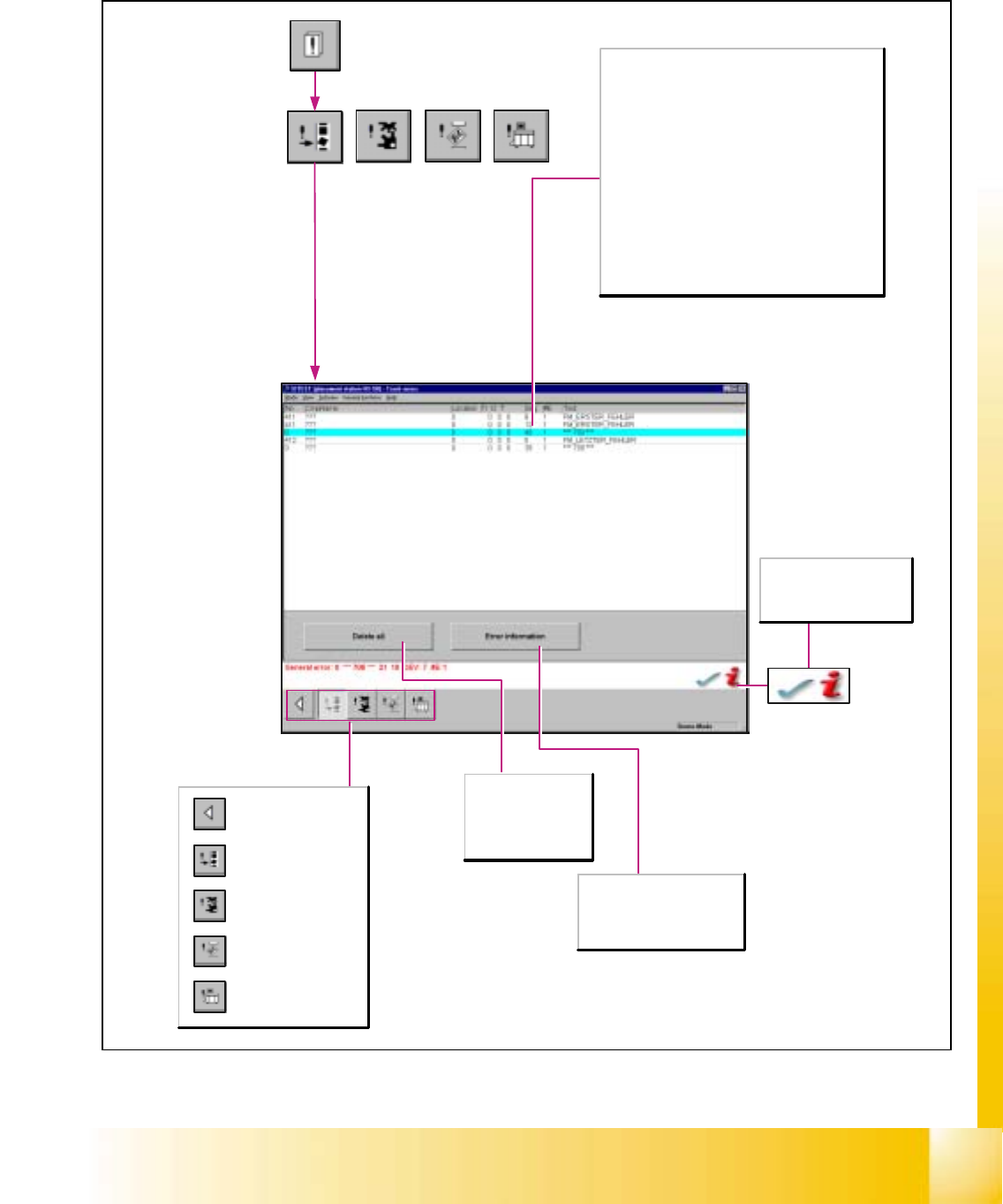
Key to the table:
No.
Indicates the error numbers of the individual errors.
Info1, Info2
Only for Siemens-internal use.
DEV
Indicates the applicable pick-up side, i.e. the gantry on
which the error has occurred.
#E
Indicates how often the particular error has already
occurred.
Text
Describes the error at issue.
Delete all
Deletes all error
messages of the
error class currently
displayed.
After the successful
completion of
troubleshooting activities,
the current error is deleted.
Error information
Starts a help system listing the
possible causes of selected
errors and displays possible
corrective actions to be taken.
Call-up of the display
of the general errors.
Call-up of the transport
error display.
Call-up of the machine
error display.
Call-up of the track
error display.
Return to the main
view.