HS50_advance_level 1_20200522_221201 (1).pdf - 第216页
06/2002 E dition Studen t Guide H S-50 Advance d I 6 Operati ng the S IT ES T Softwa r e 32 6.5.1 1 Magazin e Func tions of t h e Re volver Head No zzle Changer Specified nozzle... Select the noz zle type for the speci f…
Student Guide HS-50 Advanced I 06/2002 Edition
6 Operating the SITEST Software
31
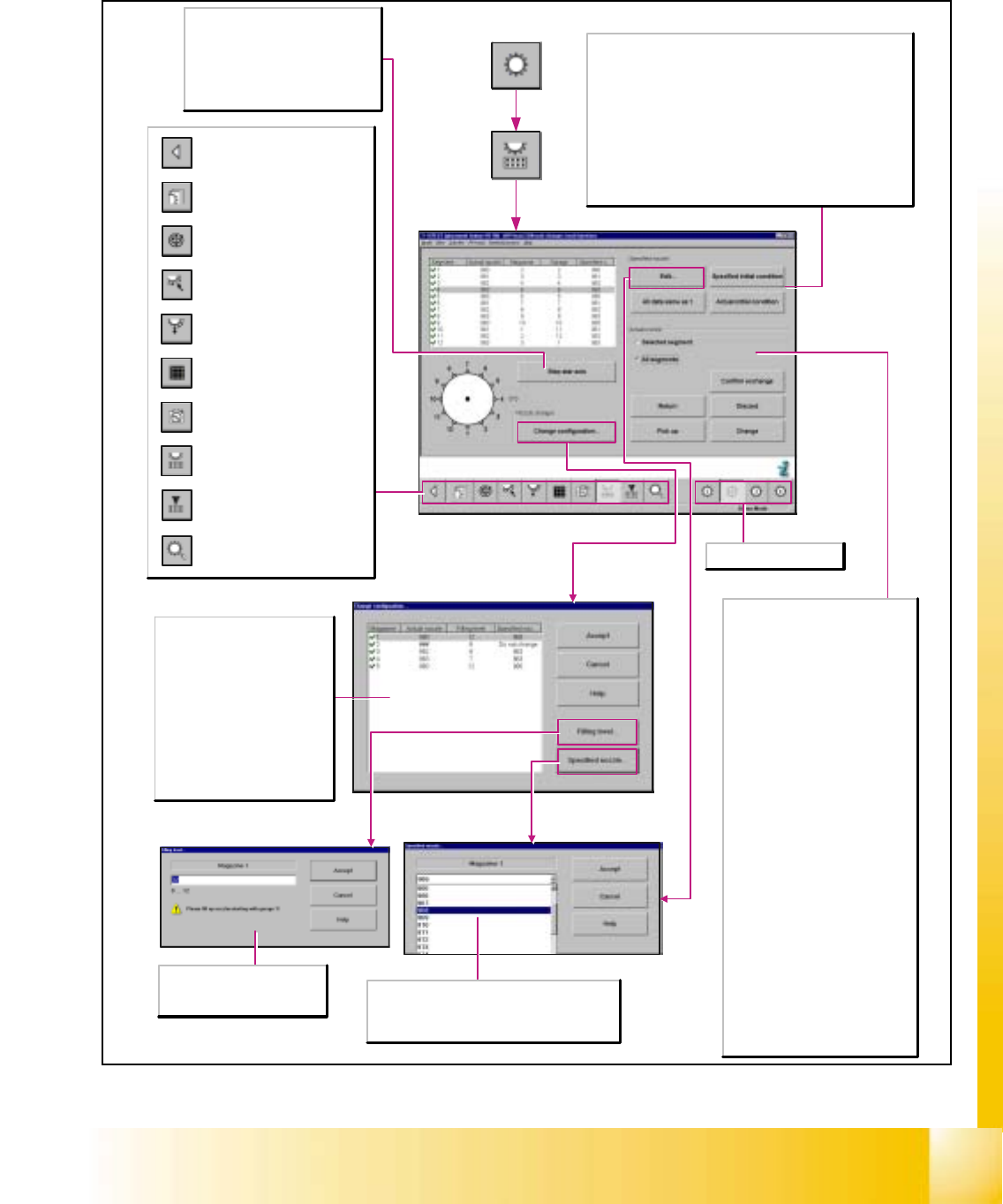
6.5.10 Head Functions of the Revolver Head Nozzle Changer
Step star axis
This function permits the star to be
advanced step by step. Every time this
button is clicked, the star is advanced
by one segment. The positions of the
individual segments are displayed on
the screen.
Specified nozzle...
Select the nozzle type for the specified nozzle.
This nozzle type will be accepted as the actual
nozzle by actuating the Accept button.
Magazine
Displays the current magazine.
Actual nozzle
Indicates which nozzle type is set
up in the selected magazine.
Filling level
Indicates how many nozzles are
set up in the selected magazine.
Specified nozzle
Displays the preset nozzle type for
a magazine.
Opening the screen for the
magazin functions of the
revolver head nozzle changer
Return to the main
view.
Call-up the view for the functions
of the revolver head component
sensor.
Opening the screen for the head
functions of the revolver head
nozzle changer
Call-up of the display of the RV
camera functions.
Call-up of the display of the
mapping functions of the
revolver head.
Call-up of the display of the
functions of the revolver head in
the placement and pick-up
circuit.
Call-up of the display of the
functions of the revolver head in
the holding and reject circuit.
Call-up of the display of the axis
functions of the revolver head.
Call-up of the display of the
functions of the revolver head.
Selects revolver head 1-4.
Specified nozzle
All data same as under 1
Adopts the specified nozzle type in every segment.
Specified initial condition
The specified initial condition of the specified nozzle is saved upon
the start of the SITEST test program and can thus be restored
after any change that may be made to the specified nozzle.
Actual initial condition
The actual initial condition of the specified nozzle is saved upon
the start of the SITEST test program and can thus be restored
after any change that may be made to the specified nozzle.
Actual nozzle
Selected segment
Activates the functions for the
selected segment.
All segments
Activates the functions for all
segments.
Return
Places the nozzle into the selected
nozzle holder of the selected
magazine.
Pick up
Picks up the nozzle from the selected
nozzle holder of the selected
magazine.
Discard
Positions the nozzle above the reject
bin and then drops it into the bin. This
function can be used, for example, for
removing defective nozzles.
Change
Returns the current nozzle of the
selected segment and picks up the
specified nozzle of the selected
segment.
Confirm exchange
Confirms the exchange of nozzles
when nozzles are exchanged without
a nozzle changer. Specified and
actual nozzles in the list will coincide.
Filling level...
Enter the desired filling level
within the specified value range.
06/2002 Edition Student Guide HS-50 Advanced I
6 Operating the SITEST Software
32
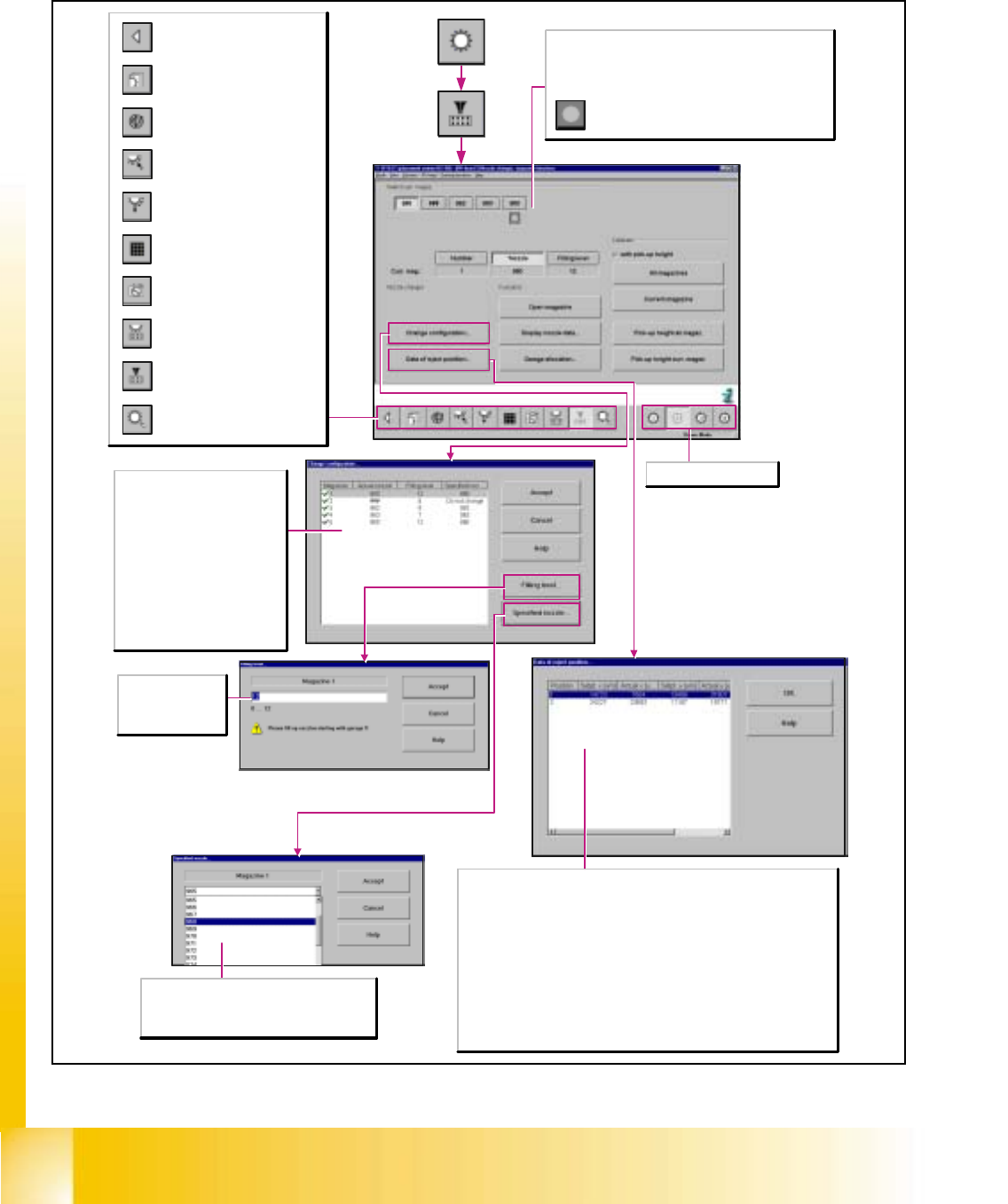
6.5.11 Magazine Functions of the Revolver Head Nozzle Changer
Specified nozzle...
Select the nozzle type for the specified nozzle.
This nozzle type will be accepted as the actual
nozzle by actuating the Accept button.
Filling level...
Enter the desired
filling level within the
specified value range.
Magazine
Displays the current magazine.
Actual nozzle
Indicates which nozzle type is set
up in the selected magazine.
Filling level
Indicates how many nozzles are
set up in the selected magazine.
Specified nozzle
Displays the preset nozzle type for
a magazine.
Opening the screen for the
magazin functions of the
revolver head nozzle changer
Return to the main
view.
Call-up the view for the functions
of the revolver head component
sensor.
Opening the screen for the head
functions of the revolver head
nozzle changer
Call-up of the display of the RV
camera functions.
Call-up of the display of the
mapping functions of the
revolver head.
Call-up of the display of the
functions of the revolver head in
the placement and pick-up
circuit.
Call-up of the display of the
functions of the revolver head in
the holding and reject circuit.
Call-up of the display of the axis
functions of the revolver head.
Call-up of the display of the
functions of the revolver head.
Selects revolver head 1-4.
Select curr. mag.
No actions on the machine will be initiated when the buttons
Number, *Nozzle and Filling level are actuated. Only a
selection is being made.
Displays the reject position.
Position
Displays the number of the reject position.
Setpt. x [µm]
Displays the specified x-positions of the selected magazine.
Actual x [µm]
Displays the x-positions of the selected magazine determined after the calibration.
Setpt. y [µm]
Displays the specified y-positions of the selected magazine.
Actual y [µm]
Displays the y-positions of the selected magazine determined after the calibration.
Student Guide HS-50 Advanced I 06/2002 Edition
6 Operating the SITEST Software
33
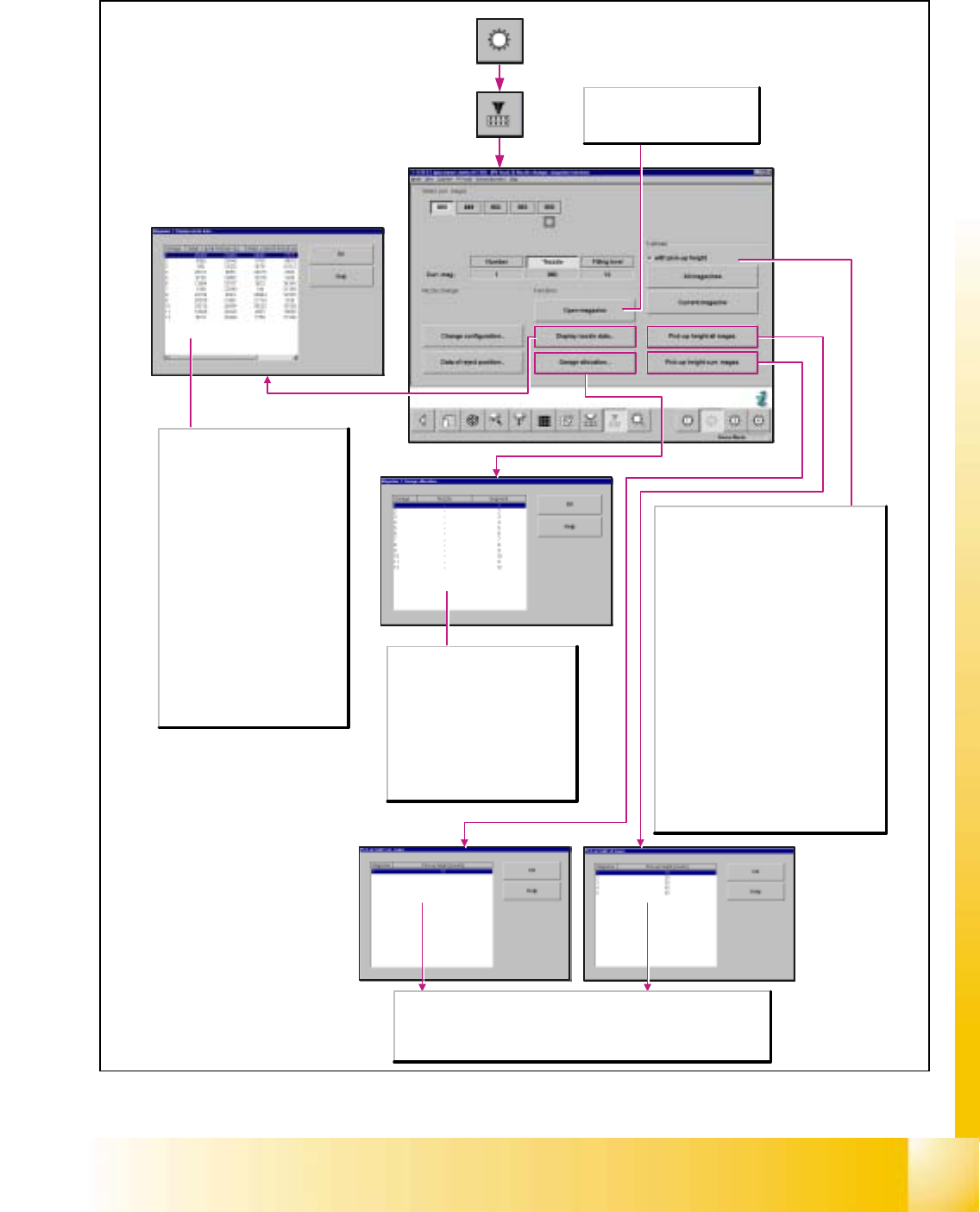
Open magazine
Opens (moves) the locking plate and
releases the locking mechanism of
the nozzles.
Garage
Displays for the selected magazine the
segment in which the nozzles are
located.
Nozzle
Displays the nozzle type of the
selected magazine.
Segment
Displays the appropriate segment
number for the selected magazine.
Magazine
Displays the calibrated magazine.
Pick-up height [counts]
Displays the z-position of the selected magazine determined after the calibration.
Garage
Indicates the garage number.
Setpt. x [µm]
Indicates the preset x-positions of the
magazine selected.
Actual x [µm]
Indicates the x-positions of the
selected magazine, determined after
the calibration process.
Setpt. y [µm]
Indicates the preset y-positions of the
magazine selected.
Actual y [µm]
Indicates the y-positions of the
selected magazine, determined after
the calibration process.
Pick-up height [counts]
Displays the z-position of the selected
magazine determined after calibration.
Calibration
with pick-up height
Note:The functions All magazines and Curr.
magazine can also be selected with the addition
with pick-up height. The pick-up height will then
be included in the calibration of the selected
magazines.
All magazines
The PCB camera moves over the position
fiducials of the magazines and measures their x-
and y-positions.
Curr. magazine
The PCB camera moves over the position
fiducials of the selected magazine and
measures the x- and y-positions.
Pick-up height, all magaz.
Determines the current z-height of the nozzle in
the magazine thus determining the pick-up
height of the nozzles for the selected magazine.
Pick-up height, curr. magazine
Determines the current z-height of the nozzle in
the magazine thus determining the pick-up
height of the nozzles for the selected magazine.