HS50_advance_level 1_20200522_221201 (1).pdf - 第220页
06/2002 E dition Studen t Guide H S-50 Advance d I 6 Operati ng the S IT ES T Softwa r e 36 6.6. 2 Conveyor W id th Se ttings Measure conv eyor w idth Measures the current con v eyor width and display s the value above t…
Student Guide HS-50 Advanced I 06/2002 Edition
6 Operating the SITEST Software
35
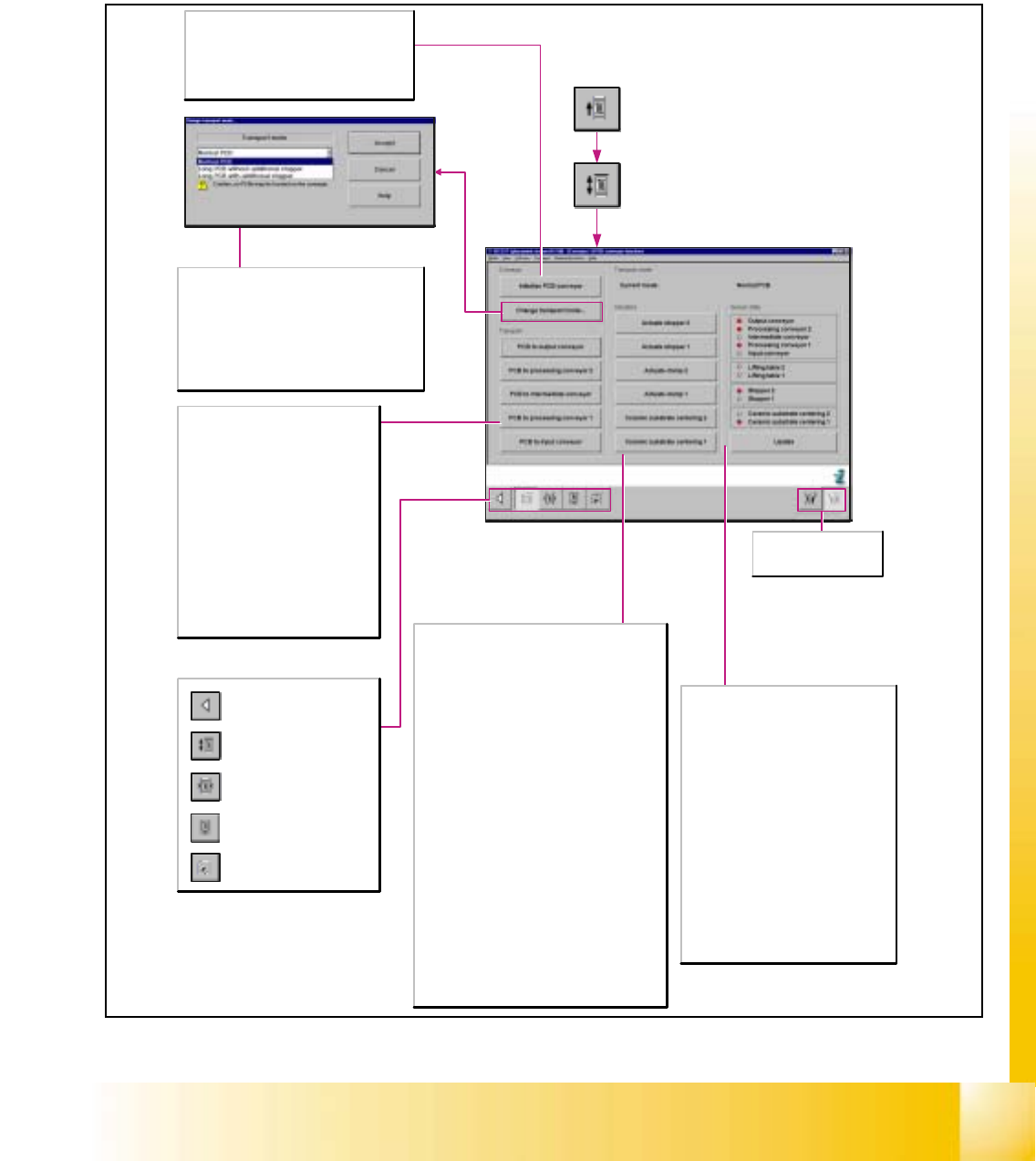
6.6 PCB Conveyor
6.6.1 Screen Displaying of the PCB Transport Function
Call-up the Conveyor Functions
view.
Call-up the screen for setting
the conveyor speed.
Not for SIPLACE S-25HM!
Call-up of the display of the
conveyor width settings.
Call-up the screen displaying
the PCB transport functions.
Return to the main view.
Transporting
PCB to output conveyor
Transports the PCB from the processing
conveyor 2 to the output conveyor.
PCB to processing conveyor 2
Transports the PCB to the processing
conveyor 2.
PCB to intermediate conveyor
Transports the PCB from the processing
conveyor 1 to the intermediate conveyor.
PCB to processing conveyor 1
Transports the PCB to the processing
conveyor 1.
PCB to input conveyor
Transports the PCB to the input conveyor.
Actuators
Actuate stopper 2
The PCB stopper of processing conveyor 2 is either
retracted or extended, depending on the current state.
Actuate stopper 1
The PCB stopper of processing conveyor 1 is either
retracted or extended, depending on the current state.
Note:
If the Actuate stopper 1/2 buttons are deactivated, the
machine is fitted with laser light barriers.
For SIPLACE HS-55 only.
Actuate clamp 1
The PCB on the processing conveyor 2 is either
clamped or unclamped, depending on the current
state.
Actuate clamp 2
The PCB on processing conveyor 1 is either clamped
or unclamped, depending on the current state.
Ceramic substrate centering 2
Option: A ceramic substrate on processing conveyor 2
is either clamped or unclamped, depending on the
current state.
Ceramic substrate centering 1
Option: A ceramic substrate on processing conveyor 1
is either clamped or unclamped, depending on the
current state.
Sensor state
Indicates the current state of the ultrasonic
sensors of the individual conveyors and
actuators. The current states of the ultrasonic
sensors are indicated by associated LED
symbols:
gray: not activated
red: activated
Update
Updates the status display of the ultrasonic
sensors of the individual conveyors and
actuators.
This functions may also be used for testing
the proper response of the ultrasonic
sensors. They may have to be readjusted, as
required.
Note:
The SIPLACE HS-55 uses laser light barriers
in place of ultrasound sensors.
Selects PCB conveyor 1/2
(in the case of dual lane
conveyors).
Conveyor
Initialize PCB conveyor
All conveyors, except for the input conveyor, are
moving at high speed.
To check the transport functions without
performing an overall reference run, it is
necessary to initialize the PCB conveyor system.
Transport mode
The following transport modes are available:
- normal PCB (up to 368 mm)
- long PCB without additional stopper (up to 610 mm)
- long PCB with additional stopper (up to 610 mm)
Note:
If you have selected the long PCB with additional
stopper transport mode, it is not possible to teach the
PCB reference corners.
06/2002 Edition Student Guide HS-50 Advanced I
6 Operating the SITEST Software
36
6.6.2 Conveyor Width Settings
Measure conveyor width
Measures the current conveyor
width and displays the value
above the applicable button.
Adjusting the conveyor width
Width-out
The width of the conveyors will be increased when the button is
actuated.
Width-out (high speed)
The width of the conveyors is increased at high speed when the
button is actuated.
Calibrate conveyor width
Determines the gantry position for a 100mm wide PCB.
Width-in
The width of the conveyors will be decreased when the button is
actuated.
Width-in (high speed)
The width of the conveyors is decreased at high speed when the
button is actuated.
Call-up the Conveyor Functions
view.
Call-up the screen for setting
the conveyor speed.
Not for SIPLACE S-25HM!
Call-up of the display of the
conveyor width settings.
Call-up the screen displaying
the PCB transport functions.
Return to the main view.
Selects PCB conveyor 1/2
(in the case of dual lane
conveyors).
Width [mm/10]
Enter the desired conveyor
width (within the specified value
range) in the data entry field.
Student Guide HS-50 Advanced I 06/2002 Edition
6 Operating the SITEST Software
37
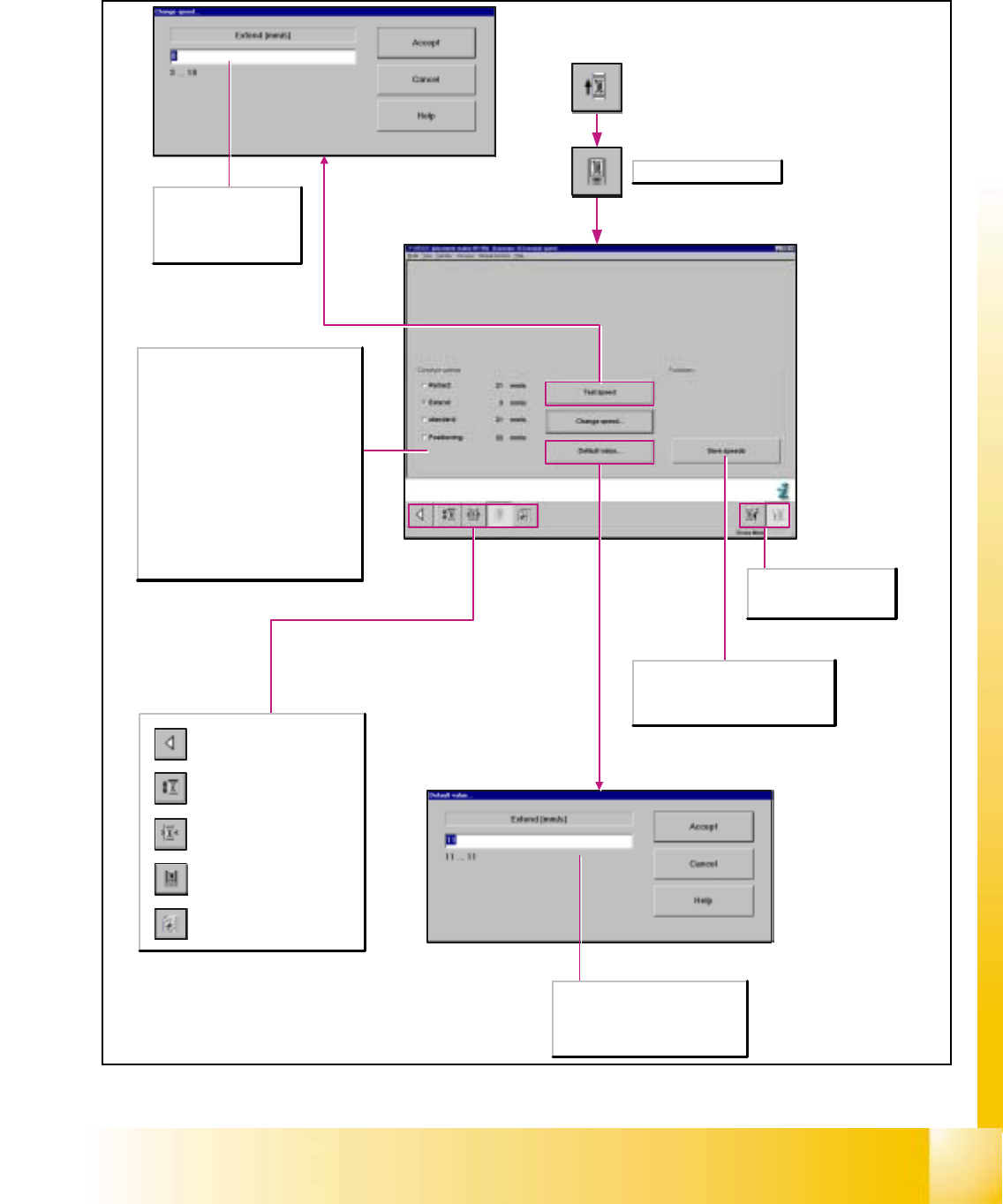
6.6.3 Setting the Conveyor Speed
Here, the conveyor speed may be set
to the default value.
Enter the default value within the
specified value limits.
Save speeds
This function is only active if the
conveyor speed was changed or set to
a default value.
Call-up the Conveyor Functions
view.
Call-up the screen for setting
the conveyor speed.
Not for SIPLACE S-25HM!
Call-up of the display of the
conveyor width settings.
Call-up the screen displaying
the PCB transport functions.
Return to the main view.
Selects PCB conveyor 1/2
(in the case of dual lane
conveyors).
Here, the conveyor speed
may be changed.
Enter the speed within the
specified value limits.
Not for SIPLACE S-25 HM
Conveyor speeds
Retract
Selects the input conveyor.
Extend
Selects the output conveyor.
Standard
Selects all conveyors.
Positioning
Selects the center conveyor.
Test speed
The conveyor continues operating until
operation is disrupted. The speed of the
selected conveyor is tested when so doing.