HS50_advance_level 1_20200522_221201 (1).pdf - 第239页
Studen t Guide HS-50 A dvanced I 06/200 2 Edition 7 Calibration 9 0 fi g 7.3 - 1 0 Dis play "C &P He ad no z zle c han ge r" 0 0 0 NOTE The p ick-up height must be determined for each magazin e. 0 7. 3.5. 2…
06/2002 Edition Student Guide HS-50 Advanced I
7 Calibration
8
0
fig 7.3 - 9 Display "Calibration of nozzle Changer"
0
0
7.3.5 Calibration Collect & Place Head Nozzle Changer
7.3.5.1 Complete Calibration
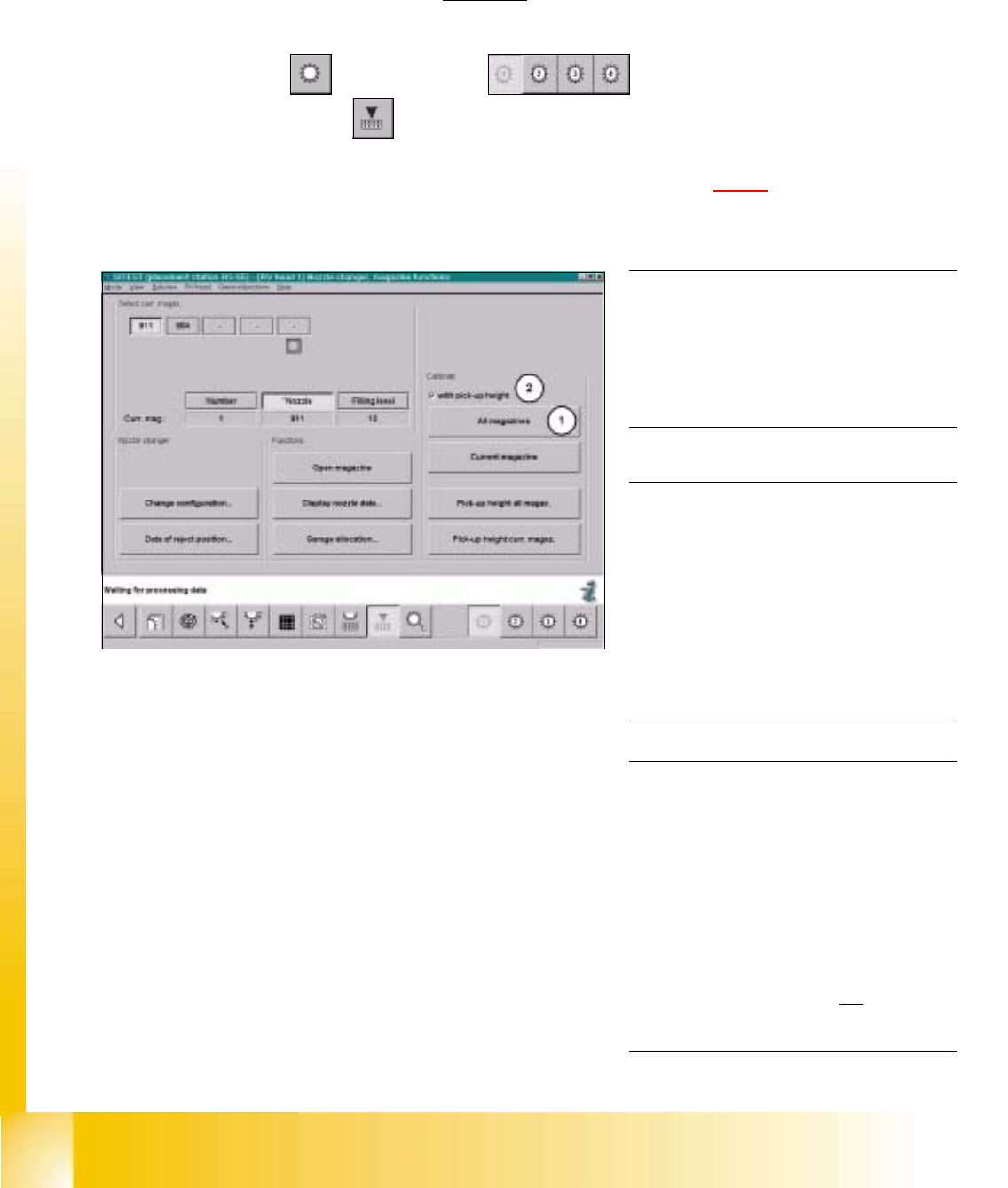
Example: Nozzle changer for C&P Head 1, completely supplied with all 5 or 10 magazines. 7
SITEST: 7
à Select "C&P Heads" ==> "C&P Head 1" ==>
"C&P Head nozzle changer" ==> "All magazines (1)" (with pick up height (2)).
à Have you deactivate the button "with Pick-Up Height" Proceed see section 7.3.5.3).
NOTE
Make sure that the calibration data for the
PCB camera, the segment offset II (C&P
PCB camera offset) and the machine zero
point have been determined already. 0
NOTE
A nozzle changer contains 5 magazines
maximum, with 12 nozzle garages each.
For every single C&P Head, 2 nozzle
changers may be installed. During
calibration these will be handled like one
single nozzle changer with 10 maga-
zines. 0
NOTE
The function "Complete calibration" is
used, if the nozzle changer is completely
loaded with all 5 or 10 magazines.
All 12 nozzles must be on the C&P Head.
With the help of the function "Calibrate
current magazine", x- and y-values must
be individually determined for each
magazine if the changer is not
completely
loaded. 0
Student Guide HS-50 Advanced I 06/2002 Edition
7 Calibration
9
0
fig 7.3 - 10 Display "C&P Head nozzle changer"
0
0
0
NOTE
The pick-up height must be determined for
each magazine. 0
7.3.5.2 Calibration of the Current Magazine
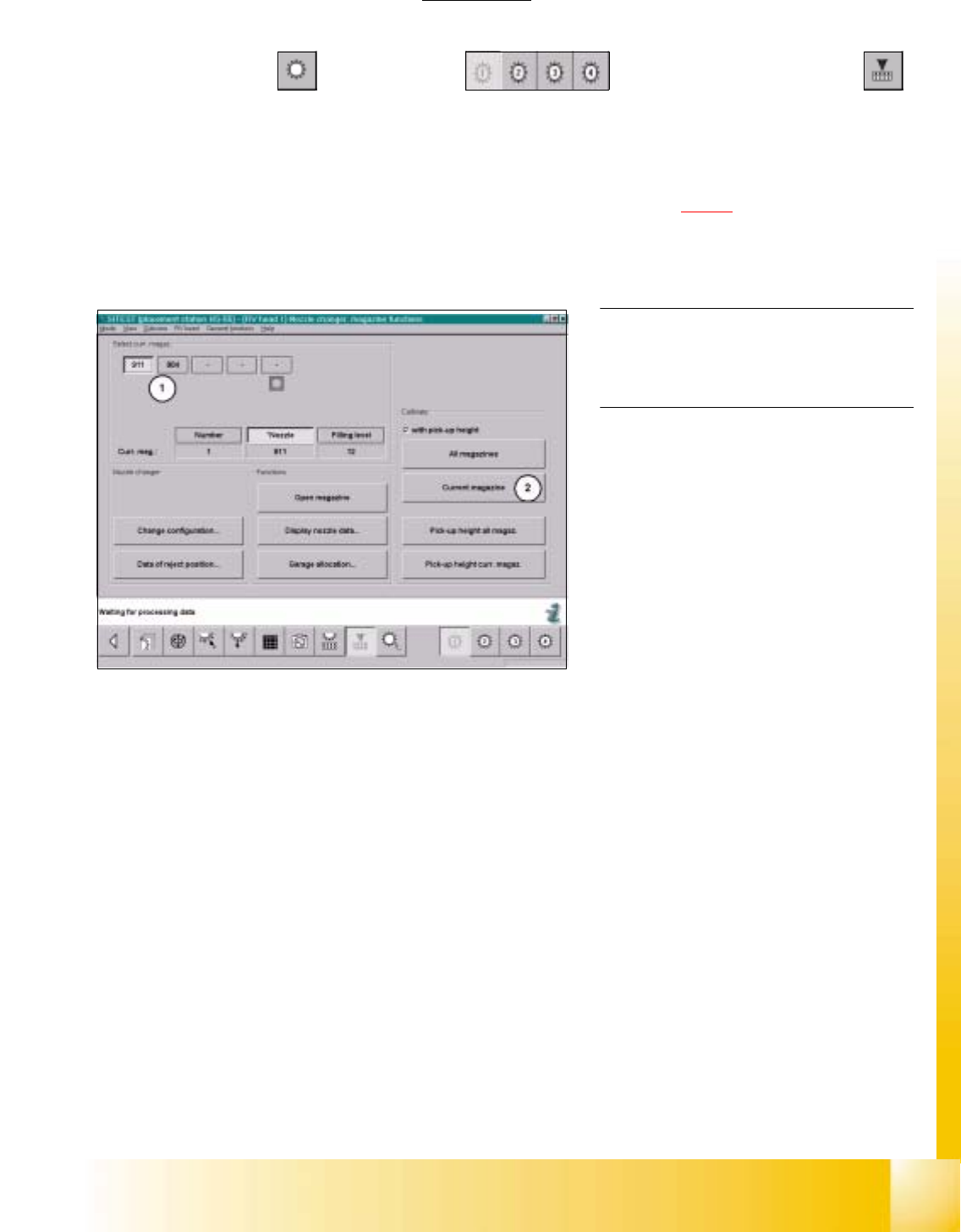
Example: Nozzle changer for C&P Head 1, not completely loaded with all magazines. 7
SITEST: 7
à Select "C&P Heads" ==> "C&P Head 1" ==> "C&P Head nozzle changer"
==> select the current "Magazine number...(1)" ==>Calibrate "Current magazine (2) ".
à Repeat these instructions with all magazines.
à Have you deactivate the button "with Pick-Up Height" Proceed see section 7.3.5.3).
06/2002 Edition Student Guide HS-50 Advanced I
7 Calibration
10
0
fig 7.3 - 11 Display "C&P Head nozzle changer"
0
0
0
0
0
0
0
0
0
0
0
0
0
0
0
0
7.3.5.3 Calibration of Pick-Up Height
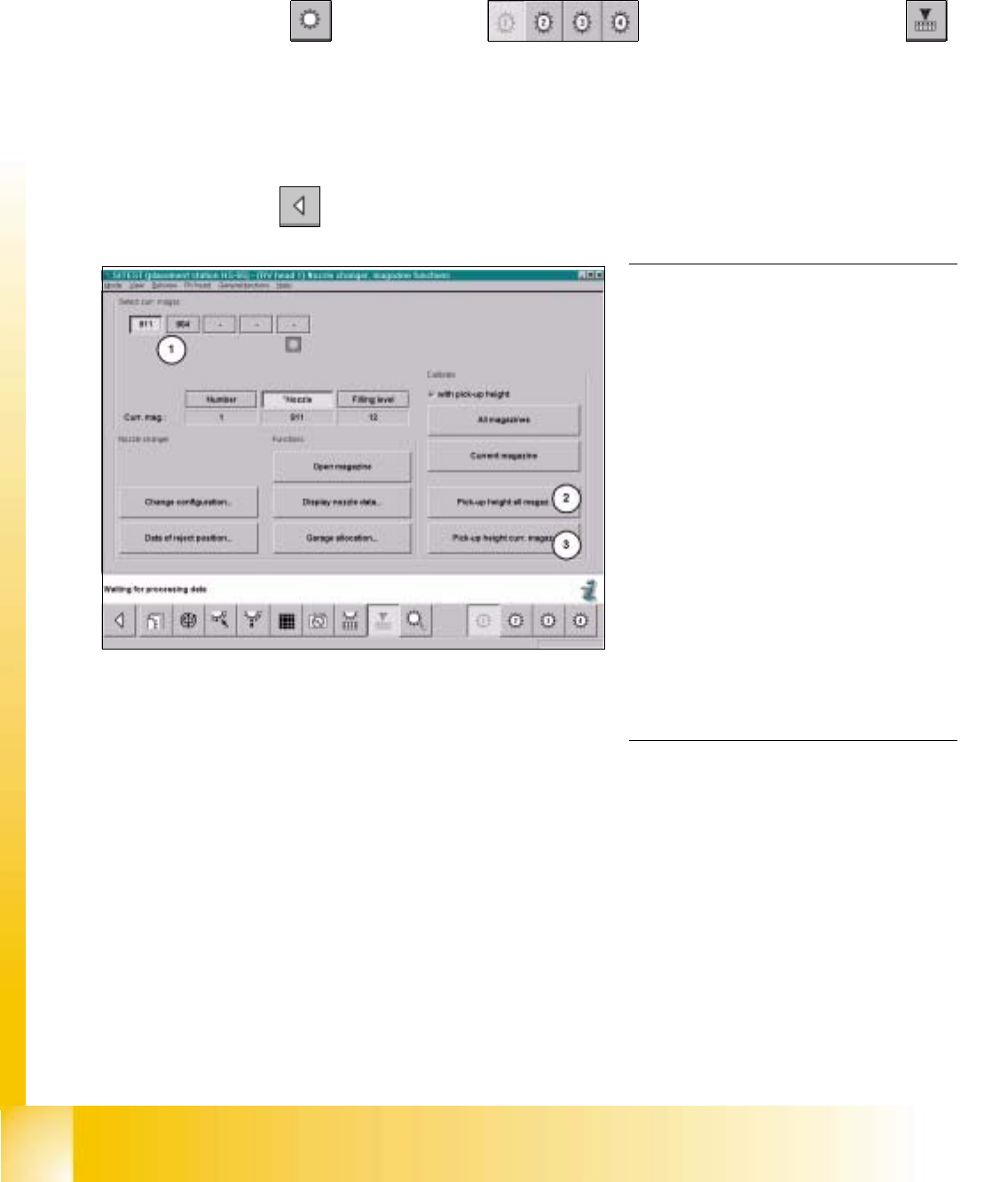
à Ascertain, that there is a nozzle on the lower segment, and that all garages selected below, are empty.
SITEST: 7
à Select "C&P Heads" ==> "C&P Head 1" ==> "C&P Head nozzle changer"
==> select the current "Magazine number...(1)" ==>Calibrate "Pick-up height current magazine (3) " or
"Pick-up height all magazines (2) ".
à Repeat this procedure for all magazines, if it necessary.
à Select "Main View" ==> "Settings" ==> "Save machine data".
NOTE
Each individually determined pick-up
height (z-position) will be displayed in a di-
alogue box, after the calibration.
The z-position of the reject container will
be calculated from the pick-up height
determined for the last magazine.
If you want to test if the calibration was
successful, you should always FIRST
save the determined calibration data
("Main view" ==> "Settings" ==> "Save
machine data"). After saving the data,
return to the display "C&P Head nozzle
changer".
With the help of the functions "Place / Pick-
up" you can test the calibration result. 0